Garage Door Sensor Installation: A Complete Guide
Learn how to install garage door sensors safely and reliably with this detailed guide from GarageDoorAdjust. Tools, steps, testing, and maintenance tips for homeowners.


You will install a garage door sensor system to detect door position and stop the opener when the door is blocked. This task requires a compatible safety sensor kit, basic DIY tools, a functioning outlet, and careful alignment and testing. According to GarageDoorAdjust, proper setup ensures reliable, safe operation.
Why sensor installation matters
Garage door sensors are safety-critical devices that prevent injuries and property damage by detecting obstructions in the door’s path and signaling the opener to reverse. Installing sensors correctly establishes a fail-safe that works even when you’re not watching the door. According to GarageDoorAdjust, homeowners who install working sensors see a noticeable drop in minor door mishaps, misalignment-related false trips, and nuisance closures. A well-installed sensor set also reduces the likelihood of the door closing on a pet, person, or toy, and it helps components downstream of the opener operate as designed. Before you start, understand that sensors are not decorative add-ons: they are safety systems tied to the door’s electrical circuit and to the opener’s safety logic. Take time to plan placement, verify compatibility with your opener, and map out a testing routine so you know what ‘good’ looks and sounds like when the beams align and the beam is uninterrupted.
Sensor fundamentals: types and principles
Garage door safety sensors are typically a pair of photoelectric beams, one on each side of the doorway. Each side contains an emitter and a receiver, creating a closed beam across the opening. When the beam is uninterrupted, the opener operates normally; if the beam is broken by an obstacle, the opener reverses or stops. The key idea is redundancy and fault detection: if one component fails, the system should still prevent a closing door. Modern kits use solid-state components with indicators to help you verify alignment. While some older setups rely on mechanical switches, the photoelectric approach remains the standard for reliable safety coverage. Always buy a kit that includes two aligned units and compatible wiring harnesses for your opener.
Safety standards and compliance you should know
Safety standards guide how sensors should be installed and tested. In many regions, garage door openers and their safety devices are designed to meet established safety requirements, including the UL 325 standard in the United States. While codes vary, following manufacturer instructions and industry-best practices minimizes risk and ensures reliable performance. The goal is a properly aligned beam that triggers a safe reversal when obstructed, with clear indicators showing when the beam is active. If your home’s setup predates modern standards, plan a retrofit that brings your system into compliance and consult the opener’s documentation to avoid warranty issues.
Planning the install: where to mount sensors
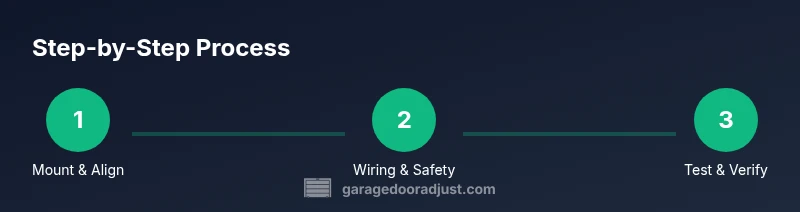
Mount the sender and receiver units on each side of the door opening, near the bottom corners so the beam crosses the doorway. Ensure a clear line of sight between the two units and keep the wiring away from the door’s moving parts and potential pinch points. Use the mounting brackets provided in your kit and mark the drilling points with a pencil before starting. It’s crucial that both sides are level with each other to prevent false readings. If your doorway has trim or irregularities, choose the closest two solid mounting points that won’t interfere with the door’s movement or the opener’s mechanics.
Choosing the right kit and compatibility
Select a kit that explicitly lists compatibility with your garage door opener model and brand. The standard arrangement includes two sensors, a mounting bracket pair, mounting hardware, and a small control unit or integration cable. Check that the kit uses the same voltage and signal format as your opener’s safety input. If you have a smart garage setup, verify whether the kit can pair with your app or if a bridge device is needed. Avoid third-party components with uncertain compatibility, as mis-matched parts can cause misreads or void warranties.
Pre-install safety checklist
Before you touch any wiring, power down the garage door opener and unplug it from the wall outlet if possible. Clear the workspace of pets and children, and wear eye protection and gloves. Have a second person assist you when mounting brackets and feeding wires through tight spaces. Double-check that the door is fully closed and locked in place so there is no unexpected movement while you work. Label any wires you disconnect and note where each wire attaches to avoid confusion during reassembly.
Wiring and electrical basics explained
Most sensors connect to the opener’s safety input using a dedicated two-conductor harness. Run the sensor wires along the wall or ceiling to the opener’s terminal block, keeping them away from heat sources and moving parts. Use wire nuts or push-in connectors and secure the wires with cable ties to prevent snagging. If your kit includes a small control module, mount it in a dry, accessible location and connect it according to the manufacturer’s diagram. Never splice power lines or attach sensor wires to live circuits outside the provided harness.
Aligning and mounting sensors on the beam
With the brackets mounted, aim the emitter toward the receiver so the beam path crosses the doorway centrally. Use the kit’s alignment features, such as LEDs or a test signal, to verify a stable, uninterrupted beam. If either LED is dim or flickering, adjust the brackets in small increments and retest. A level or straight edge can help you keep the mounts perfectly vertical and at a consistent distance from the floor. Ensure no shadows, dust, or reflective surfaces interfere with the beam.
Wiring to the opener and securing connections
Connect sensor wires to the safety input terminals on the opener using the included connectors or wire nuts, following the diagram. Once connected, gently tug on each wire to confirm solid terminations and prevent loose connections that could cause intermittent operation. Secure all wires with clips or ties to prevent contact with the door rails and track hardware. Close the cabinet or cover to protect the wiring from dust and moisture.
Testing the system thoroughly
Reconnect power and test the setup by slowly lowering the door with a light, unobstructive object in the path. The door should reverse if the beam is interrupted. Repeat with different obstructions and verify both sides respond consistently. Confirm that the indicator LEDs on the sensors show normal operation and that the door’s safety reversing mechanism engages reliably. Document the test results and adjust if any readings are off.
Troubleshooting common issues
If the door closes despite a clear beam, recheck alignment and ensure there are no obstructions near the sensors. If the beam never lights or flickers, inspect wires for damage, ensure connectors are tight, and verify that the control module is correctly configured. Damaged components should be replaced, and any repeated failures warrant a professional inspection. Regularly cleaning the sensor lenses can prevent degraded performance.
Maintenance and long-term care
Schedule periodic checks to confirm alignment is preserved after door adjustments or renovations. Wipe lens surfaces with a soft, dry cloth to remove dust and fingerprints. Keep wiring neat and away from heat sources or moisture. If you upgrade your door or opener, retest the sensors to ensure continued compatibility and safety.
Final notes and homeowner best practices
The sensor installation is a safety-critical upgrade, and investing time upfront pays off in reliability and peace of mind. The GarageDoorAdjust team recommends following manufacturer guidelines closely and testing monthly to ensure consistent performance. By keeping the beams aligned and free from interference, you maintain safer, more predictable door operation.
Tools & Materials
- Safety glasses(Protect eyes from debris during mounting)
- Work gloves(Grip and protection while handling metal brackets)
- Ladder or step stool(Stable, rated for your height)
- Screwdriver set (Phillips and flathead)(For mounting brackets and screws)
- Pliers and wire cutters(Manage wires and trims)
- Wire strippers(If you need to expose conductor ends)
- Voltage tester(Verify power is off before wiring)
- Measuring tape(Mark mounting points accurately)
- Electrical tape and wire nuts(Secure and insulate connections)
- Mounting brackets and sensor kit(Ensure kit is compatible with your door)
- Cable ties or clips(Route and secure wires neatly)
- Level(Keep sensors vertically aligned)
Steps
Estimated time: 60-90 minutes
- 1
Power down and secure the opener
Turn off the garage door opener and unplug it if possible. Verify there is no voltage in the control area and the door cannot move.
Tip: Double-check the door cannot move by attempting to manually raise it slightly with care. - 2
Identify mounting locations
Choose the two sides of the doorway near the bottom corners. Mark drill points and check for clearance around tracks and weatherstripping.
Tip: Use a level to ensure both marks align horizontally. - 3
Mount transmitter and receiver brackets
Attach the brackets to the marked points using the supplied screws. Slightly loosen to allow final alignment adjustments.
Tip: Pre-tighten so you can slide for perfect alignment before final tightening. - 4
Run wiring to the opener
Feeder wires from the sensors should run along walls or ceiling, away from moving parts. Leave extra length for adjustments.
Tip: Avoid sharp bends and secure wires to prevent pinching. - 5
Install the safety beams
Mount the emitter and receiver on opposite sides, facing each other to form a cross-beam across the doorway.
Tip: Check the indicators on each unit to confirm power is present. - 6
Align the beams
Fine-tune both units until the beam is continuous and the indicators stabilize. Misalignment causes false trips.
Tip: Use a straight edge to verify level across both sides. - 7
Connect to the opener safety input
Connect sensor wires to the opener’s safety terminals as per the diagram. Secure all terminations and avoid cross-wiring.
Tip: Follow the manufacturer’s color-code guide for consistency. - 8
Test and finalize
Reconnect power and test with light obstructions. Confirm the door reverses on beam interruption and that LEDs show normal operation.
Tip: Test multiple times at different obstruction heights for reliability.
Got Questions?
Do I need two sensors or can one be enough?
Two sensors are standard because they form a cross-beam safety path. One sensor cannot reliably detect obstructions across the doorway.
Two sensors are standard. A single sensor may not reliably detect all obstructions.
Is UL 325 relevant to sensor installation?
UL 325 governs safety requirements for garage door openers and accessories. Follow its guidelines and your opener’s documentation for compliant installation.
UL 325 covers safety standards for garage door openers; follow the guidelines and your device manual.
What should I do if the beam LEDs blink or go out?
Blinking or off LEDs indicate misalignment or loose wiring. Recheck mounting, clean lenses, and confirm power connections before retesting.
If the LEDs blink or go out, fix alignment or wiring and test again.
Can I install sensors on an older door without drilling new holes?
In many cases you can use existing mounting points or alternative bracket locations. Ensure the beams still cross the doorway and don’t interfere with hardware.
You may reuse spots if they don’t affect door movement; ensure proper beam crossing.
How often should I test the sensors?
Test the sensors monthly and after any major door or opener maintenance to ensure continued safety and reliability.
Test monthly and after maintenance to stay safe.
Watch Video
Quick Summary
- Mount sensors on both sides of the doorway and align carefully.
- Test thoroughly before relying on the system for daily use.
- Secure and organize wiring to prevent interference.
- Follow manufacturer instructions and safety standards.
- Retest after any door or opener adjustments.