Garage Door Alarm Sensor: Step-by-Step Guide
Learn how to install and maintain a garage door alarm sensor to boost home security. This step-by-step guide covers sensor types, mounting, pairing, alerts, and troubleshooting for wired and wireless setups.


You will learn how to add a garage door alarm sensor to monitor door position and trigger alerts when the door opens unexpectedly. This guide covers sensor types, mounting, wiring or pairing, configuring alerts, and basic troubleshooting. No special tools are required for most wireless installs. Whether you’re upgrading an existing system or starting fresh, this guide helps you improve security without complicating daily routines.
What is a garage door alarm sensor and why it matters
A garage door alarm sensor is a compact device that attaches to your door and frame to monitor whether the door is fully closed. Most systems use a magnetic reed switch or a tilt/position sensor to detect the door’s status, sending this information to a central alarm panel or a connected app. When the door opens unexpectedly or is left ajar, the sensor triggers an alert, enabling a quick response. According to GarageDoorAdjust, a well-chosen sensor setup improves security without creating daily friction, especially when you plan for routine checks and maintenance. In practice, you’ll want a sensor that aligns with your existing alarm or smart home hub, fits your door type, and offers reliable battery life or power supply. This section covers the basics you need to know before you buy or install.
Sensor types: magnetic contact vs tilt/door position sensors
Most garage door alarm sensors fall into two main categories: magnetic contact sensors (reed switches) and tilt/door-position sensors. Magnetic sensors are compact and economical; they detect door closure by sensing when a magnet and sensor are aligned. Tilt sensors measure the door’s angle and detect when the door is not fully vertical, which can be more reliable on doors with unusual hardware. Magnetic contacts are great for standard doors and quick DIY installs, while tilt sensors can be more accurate on older or heavily insulated doors. Consider your door type, weather exposure, and the hub compatibility when choosing between these options.
Wired vs wireless sensors: pros and cons
Wired sensors rely on a physical connection to a control panel or alarm hub, offering consistent power and less risk of interference. They’re often preferred in newly built garages or where a hard-wired security backbone already exists. Wireless sensors are easier and faster to install; they run on batteries and pair with a dedicated hub or smart home controller. Wireless setups typically provide straightforward app notifications, remote diagnostics, and scalable expansions. The trade-off is battery maintenance and potential wireless interference in dense Wi-Fi environments. When in doubt, match your choice to your current security ecosystem and expected maintenance cadence.
How to choose the right sensor for your garage
To pick the right sensor, start with your current alarm or smart hub. Check compatibility lists from the hub manufacturer and your door type. If you want minimal wiring and simple setup, a wireless magnetic contact is usually sufficient. If your garage experiences temperature swings or you need higher fidelity for automation routines, a tilt sensor paired with a robust hub can provide more accurate status information. Budget, installation complexity, and future automation goals should guide your final decision.
Planning the installation: location, alignment, and wiring considerations
Plan the mounting location to maximize accuracy. The top of the door frame is the classic spot for magnetic contacts, but some doors require slightly offset placements. Ensure the magnet on the door aligns with the sensor across the gap when the door is closed. For wired installations, decide on a safe cable route that avoids moving parts and ensures clean exits to the hub. For wireless installs, confirm the sensor’s range to the hub and plan for any potential signal obstacles like metal shelving or concrete walls.
Tools and materials you’ll need
Collecting the right tools before you start saves time and reduces mistakes. You’ll typically need a drill, appropriate drill bits, screwdrivers, a level, tape measure, mounting brackets, screws/anchors, the sensor and magnet, a wireless hub or alarm panel, spare batteries, wire nuts if wiring, and a smartphone or computer for configuration. Keep a ladder handy if mounting high on a frame. Safety goggles are recommended when drilling or cutting.
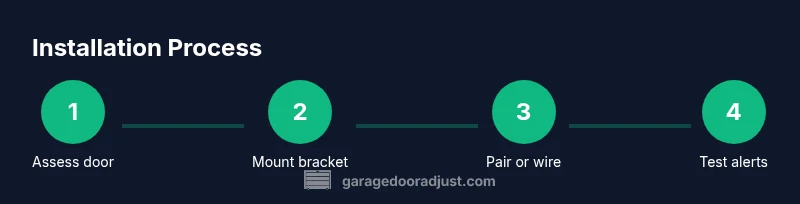
Step-by-step installation guide (Part 1): Prep and mounting
-
Assess door type and sensor compatibility. Verify that the sensor you chose matches your door construction and hub compatibility. This upfront check prevents compatibility issues later. Tip: Review the manufacturer’s installation guide to confirm screw size and magnet gap.
-
Choose mounting location. Select a spot on the top jamb where the door edge will reliably align with the magnet. Ensure the chosen location won’t interfere with weatherstripping or hardware. Tip: Avoid mounting near hinge areas where door flex could misalign sensors.
-
Mark mounting holes. Use a pencil and level to mark drill points for the sensor bracket. A plumb line helps keep the bracket square. Tip: Double-check clearance to avoid protruding screws hitting the door.
-
Install the mounting bracket. Drill pilot holes, insert anchors if needed, and secure the bracket firmly. A loose bracket leads to misalignment and false alarms. Tip: Use corrosion-resistant screws for outdoor exposure.
-
Position the sensor base. Attach the sensor base so that the magnet on the door will align when the door is closed. Ensure the sensor is oriented to avoid water or dust ingress. Tip: Check for a small 1/8–1/4 inch paid gap when the door is fully closed.
Step-by-step installation guide (Part 2): Wiring or pairing and testing
-
Install the magnet on the door. Fix the magnet to the door edge or frame, ensuring the magnet and sensor align with the door closed. Verify there is minimal wobble to prevent misreads. Tip: Keep magnets clean and free of metal shavings.
-
Wire or pair the sensor to the hub. If wired, connect according to the hub’s terminal layout, keeping wires neat and insulated. If wireless, initiate pairing from the hub or app and follow prompts to add the new device. Tip: Note the device name in the app to avoid confusion with other sensors.
-
Calibrate the alignment. Slowly close the door and watch the hub/app for a closed state signal. Fine-tune the magnet distance if necessary. Tip: Use a small spacer if the magnet sits a bit high or low due to frame irregularities.
-
Test alert triggers. Open the door to confirm that alerts trigger in real time. Close again to ensure the system returns to normal. Tip: Perform multiple tests at different times to simulate typical use patterns.
-
Configure alert rules and notifications. In the hub/app, set who receives alerts, the alert tone, and response actions. Enable push notifications and, if available, SMS or email alerts. Tip: Create a short, clear alert title for quick recognition.
-
Pair the sensor with automation routines. If your hub supports automation, create a routine that triggers lights or a camera when the door opens. Tip: Start with simple, non-intrusive automations and expand as you gain confidence.
-
Document and secure the setup. Record the sensor model, placement, and pairing steps in your home maintenance log. Verify the installation is secure and weatherproof if installed outdoors. Tip: Place a reminder in your calendar to test monthly.
Configuring alerts and integration with smart home
Once the basic installation is done, focus on notification preferences and integration. Go to the hub or app settings and specify which events you want to trigger alerts (door opened, door left open, or tamper). Set up who should receive alerts—homeowners, family members, or a security monitoring service. If your system supports voice assistants, enable voice prompts that confirm when the door changes state. Integrate the sensor with other smart devices to create coordinated security scenarios, such as turning on porch lights when the door opens at night. Regularly review app permissions and ensure the sensor’s firmware is up to date for reliability and security.
Maintenance, battery care, and troubleshooting
Battery-powered wireless sensors require periodic battery checks. Create a simple schedule to test the sensor monthly and replace batteries as recommended by the manufacturer, typically every 1–3 years depending on usage and battery type. Clean the sensor and magnet to remove dust or corrosion that could cause misreads. If you encounter false alarms, re-check alignment and ensure there’s no interference from nearby electronics or strong magnets. For wired setups, inspect the wiring for wear or loose connections and confirm that the panel shows the correct status for the zone.
Common mistakes and how to avoid them
Misalignment is one of the most common causes of false alerts. Always verify the magnet gap is within the manufacturer’s spec. Installing the sensor in an area with high vibration or door flex can degrade performance; consider a tilt sensor in such cases. Relying on a single sensor for critical security without a hub or cloud backup can be risky—add redundancy by placing an additional sensor or an alternate alert method. Finally, neglecting battery checks leads to silent failures when you least expect them. The goal is reliable, timely alerts with minimal maintenance.
Authority sources and further reading
For safety and installation guidance, consult authoritative resources such as the National Fire Protection Association (NFPA), the U.S. Consumer Product Safety Commission (CPSC), and the Occupational Safety and Health Administration (OSHA). These sources provide general safety practices that apply to electrical work, mounting hardware, and home security devices. Always follow local codes and manufacturer instructions when installing or modifying a garage door alarm sensor. The GarageDoorAdjust team also recommends verifying compatibility with your existing alarm system and performing routine checks to ensure continued reliability.
mainTopicQueryslaudge2aFirstEntryOnlyNeededForWikiLookup?InThisBlock?
Tools & Materials
- Magnetic contact sensor (reed switch)(Spare magnet aligned with mounting height.)
- Door jamb mounting bracket(For top jamb installation.)
- Wireless hub/alarm panel or compatible smart home controller(Check compatibility with your existing setup.)
- Screws and anchors(Corrosion-resistant; size per bracket.)
- Drill with appropriate bits(For pilot holes and mounting screws.)
- Screwdriver (Phillips and flathead)(For securing screws.)
- Level and tape measure(Ensure sensor aligns with magnet across the gap.)
- Wire nuts or electrical tape(If running wired; otherwise not needed.)
- Extra door sensor battery(Keep on hand for wireless models.)
- Smartphone or computer for configuration(To configure notifications.)
- Ladder(To reach high mounting point.)
- Safety goggles(Personal protection during installation.)
Steps
Estimated time: 60-120 minutes
- 1
Assess door type and sensor compatibility
Verify the sensor you chose matches your door construction and hub compatibility. This upfront check prevents compatibility issues later. Review the manufacturer’s installation guide to confirm screw size and magnet gap.
Tip: Take measurements of the door thickness and frame before buying the sensor. - 2
Choose mounting location
Select the top jamb area where the door edge will reliably align with the magnet. Ensure the location won’t interfere with weatherstripping or hardware.
Tip: Avoid hinges, vents, or decorative trim that could misalign the sensor. - 3
Mark mounting holes
Use a level to mark drill points for the sensor bracket. A precise plumb line helps keep the bracket square.
Tip: Check twice, drill once to prevent misalignment. - 4
Install the mounting bracket
Drill pilot holes, insert anchors if needed, and secure the bracket firmly. A loose bracket causes misreads and false alerts.
Tip: Seal exterior brackets to prevent water intrusion if installed outdoors. - 5
Position the sensor base
Attach the sensor base so the door’s closing edge aligns with the magnet across the intended gap. Ensure no wobble.
Tip: Aim for a small, consistent gap to improve reliability. - 6
Install the magnet on the door
Fix the magnet to the door edge or frame so alignment with the sensor is preserved during operation.
Tip: Keep magnets clean and free of debris to avoid readings drift. - 7
Wire or pair the sensor to the hub
For wired setups, connect to the hub as per the terminal layout. For wireless, initiate pairing via the hub/app and follow prompts.
Tip: Label the device in the app to avoid confusion with other sensors. - 8
Calibrate the alignment
Close the door and verify the closed state is registered. Fine-tune magnet distance if needed.
Tip: Minor spacing adjustments can dramatically reduce false positives. - 9
Test alert triggers
Open and close the door to confirm alerts occur in real time and reset properly.
Tip: Test at multiple times of day to mimic real usage. - 10
Configure alert rules
Set whom to notify, preferred notification channels, and response actions. Enable automation support if available.
Tip: Avoid overloading with too many alerts to prevent fatigue. - 11
Integrate with automation
Create routines that trigger lights or cameras when the door opens. Start with simple automations and expand gradually.
Tip: Use conservative triggers to avoid nuisance automation. - 12
Document and schedule maintenance
Log the sensor model, placement, and pairing steps. Schedule monthly checks and battery replacements as needed.
Tip: Keep spare batteries on hand and track replacement dates.
Got Questions?
Do I need a professional to install a garage door alarm sensor?
Many wireless sensors are DIY-friendly and come with step-by-step instructions. If your setup involves complex wiring, high-security areas, or integration with a professional alarm panel, consider hiring a licensed technician.
Many wireless sensors are DIY-friendly, but call a professional for complex systems or high-security installs.
Will a garage door alarm sensor work with my existing alarm panel?
Most sensors are designed to integrate with common alarm hubs and smart home controllers. Check compatibility lists and ensure you can pair or wire the sensor to your current control panel.
Check your panel’s compatibility and follow the manufacturer’s pairing steps.
What maintenance does a sensor require?
Regular battery checks for wireless sensors are essential. Clean the sensor and magnet periodically to remove dust and restore optimal alignment. Test alerts monthly.
Keep batteries fresh and test alarms every month.
Why doesn’t the alert trigger when the door opens?
Possible causes include misalignment, weak batteries, or interference. Recheck magnet distance, replace batteries, and test again. If problems persist, re-pair the sensor to the hub.
Check alignment and batteries, then re-pair if needed.
Are there safety concerns when mounting near moving parts?
Mount away from hinges and weather sealing; avoid drilling into moving parts. Use proper personal protective gear and follow local codes.
Mount away from moving parts and use PPE when drilling.
How often should I test the sensor’s connectivity?
Test connectivity during initial installation and then quarterly as a routine check. If you notice delayed alerts, test more frequently.
Do a quick quarterly connectivity check.
Watch Video
Quick Summary
- Choose the right sensor type for your door and hub
- Mount with precise alignment to prevent false alarms
- Test alerts regularly and replace batteries on schedule
- Integrate with your hub for centralized notifications