Why Does My Garage Door Open by Itself? Troubleshooting Guide
Urgent guide to diagnose and fix a garage door that opens by itself. Learn common causes, step-by-step checks, safety tips, and when to call a professional.


Most likely a stray signal from a transmitter or a stuck wall button is triggering the opener. Start by removing batteries from spare remotes, unplugging the wall switch, and disabling timer-to-open features. If the door still rises on its own, check smart-home integrations and reset the opener to clear ghost signals.
How a garage door opener works (a quick refresher)
Your garage door opener isn’t haunted; it’s signaling and electronics at work. A typical system includes a motor unit mounted in the ceiling, a receiver board, safety sensors near the door tracks, and a handheld remote. The moment any valid transmitter or wall switch sends a code, the receiver activates the motor to lift the door. Signals can originate from your own remotes, a neighbor’s remote that’s in range, or even smart devices connected through a hub. According to GarageDoorAdjust, many incidents where the door seems to go up on its own start with a stray or frequently repeated signal, a stubborn button, or a misconfigured setting at the opener. Understanding the signal path helps you isolate the culprit quickly. The main sources typically fall into transmitter issues, wiring or control-panel faults, timers or vacation modes, and app integrations. Each path has a straightforward test you can perform safely. As you troubleshoot, keep safety first: never place your hands near a moving door, and disconnect power before inspecting the receiver or wiring. A properly balanced door and functioning safety features are essential for safe operation.
Common triggers for ghost openings
Most ghost openings have a handful of consistent culprits. A stuck or pressed wall button is the frequent offender; it can be physically stuck or activated by a loose contact. Another common source is an extra transmitter left in a purse, coat pocket, or glove box, which can generate a signal at random times. Neighboring garages with overlapping frequencies may also trigger your opener if their remotes randomly search for their own code. Additionally, old keypads or touchpads can send spurious open commands when weather or moisture affects their buttons. In practice, the most effective first checks are quick, non-destructive tests: unplug the unit to see if the door still moves; remove batteries from spare remotes; and disable any timer-to-open or automatic close settings in the opener’s menu. GarageDoorAdjust’s analysis shows that clearing stray signals and resetting small control inputs resolves most cases without replacing parts. If you still see unexpected opening after these steps, record the exact times and symptoms to share with a professional.
How signals travel and why stray signals happen
The open/close signal travels as a coded radio-frequency burst from a remote or button to the opener’s receiver. If the receiver interprets an invalid or repeated burst, it can interpret as a command to lift, even if you didn’t press anything. Stray signals can come from poorly shielded remotes, devices with similar frequencies, or even RF noise from appliances and wireless devices in your home. Some models employ rolling codes to reduce this, but a weak battery or a damaged transmitter can still produce partial codes that fool the receiver. Another factor is a misconfigured or damaged wall-mounted switch that may continually feed a "lift" command if its wiring is shorted or the contact is worn. To test, temporarily disconnect the wall switch and remove all extras from the wall and from other doors. If the door stops behaving oddly, you’ve identified the source. Remain cautious when testing; never tamper with live wiring beyond what you can safely observe.
Safety sensors and how they affect opening behavior
A photoelectric sensor pair near the floor on each side of the door ensures the path is clear. If one beam is misaligned or blocked, the opener may reverse or halt movement, but it can also cause odd opening behavior if the logic board misreads signal timing. Misalignment doesn’t usually cause a door to rise by itself, but it can complicate testing when you’re trying to diagnose a ghost open. Check the sensors for visible misalignment: the LED indicators should both be solid or steady; clean the lenses gently with a soft cloth. If one eye is out of alignment, adjust the mounting bracket slightly and retest. If misalignment coincides with random opens, repair or replace the sensor assembly to restore proper safety interlocks.
Timers, vacation mode, and smart devices
Many modern openers support timer-to-close, temporary vacation modes, or app-based automation. A misconfigured timer might cause the door to start opening at odd times, especially if the system believes a press or automation occurred. If you’ve recently added a smart home hub, an outlet timer, or an automation routine, review all automation rules and disable anything that triggers the opener unexpectedly. Some apps can be set to a default ‘open on motion’ behavior for other tasks, which may mirror a physical push. When diagnosing, check the opener’s own settings first, then the app or hub settings. After changes, test the door in a controlled way.
Quick DIY checks you can do safely tonight
To minimize risk and narrow down causes, start with non-invasive steps. First, unplug the opener from its power source, then re-seat the power connection and plug it back in to reset the receiver. Remove all extra remotes from the home and replace their batteries if you haven’t done so recently. If you have a wall switch, disconnect it or tape the contacts to ensure no current leaks, then test the door with a manual close push to see if it responds only to the emergency cord (which indicates the motor and track are likely fine). Finally, perform a factory reset on the opener following the manufacturer instructions, then reprogram your remotes one by one. Always keep a pro on standby if you’re unsure.
When to call a professional and what to expect
If the door continues to rise on its own after your checks, you should schedule a professional diagnostic. A trained technician will inspect the receiver board, the transmitter and sensor alignment, and the wiring harness for loose connections or shorts. They will also test the door balance and safety reversal system, which are essential for safe operation. Because misalignments or faulty safety components can create real hazards, do not operate the door in ways that could injure you or others while waiting. The goal is to identify whether the issue is a simple stray signal or a deeper problem requiring component replacement, wiring repair, or a full opener replacement. The GarageDoorAdjust team recommends documenting each symptom to speed up the service.
Steps
Estimated time: 45-60 minutes
- 1
Power down and safety check
Unplug the opener from power and remove the manual release cord. Verify you have a clear, safe working area before touching any components.
Tip: Use a flashlight and keep children/pets away from the area. - 2
Clear remotes and reset signals
Remove batteries from all remotes, unplug, then replug the opener. Program remotes one by one to ensure only intentional signals are accepted.
Tip: Label remotes to avoid confusion later. - 3
Disable timer and automation features
Enter the opener’s settings to disable timer-to-open and any automation rules that could trigger opening.
Tip: Document current settings before changing anything. - 4
Check wall switch and wiring
Inspect the wall switch for sticking contacts or damaged wiring; replace switch if needed.
Tip: Only work on de-energized circuits. - 5
Reset and reprogram
Perform a factory reset on the opener and reprogram remotes in a controlled sequence.
Tip: Test after each remote to confirm only intentional inputs work. - 6
Test safety sensors
Ensure sensors are aligned and unobstructed; clean lenses and re-test door operation.
Tip: A misaligned sensor can cause odd behavior unrelated to ghost opens. - 7
If unresolved, call a pro
If the door still opens itself, arrange a professional diagnostic focusing on the receiver and wiring harness.
Tip: Provide a symptom log to the technician to speed up the service.
Diagnosis: Garage door rises by itself without user input.
Possible Causes
- highStuck or pressed wall switch/button
- highTransmitter left on or stuck in pocket/garage
- mediumNeighbor remote interference or random signal
- mediumTimer-to-open or automation rule triggered by smart devices
- lowFaulty receiver or control board
Fixes
- easyPower down the opener and remove all remotes; unplug wall switch; disable timer-to-open; reprogram remotes individually
- easyInspect and unplug wall switch; replace bad contacts or replace switch if stuck
- easyReset the opener to factory settings and reprogram remotes; consider changing code or rolling code options
- mediumCheck for RF interference sources; relocate hub or use different channels if possible
- hardInspect the receiver/logic board for damage; call a pro if you see burnt smells or buzzing
Got Questions?
What are the most common causes of a garage door opening by itself?
The most common causes are stray transmitter signals, a stuck wall switch, or a misbehaving remote. RF interference and automation rules can also trigger openings. Start with a full power-down and remote check before moving to deeper diagnostics.
Common causes are stray transmitter signals, a stuck switch, or misbehaving remotes. RF interference and automation rules can also trigger openings.
Can a faulty sensor cause the door to open unexpectedly?
Faulty safety sensors usually cause the door to fail to close or reverse, but misalignment can complicate diagnostics and create odd opening behavior. Always inspect sensor alignment and lenses first.
Faulty sensors often cause closing and reversal problems; misalignment can create odd openings too.
Is it safe to unplug the opener to test it?
Yes, powering down the unit is a safe first step to stop unexpected openings during diagnostics. Reconnect after testing and avoid touching live components.
Yes, unplugging is a safe first step to stop unexpected opens while you test.
Will replacing the remote fix ghost openings?
Sometimes. If the remote is stuck or transmitting unintentionally, replacing its battery or the remote itself can stop ghost opens. Reprogram remotes after replacement.
Replacing or reprogramming remotes can stop phantom opens if the remote is faulty.
How do I reset the garage door opener?
Refer to your model’s manual for exact steps, but typically involves powering down, holding a reset button, and then reprogramming remotes. After resetting, test operation carefully.
You reset by powering down, then following the model’s reset steps and reprogramming remotes.
When should I call a professional?
If the door still rises on its own after basic checks, a professional should diagnose the receiver board, wiring, and safety components. This ensures avoidable hazards are addressed safely.
If issues persist after basic checks, call a professional to diagnose the receiver, wiring, and safety parts.
Watch Video
Quick Summary
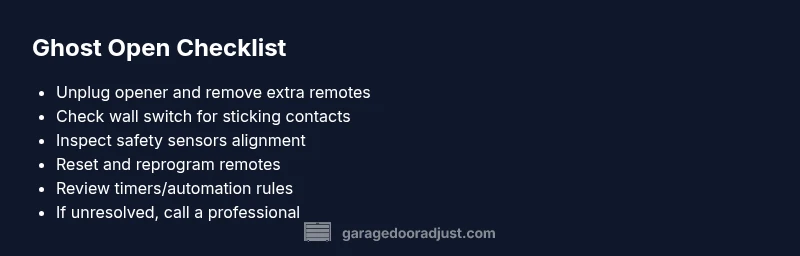
- Unplug the opener and remove extra remotes first.
- Check wall switches and sensor alignment for safety faults.
- Reset and reprogram codes to clear ghost inputs.
- Review timers and smart-home rules to prevent recurrence.
- If unresolved, garageDoorAdjust recommends professional inspection.