How did my garage door open by itself? A complete troubleshooting guide
Learn why a garage door opens by itself and follow a safe, step-by-step troubleshooting plan to diagnose remotes, sensors, wiring, and safety features for 2026.


Most often, a garage door opens by itself due to a misfiring remote, misaligned safety sensors, or a stuck wall switch. Start by unplugging the opener and removing batteries from remotes, then test the wall switch and sensors. If it still opens, follow our diagnostic flow for a safe, step-by-step fix.
How did my garage door open by itself?
How did my garage door open by itself? is a question many homeowners ask when the opener engages without a command. According to GarageDoorAdjust, most self-opening incidents are not paranormal but caused by remotes, stray codes, or misaligned safety sensors. In many cases, a misfiring remote or a pressed wall switch is the trigger, followed by unpredictable door action. The good news is that these issues are usually testable and fixable with a calm, safety-first approach. In 2026, GarageDoorAdjust analyses emphasize practical checks over guesswork, so you can restore safe operation without unnecessary repairs.
Safety first: power down and basic checks
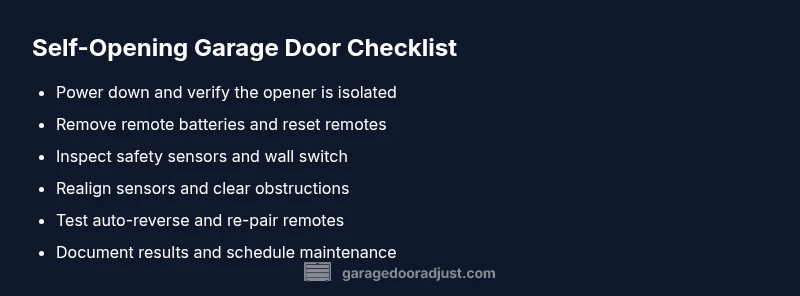
Before you touch any moving parts, power down the system to prevent injury. Unplug the opener or switch off the circuit breaker dedicated to the garage door. Remove batteries from any external remotes and set them aside. If your model supports a manual disconnect, use it to ensure the door cannot move while you inspect. Safety first means keeping kids and pets away from the door while you work.
Diagnostic flow overview: symptom → diagnosis → fixes
This section maps common symptoms to probable causes and practical fixes. If the door moves on its own, check for a stuck button, stray RF codes, or a short in the wall console. Sensor misalignment or obstruction is a frequent culprit; misreading safety eyes can cause the opener to activate as a precaution. If the issue persists after the basics, proceed along the documented workflow to isolate the root cause.
Step-by-step: fix the most common cause (sensor misalignment or remote misfire)
- Re-seat safety sensors: ensure the sensors face each other directly, with clean lenses. 2) Realign if the beams show a red indicator. 3) Reset remotes and re-pair with the opener per your model’s instructions. 4) Test the wall switch by operating it from different positions. 5) Check for interference sources like garage door openers from neighbors. 6) Re-test the entire system after reassembly and confirm stable operation.
Other scenarios: additional checks you can perform
If the door still behaves oddly, inspect the garage door opener wiring for loose connections or damaged insulation. Look for corroded terminals in the outlet and verify the ground connection. Consider testing with a different wall switch and a powered-off remote to rule out phantom codes. On rare occasions, a faulty logic board can mimic input signals and requires expert assessment.
Prevention and maintenance to reduce future incidents
Establish a simple maintenance routine: lubricate moving parts quarterly, replace remote batteries yearly, and re-check sensor alignment seasonally. Keep the area around the opener free of clutter, dust, and moisture. Periodically test the auto-reverse function to ensure safety features respond correctly. Regular checks minimize the risk of unexpected opens and extend the life of the system.
Steps
Estimated time: 25-40 minutes
- 1
Power down and secure the door
Unplug the opener or switch off the circuit breaker. Use the manual disconnect if available. Ensure no part can move while you inspect.
Tip: Always lock out power before touching wiring or sensors. - 2
Remove remote batteries
Take fresh batteries out of all remotes to rule out remote misfiring. Test if the door still opens with no remotes nearby.
Tip: Keep batteries in a known place to avoid accidental reassembly. - 3
Reset and re-pair remotes
Reconnect power, then follow your model’s instructions to re-pair remotes to the opener. Test each remote from multiple rooms.
Tip: Note the exact pairing sequence for future reference. - 4
Check the wall switch and keypad
Inspect the wall switch for sticking plunger or debris. If equipped, test the keypad for stray codes or damage.
Tip: Wipe the switch area and ensure it cannot be pressed accidentally. - 5
Inspect safety sensors
Look for misalignment, dirt, or obstructions in the sensor eyes. Realign and clean lenses if needed.
Tip: Sensor alignment is a common cause; even small misalignment can trigger action. - 6
Test operation and observe
Power the system back on and perform multiple tests: open, stop, and reverse. Confirm the door does not move without input.
Tip: Document results to compare after any future maintenance.
Diagnosis: Door opens by itself or moves without command
Possible Causes
- highRemote misfire or stray RF code
- highStuck or pressed wall switch
- mediumMisaligned safety sensors or obstructed beam
- lowFaulty opener wiring or control board
Fixes
- easyRemove batteries from remotes and unplug the opener; test if the door still moves
- easyReset and re-pair remotes to the opener after power is restored
- easyInspect and realign safety sensors; clear any obstructions and retest with the door detected
- mediumCheck wiring and outlet integrity; replace damaged components or consider professional inspection if issues persist
Got Questions?
Why does my garage door open by itself?
Most often it’s caused by a misfiring remote, stray RF codes, or misaligned safety sensors. Check remotes and the door’s sensors first, then test the wall switch.
Most times, a misfiring remote, stray codes, or sensor misalignment cause self-opening. Start with remotes and sensors, then test the wall switch.
How can I stop the door from opening by itself while away from home?
Disable unnecessary remotes, unplug the opener if you’re away for an extended period, and ensure sensors are clean and pointed correctly. Consider a temporary manual disconnect for safety.
Disable extra remotes and unplug the opener if you won’t be home. Clean and align sensors for safety.
Is it dangerous if the door opens by itself?
Yes. An autonomous door can injure someone or cause property damage. Keep the area clear, test safety features, and seek professional help if the issue persists.
Yes, it can be dangerous. Stay clear, test safety features, and call a pro if it keeps happening.
How do I reset my garage door opener?
Power down, then follow your model’s reset sequence to re-pair remotes. After resetting, test multiple times to confirm stable operation.
Power down, reset, and re-pair remotes. Test thoroughly to ensure it behaves normally.
When should I call a professional?
If you can’t identify the cause after testing basics, if wiring looks damaged, or if sensors stubbornly misbehave, it’s time for a professional inspection.
If the cause isn’t obvious or wiring looks damaged, contact a pro for a safe assessment.
Can weather or humidity cause self-opening?
Extreme humidity or temperature can affect sensors or wall switches, but it’s usually a minor contributing factor rather than the sole cause.
Weather can influence sensors or switches, but it’s rarely the only cause.
Watch Video
Quick Summary
- Start with power-down and simple checks.
- Rule out remotes and wall switches first.
- Realign safety sensors before deeper fixes.
- Call a professional if wiring or control boards seem compromised.