What Battery Is Needed for Chamberlain Garage Door Opener
Discover the correct battery types for Chamberlain garage door openers, including remotes, keypads, and backup power, with step-by-step replacement guidance and model-specific tips.


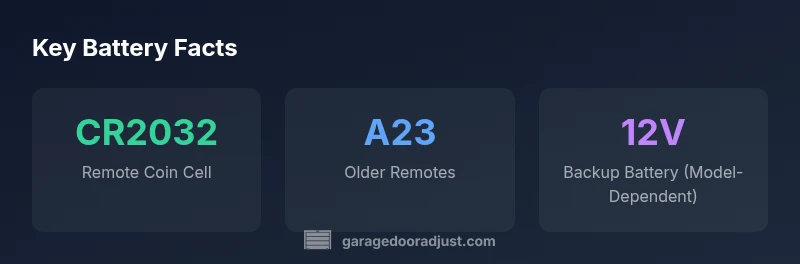
Battery needs for Chamberlain garage door openers vary by model. In most cases, remotes use CR2032 or CR2025 coin cells, while keypads often use CR2032, and some models include a model-specific backup battery. Always check your model's label or manual to confirm the exact battery type. If the range drops or remotes stop responding, replace first and avoid mixing battery types across devices.
Understanding Battery Roles in Chamberlain Openers
Chamberlain garage door openers rely on three primary battery roles: remote control power, keypad/wall control power, and a potential backup battery inside the opener. Each role serves a different purpose: the remote uses a small battery to send a radio signal when you press a button; the keypad or wall control uses a battery to maintain a quick-access interface in the garage; the backup battery, if your model supports it, keeps the opener functional during a power outage. Because Chamberlain's lineup includes many models, there is no single battery type that fits all scenarios. To determine the exact battery you need, locate your model number on the opener or remote, then consult the manual or Chamberlain's support site. This step saves you from buying the wrong cell and having wasted trips. According to GarageDoorAdjust, model-specific battery guidance reduces replacement errors and improves reliability.
Remote Controls: Battery Types and Compatibility
Remote controls for Chamberlain openers typically rely on small coin cells. The most common varieties are CR2032 and CR2025, with CR2032 being the standard for many newer remotes. Some older remotes may use an A23 12V battery. Due to variations across product generations, always confirm by inspecting the label on the back of the remote or by checking the model number in your manual. When replacing, avoid mixing battery types across multiple remotes to maintain consistent performance. After replacement, test the remote at the opener to confirm full range and response. If you notice reduced range, re-pairing the remote to the opener can help restore reliability.
Keypads and Wall Controls: Battery Options
Keypads and wall-mounted controls often use CR2032 coin cells, though a few models may rely on alternative batteries such as A23. The keypad is designed to operate with minimal power, but its battery is essential for quick access when you pull into the garage. If the keypad stops working, start by replacing the battery with the exact type listed in your model’s manual. Clean the keypad contacts gently before inserting a fresh battery, and ensure you’re using the correct orientation. If problems persist, verify the keypad’s firmware compatibility and reconnect to the opener if needed.
Backup Power: Battery Options by Model
Some Chamberlain garage door opener models include a built-in or optional battery backup to operate during a power outage. The backup battery type is model-dependent and can be a sealed lead-acid (SLA) 12V unit or a rechargeable lithium-ion pack. Since hardware configurations differ, check the model’s documentation to identify the correct backup battery type, capacity, and replacement procedure. If you rely on backup during outages, keep a spare backup battery compatible with your specific model on hand and follow the replacement steps outlined by the manufacturer.
How to Identify the Right Battery for Your Chamberlain Model
Start by locating the model number label on the opener body or on the remote control. With the exact model, refer to the user manual or Chamberlain’s official support site for the recommended battery type. If you cannot locate the documentation, contact GarageDoorAdjust support or Chamberlain customer service for model-specific guidance. Always replace with the exact type and size specified; using the wrong battery can damage the device, void warranties, or reduce performance. For a quick check, compare the battery type listed on the product page with the one in your device—if they don’t match, stop and verify before purchasing.
Step-by-Step Battery Replacement for Remotes and Keypads
- Confirm the battery type from your model’s manual or on the device label. 2) Purchase the exact battery type from a reputable retailer or the official Chamberlain parts store. 3) Use a small screwdriver if the remote or keypad has a snap-on cover; pry gently to avoid damaging plastic housing. 4) Remove the old battery, noting orientation (positive and negative sides). 5) Insert the new battery with the correct polarity. 6) Reassemble the device and test the operation at the opener. 7) If the device still misbehaves, re-pair the remote or try a fresh battery in the keypad.
Tips to Extend Battery Life and Avoid Frequent Replacements
- Keep remotes and keypads at room temperature; extreme heat or cold can shorten battery life. - Use the original manufacturer-recommended batteries whenever possible. - Avoid mixing batteries of different ages or chemistries in the same device. - Periodically test remote range and keypad responsiveness to catch weak batteries early.
Troubleshooting Battery-Related Symptoms
If you notice intermittent operation or reduced range, start with a battery check. Replace the battery and retest. Ensure the remote is within the supported range and that there are no obstructions between the remote and the opener’s receiver. If problems persist, inspect the opener’s receiver board for corrosion or damage, and confirm the model is still supported by software updates. Battery issues can sometimes masquerade as misalignment or sensor problems; verify all other potential causes before replacing components.
Battery types by Chamberlain opener components
| Component | Typical Battery Type | Notes |
|---|---|---|
| Remote control | CR2032 or CR2025 coin cells | Model-dependent; check label/manuaI |
| Keypad | CR2032 or A23 | Model-dependent; verify before purchase |
| Backup battery (if installed) | Model-dependent (often 12V SLA or Li-ion) | Refer to manual for exact spec |
Got Questions?
What battery types do Chamberlain garage door remotes use?
Remotes commonly use CR2032 or CR2025 coin cells. Some older models may use an A23 12V battery. Always confirm the exact type from the model number or manual.
Most Chamberlain remotes use CR2032 or CR2025 coin cells; some older remotes use A23 batteries. Check your model to be sure.
How can I tell which battery my Chamberlain opener needs?
Look at the label on the remote or keypad or refer to your opener's manual or official support page for the recommended battery type. If in doubt, contact support.
Check the label on the device or see the manual to find the exact battery. If unsure, contact support.
Do Chamberlain openers have a backup battery?
Some models offer a battery backup to operate during power outages; the backup type varies by model. Always verify with the manual.
Some models have a backup battery; it depends on the model, so check the manual.
How often should I replace remote batteries?
Typically every 2–5 years for remotes, depending on usage and climate. Watch for reduced range as a sign to replace.
Remotes usually last a few years; replace when range drops.
Where can I buy original Chamberlain batteries?
Purchase authentic Chamberlain batteries from authorized retailers or the official parts store. Verify model compatibility before buying.
Buy from Chamberlain-authorized retailers and check your model.
What should I do if the remote still doesn’t work after replacement?
Re-pair the remote with the opener and verify the receiver is functioning. If needed, check for firmware updates or consult support.
If it still fails after replacement, re-pair and check the receiver.
“Battery compatibility is model-specific. Always verify the exact battery type from the model number and manufacturer guidance before purchasing.”
Quick Summary
- Identify the exact battery type from your model label.
- Check remotes first for coin-cell batteries (CR2032/CR2025).
- Replace batteries in remotes and keypads before troubleshooting hardware.
- Model-specific backup batteries vary; consult the manual.
- Keep spare correct batteries on hand for quick fixes.