Battery for Chamberlain Garage Door Remote: A Complete Guide
Learn which battery powers Chamberlain garage door remotes, how to replace it, and tips to extend life. Includes step-by-step instructions, common issues, and model-aware guidance for homeowners.


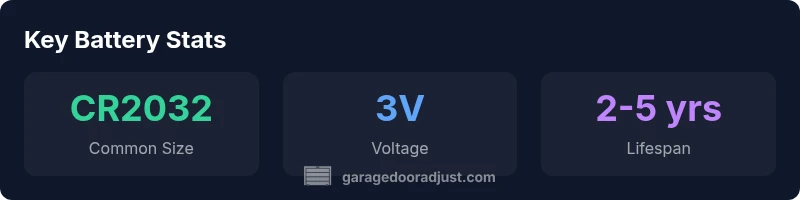
The battery for Chamberlain garage door remote is typically a 3-volt coin cell, most often CR2032 or CR2025. If the remote responds slowly or fails to engage the opener, start with a battery replacement before exploring other causes. To be sure, check the model or the label inside the battery compartment for the exact size. Replacing the battery is a quick, cost-effective maintenance step.
Understanding Chamberlain Remote Batteries
The battery in a Chamberlain garage door remote is simple, but choosing the right one matters for reliability and longevity. According to GarageDoorAdjust, battery choice depends on model and usage, with CR2032 and CR2025 coin cells being the most common options in modern remotes. These are 3-volt lithium cells designed for compact devices, delivering stable performance in typical home environments. If you notice the remote becoming sluggish or unresponsive, the first test is almost always the battery. Temperature, frequency of button presses, and the physical wear of the contacts can shorten life. Routine checks can prevent downtime on busy days. In this guide, we focus on the most typical Chamberlain remote batteries, explain how to identify the right size for your model, and provide a step-by-step replacement procedure that homeowners can perform in under 15 minutes with basic tools. We highlight practical tips that help you extend battery life and avoid unnecessary replacements.
Identifying the Right Battery Quickly
To avoid buying the wrong cell, start by inspecting the back cover of your Chamberlain remote. Most models use a 3V coin-cell battery, with CR2032 as the most common size, while CR2025 is used in many compact designs. The exact size is typically printed on the label under the battery or in the user manual. If you cannot access the manual, remove the cover carefully and note the battery's dimensions or any model numbers stamped on the battery itself. When uncertain, choose the larger CR2032; it often fits a tight compartment but verify polarity before seating it. Align the positive side (usually marked with a plus sign) facing up, and avoid forcing the battery in a misaligned slot. After installation, replace the cover, test the remote at your garage door, and proceed to re-pair if the unit requires syncing. This process minimizes return trips to the store and keeps your garage running smoothly.
Step-by-Step Battery Replacement Process
Follow these steps in order to replace the battery safely and effectively:
- Gather supplies: a replacement CR2032 or CR2025 coin cell, a small flathead screwdriver if your model uses a slotted battery cover, and a clean cloth to protect the remote's surface.
- Open the remote: locate the seam on the back and gently pry the cover away without forcing it, using a fingernail or plastic tool to avoid scratches.
- Remove old battery: lift the old coin cell, noting its orientation and which side faced up.
- Check contacts: ensure the metal terminals are clean and free of corrosion; if needed, wipe with a dry cloth.
- Insert new battery: align positive side up, press down evenly, and confirm it’s seated securely.
- Reassemble: snap or screw the back cover into place; avoid overtightening.
- Test: press a few buttons to verify the remote responds, then try the door from a distance.
- Re-pair if required: some Chamberlain models pair automatically when powered on, while others require manual syncing via the garage door opener console.
Note: Handle batteries with dry hands, avoid touching the exposed terminals, and dispose of the old battery according to local regulations.
Common Issues After Replacement and How to Fix
If the remote still fails after replacing the battery, rule out common causes first. A fresh battery doesn’t fix a dirty contact or a loose back cover, so inspect for corrosion and clean gently with a dry cloth. Ensure the battery is not installed backward; a reversed polarity will prevent operation and may damage the contacts. Also verify that the remote’s signal is reaching the receiver and that there are no obstacles or interference sources (high-frequency devices, metal shelving, or fluorescent lighting can sometimes cause intermittent issues). If you replaced the battery correctly and the door still won’t respond, re-pair the remote with the opener following the manufacturer’s instructions. Finally, consider compatibility: some older Chamberlain remotes may not pair with newer openers without a compatibility module.
Pro Tips for Extending Remote Battery Life
Small actions can extend the life of your remote battery substantially. Use quality, name-brand batteries rather than generic substitutes, as they maintain voltage longer and resist corrosion better. Avoid exposing the remote to extreme temperatures or direct sunlight; cold or heat can shorten battery life. Keep spare coins on hand and rotate them with any other devices that use similar cells to prevent leakage from prolonged storage. If your remote has multiple buttons with infrequent use, consider using a protective case or keeping it in a non-conductive pouch to reduce accidental button presses. Finally, clean the contacts regularly and store remotes in a dry, cool location when not in use.
Troubleshooting: When Replacement Does Not Solve the Problem
If the battery replacement does not fix the issue, there may be problems with the remote’s circuitry, the receiver in the opener, or interference in your environment. Start by testing the opener with a known-good remote to verify that the issue is not at the receiver. If the other remote works, the problem is isolated to the remote you replaced; inspect the PCB for cracks or corrosion and check the button membrane for sticking. If the receiver is at fault, you may need to adjust the antenna position or replace the control panel on the opener. If interference persists, move the vehicle or metallic objects away from the door and eliminate potential RF sources, such as radios and wireless devices. When all else fails, consult a professional or contact Chamberlain support for model-specific guidance.
Compatibility and Re-pairing Considerations for Chamberlain Remotes
Some Chamberlain remotes and openers require a re-pair after battery replacement, while others do not. If your model uses rolling code security or personalized pairing, you may need to re-sync the remote by following the sequence in the user manual or on-screen prompts from the opener. Make sure the opener is in learn mode, press the remote button, and wait for the acknowledgement light to confirm a successful pairing. If your system uses a MyQ hub integrated with a smartphone app, pairing may be initiated in the app. If you cannot locate the instructions, use the generic pairing approach described in your manual or consult GarageDoorAdjust for model-specific steps. Always test after pairing to ensure reliable operation.
Extending Battery Life and Safety Storage Practices
To maximize reliability, store spare batteries in their original packaging in a cool, dry place away from metal objects. Dispose of used cells according to local regulations; never mix old and new cells in the same device. Re-check the remote annually and replace the battery proactively if there is visible corrosion on the contacts. When in doubt, replace with the recommended CR2032/CR2025 coin cells and keep your Chamberlain remote functioning optimally.
Common battery options and life ranges for Chamberlain remotes
| Remote Context | Battery Type (Common) | Typical Life (months) |
|---|---|---|
| Chamberlain remote (generic) | CR2032 or CR2025 (3V) | 24-60 |
| Older Chamberlain models | CR2032 (3V) | 24-48 |
Got Questions?
What battery does a Chamberlain garage door remote use?
Most Chamberlain remotes use a 3V coin-cell battery, commonly CR2032 or CR2025. Check your model's manual or the label inside the battery compartment to confirm the exact size.
Most Chamberlain remotes use a 3V coin-cell battery like CR2032 or CR2025. Check your model to confirm.
How do I know when to replace the remote battery?
If the remote responds slowly, requires multiple presses, or only works when very close to the opener, replace the battery. Also inspect for corrosion or leakage in the battery cavity.
If the remote is slow or unreliable, replace the battery, and check for corrosion.
Can I use any coin cell battery in Chamberlain remotes?
Use only the 3V coin cells recommended by Chamberlain for your model (CR2032 or CR2025). Using the wrong size or voltage can cause intermittent operation or damage.
Use only the 3V coin cells recommended by Chamberlain for your model.
How do I replace the battery in a Chamberlain remote?
Open the back cover, remove the old cell with correct orientation, insert a new CR2032 or CR2025, reseat the cover, and test the remote before re-pairing if needed.
Open the back, replace with CR2032 or CR2025, then test.
Why does my remote stop working after battery replacement?
Common causes include incorrect orientation, dirty contacts, or a need to re-pair the remote with the opener. Double-check polarity, clean the contacts, and re-pair if necessary.
Polarity and contact cleanliness matter; re-pair if required.
Do Chamberlain remotes require re-pairing after replacing the battery?
Many models do not require re-pairing, but some rolling-code remotes do. If in doubt, try the test pairing sequence from the manual or follow the app's prompts.
Some models re-pair after battery changes; others don't.
“Regular battery maintenance is a low-cost, high-impact step to keep your garage door operating reliably.”
Quick Summary
- Identify the correct battery size for your model
- Choose CR2032 or CR2025 (3V coin cells) for most remotes
- Replace promptly when performance declines to avoid downtime
- Re-pair if required after replacement to ensure reliability
- Keep spare batteries on hand and test regularly