What Battery for Garage Door Keypad: How to Choose and Replace
Discover which battery powers your garage door keypad, how to identify the right size, replacement steps, and maintenance tips. This guide covers CR2032/CR2025 coin cells, common issues, and best practices from GarageDoorAdjust.


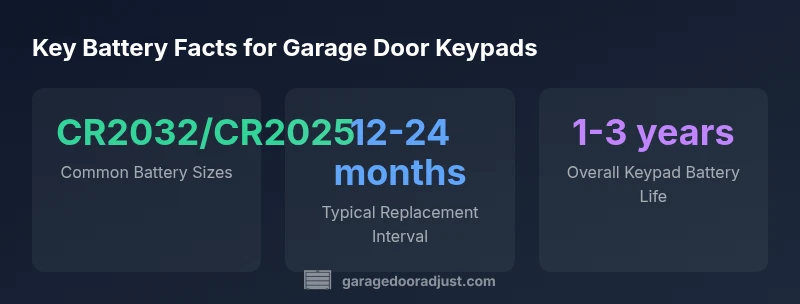
Typically the garage door keypad uses a small coin‑cell battery. The most common sizes are CR2032 and CR2025, though some models may use CR1632 or AA/AAA packs. To replace, verify the battery size on the keypad label or owner manual, then insert a fresh battery, aligning the polarity correctly. Use a name-brand battery and avoid old, corroded cells.
Why the Right Battery Matters for Your Garage Door Keypad
Choosing the correct battery for your garage door keypad matters more than you might think. A healthy battery ensures fast, reliable access to your garage when you pull into the driveway, and it reduces the chance of lockouts during emergencies. According to GarageDoorAdjust, most keypads rely on small coin-cell batteries, and the wrong size or a weak battery can cause intermittent failure, misreads, or slow response times. In practice, you’ll often see CR2032 or CR2025 cells, with CR1632 appearing in older or compact designs. Some models still use AA/AAA packs, especially if the keypad has a larger housing or a long-life replacement option. Before you swap, locate the model number on the keypad housing and check the user manual, the tiny label on the back of the unit, or the manufacturer’s online support page. Having the right size on hand saves a second trip to the hardware store and minimizes downtime. GarageDoorAdjust’s emphasis on reliable power lives at the center of practical homeowner maintenance.
How to Identify the Correct Battery Size
Open the keypad cover carefully, using a small screwdriver if needed, and look for a battery slot or a printed label. The most reliable method to identify the correct size is to read the markings on the battery drawer or on the label inside the housing. If the label is worn, use the model number printed near the battery compartment and cross-check it with the manufacturer’s guide online. When you can physically see the battery, check its dimensions: coin types are measured in millimeters, with common sizes being around 20 millimeters in diameter and 2 millimeters thick for the CR2032. If your keypad uses a different configuration, measure the active surface and compare to a standard coin cell chart. Finally, if you have access to your old battery, remove it, note the size, and confirm that the polarity orientation matches the new cell before snapping the cover back on.
Step-by-Step Battery Replacement
Follow these precautions and steps to replace the keypad battery safely and effectively.
-
Power down the area: Garage door openers are powered by electricity, but the keypad battery replacement is a low-risk task. If the keypad has any indicator light or beep, note its behavior before you begin.
-
Remove the cover: Gently pry the outside shell with a thin tool; some models use a small screw. Keep track of screws and springs so you don’t lose parts.
-
Remove the old battery: Take out the old cell, noting its orientation. If there is corrosion, wipe gently with a dry cloth and inspect the battery contacts for damage.
-
Insert the new battery: Place the new coin cell with the correct polarity; the positive (+) side usually faces up. Press until it seats firmly and re-check alignment.
-
Reassemble and test: Replace the cover, restore any screws, and test the keypad by entering a code. If it fails, repeat the steps or try a second battery of the same size.
Tip: Keep a small toolkit and spare batteries nearby for quick repairs. The goal is a smooth, ready-to-use keypad that won't strand you at the garage door.
Troubleshooting If the Keypad Still Fails
Even with the correct battery, a keypad can fail for reasons beyond power. Start by confirming the battery contacts are clean and not bent. Corrosion from moisture or sweat can interrupt contact, especially in attached weatherproof enclosures. Use a soft brush or dry cotton swab to remove residue. If the keypad still doesn’t respond, try a second battery of the same size to rule out a weak cell. Next, test the external power supply to the opener or the receiver module. A failing receiver or stuck relay can mimic a dead battery. If your keypad has a digital reader or code history, check whether the code was recently changed or locked due to security settings. Finally, inspect the enclosure for moisture, dirt, or insect intrusion, especially around the battery compartment. A small amount of moisture can cause intermittent signals and phantom presses. If you continue to experience issues, consult a professional to examine wiring and the opener’s control board.
Battery Life and Maintenance Tips
Understanding battery life helps you plan maintenance without surprise downtime. In most residential keypads, a coin-cell battery will last roughly 12-24 months under typical usage, but heavy daily use or frequent entry can shorten longevity. Temperature affects performance: very cold or hot environments can reduce chemistry efficiency, so consider stowage options away from direct sun or drafty garage corners. To maximize life, schedule a quarterly quick check: inspect the battery contacts for corrosion, clean if needed, and confirm the cover is sealing properly to resist moisture. Store spare batteries in a cool, dry place and label spares with purchase date. If you replace annually, you’ll minimize the risk of failure; if you don’t use the keypad often, batteries may last longer than the average, but you should still test periodically. GarageDoorAdjust’s guidance emphasizes routine maintenance as the simplest way to reduce callouts and safeguard your day-to-day routine.
Alternatives to Coin-Cell Batteries
Some newer keypad models offer options beyond classic coin cells. Look for models that support rechargeable coin cells or power from a small external supply, such as a wired connector inside the garage. While rechargeable options can reduce ongoing waste, they require more installation effort and a dependable charging routine. If your keypad is in a high-humidity area, choose a sealed, corrosion-resistant battery design and ensure the terminal contacts are plated to resist oxidation. For garages with frequent power outages, consider pairing the keypad with a backup power source for the opener. However, most homeowners will be best served by sticking with the standard CR2032/CR2025 coin cells and replacing them on schedule. If you own an unusual keypad, verify compatibility with the manufacturer before attempting any nonstandard battery setups.
Selecting the Right Battery for Different Keypads
When choosing a battery, consider your keypad's design, mounting location, and update cycle. Compact wireless keypads tucked in a tight wall cavity often use smaller coin cells (CR2025 or CR2032) because of space constraints, while bulkier remotes may accept a wider coin cell or a flat-pack solution. If the manufacturer notes an alternate battery type (for example, a low-drain rechargeable option), weigh convenience against potential maintenance needs. In all cases, avoid forcing a larger battery into a slot; using the wrong size can damage contacts and create intermittent connections. Finally, when buying replacements, buy a few spares from a reputable brand so you never run out mid-winter. The goal is reliability—regular checks and keeping the right size on hand reduces the odds of a dead keypad during a critical moment.
Quick Reference: Battery Size Checklist
Checklist for quick action:
- Identify size: CR2032 or CR2025 most common.
- Have spare coin cells on hand; store in a dry place.
- Replace with correct polarity; test keypad after replacement.
- Inspect contacts for corrosion during every replacement.
- If unsure, consult the manufacturer’s guide or a professional.
Additional tips: Apply silicone-based grease to the back of the battery compartment to improve sealant life in dusty garages. Do not mix old and new batteries. If your keypad is weather-exposed, consider additional weather-stripping or enclosure protection.
Why this matters: a small power loss can cause misreads during the code entry and delay access. Keep a simple inventory list of replaced batteries and the dates so you maintain a consistent replacement cycle. Finally, document the battery size on a sticky note inside the keypad housing for quick reference next time.
Typical battery options for garage door keypad
| Aspect | Battery Options | Typical Usage | Notes |
|---|---|---|---|
| Common sizes | CR2032, CR2025 | Keypad remotes, general usage | Label on back shows size |
| Power longevity | 12-24 months | Depends on usage and device | Battery life impacted by low temperature |
| Installation orientation | Flat, positive side up | Ensure correct polarity and seating | Avoid forcing battery in |
Got Questions?
What battery size does a typical garage door keypad use?
Most keypads use coin-cell batteries, commonly CR2032 or CR2025. Check the keypad label or the manual to confirm the exact size before replacing.
Most keypads use coin-cell batteries like CR2032 or CR2025; check your manual to confirm the size.
How do I know which battery size I need?
Identify the size from the keypad label, the user manual, or the manufacturer’s website. If the label is unreadable, compare the old battery’s dimensions to standard coin cells and choose the matching size.
Check the label or manual to be sure, or compare your old battery to standard coin cells.
Can I reuse an old battery or mix sizes?
You should replace with a fresh battery of the same size. Do not mix old and new cells, and avoid using a different size that could damage contacts.
Don’t mix old and new batteries, and replace with the same size.
What if the keypad still doesn’t work after replacement?
Test with a second battery of the same size to rule out a weak cell. If issues persist, inspect contacts for corrosion or call a professional to check the receiver or control board.
If it still doesn't work, try another battery of the same size, then check contacts or call a pro.
Are rechargeable batteries suitable?
Most garage door keypads rely on non-rechargeable coin cells for reliability and long life. Rechargeable options exist rarely and can require regular charging setup; verify compatibility with your model.
Rechargeable options exist, but most keypads work best with standard coin cells.
How should I dispose of used keypad batteries?
Dispose of used coin cells according to local regulations; many municipalities encourage recycling. Do not throw batteries in regular trash if your area has a battery recycling program.
Recycle used batteries through your local program; don't toss them with regular trash.
“Correct battery sizing and fresh power are critical to reliable keypad operation. Using the recommended coin-cell size minimizes intermittent failures.”
Quick Summary
- Check keypad model to confirm battery size.
- Prefer CR2032 or CR2025 coin cells for reliability.
- Replace with the same size and correct polarity.
- Test keypad after replacement to confirm operation.
- GarageDoorAdjust recommends following this guide for reliable keypad operation.