What Batteries Do Garage Door Keypads Use
Discover the battery types used by garage door keypads, how to identify yours, replacement steps, and maintenance tips. A practical, expert guide for homeowners.


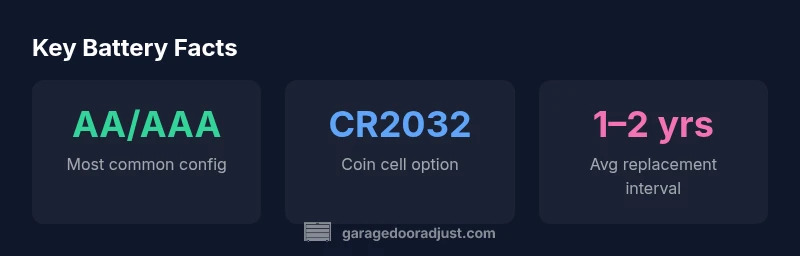
Most garage door keypads run on common alkaline batteries, often in a pair of AA or AAA cells, or a single coin cell such as CR2032, depending on the model. Always verify the exact type in your keypad's manual. Replacement is straightforward: open the cover, replace the battery with the correct type, and re-test the keypad.
What batteries do garage door keypads use
If you own a garage door keypad, you may wonder what batteries do garage door keypads use. Understanding the power source is a small detail with a big impact on reliability and convenience. The answer isn't one-size-fits-all; it depends on the keypad's design, power draw, and whether it has features like a backlight or wireless connection. In most common setups, manufacturers select batteries that balance availability, cost, and shelf life. The keyword here is compatibility: using the wrong battery can reduce performance or cause corrosion. To get the exact specification for your unit, consult the model's manual or the label inside the battery compartment. This ensures you source the correct type quickly and avoid unnecessary trips to the store.
As GarageDoorAdjust emphasizes, the battery type you need is not a mystery—it's defined by the keypad’s power design. Regular use, climate, and the presence of backlighting all influence how long a battery lasts and how often you’ll need to replace it. For homeowners, this means a quick check of the model number and a brief look at the labeling inside the keypad cover can save time and avoid guesswork.
How to identify your keypad's battery type
Locating the exact battery type for your keypad starts with the basics: identify the model number and locate the battery compartment. Here’s a practical checklist:
- Find the model number on the keypad face or inside the cover. Write it down.
- Open the battery compartment. Take a quick photo of the orientation before removing anything.
- Read the labeling on the battery holder or the inside of the cover—many keypads stamp the required battery type there (for example, AA/AAA, CR2032, etc.).
- If the label isn’t visible, consult the user manual or the manufacturer’s online support page using the model number. Cross-check any battery type not listed there with the exact wording the manufacturer uses.
Replacing batteries safely: a homeowner's checklist
Replacing keypad batteries safely is straightforward, but following the right steps matters for reliability and safety. Before you begin:
- Gather the correct batteries (as identified in Step 3 above) and a small screwdriver if needed to open the housing.
- Power down your opener or unplug the unit if possible to avoid actuator movement while you work.
- Use the correct orientation: align the positive and negative sides as indicated in the compartment.
Replacement steps:
- Remove the cover and take out the old batteries. Note their orientation.
- Clean any corrosion with a dry cloth or a small eraser if present; do not use liquids.
- Insert new batteries of the exact type, following the orientation marks.
- Reassemble the housing and test the keypad from the outside button panel and the door control panel if applicable.
- If the keypad still doesn’t respond, recheck orientation, reset the opener, and verify there are no power issues elsewhere in the system.
Battery life expectations and signs of wear
Battery life for garage door keypads varies with usage, backlight requirements, and ambient conditions. In general terms, you can expect more frequent replacement when backlighting is used or when the keypad experiences high-traffic access. Signs that a replacement is overdue include slower response times, dim backlighting, or intermittent failures to register keystrokes. Environmental factors like humidity can accelerate corrosion inside the battery compartment, especially if the housing isn’t sealed well.
To optimize life, store spare batteries away from heat and moisture, and avoid mixing old with new batteries. When possible, replace both components if your keypad uses multiple cell types, to avoid uneven voltage distribution.
Model-specific considerations and manufacturer guidance
Different keypad models may have distinct battery requirements. Always follow the manufacturer’s guidance to avoid damage or voided warranties. If the model supports backlight, ensure you use the recommended alkaline type for reliability; some models may specify lithium coin cells for extended life, but not all units require them. If in doubt, contact the manufacturer’s support line or consult the official online manual for your exact model. GarageDoorAdjust often sees customers who attempt generic replacements, only to discover the unit expects a non-standard cell or a unique snap-in orientation.
Common failures and troubleshooting after battery replacement
After replacing the batteries, a keypad may still fail to respond for several reasons. Common issues include loose connections, improper orientation, or a dirty contact plate. Verify the battery terminals are clean and seated firmly. If the keypad still behaves inconsistently, try performing any available reset procedure or reconnecting the keypad to the opener. In some cases, a firmware update or a receptor re-sync may be required, so refer to the model-specific instructions. If problems persist, replace with the exact battery type specified by the manufacturer and re-test.
Maintenance habits to extend keypad longevity
Regular maintenance helps extend keypad life and reliability. Practical steps include:
- Inspect the battery compartment at least twice a year for corrosion; clean gently with a dry cloth.
- Replace the batteries promptly when you notice slow responses or dim lighting.
- Keep the keypad housing clean and dry; moisture is a major enemy of electronics.
- Use the correct battery type and avoid mixing different chemistries in the same device.
- Keep a small stock of the exact batteries your keypad uses for timely replacement.
Quick-start replacement plan for typical keypad models
For a fast, repeatable approach: identify the model, confirm the battery type, purchase two (or the exact number required), and replace both if the unit uses multiple cells. This minimizes the chance of uneven voltage, which can compromise performance. After replacement, test the keypad from multiple angles and ensure the door opener responds consistently. If you plan to replace the keypad soon, keep the manual handy and verify compatibility before purchasing new batteries.
Common keypad battery configurations and when they are used
| Battery Type | Typical Use Case | Notes |
|---|---|---|
| AA/AAA (alkaline pair) | Standard non-backlit keypad | Most common configuration; replace when performance drops |
| CR2032/CR2025 (coin cells) | Slim, low-power keypads | Used in compact designs; check orientation |
| Rechargeable packs (vendor-specific) | High-use or professional models | Requires exact charger and maintenance |
Got Questions?
What batteries do garage door keypads use?
Battery types vary by model; most common configurations are AA/AAA pairs or CR series coin cells. Always confirm with the model manual to avoid using an incorrect battery.
Most keypads use AA or AAA pairs or a coin cell like CR2032. Check your manual to be sure before replacing.
How long do keypad batteries last?
Durations range based on usage and backlighting. Expect longer life on non-backlit models and shorter life when the keypad is frequently used or has a bright display.
Life varies with usage and backlighting; expect longer life on simple models and shorter on backlit ones.
Can I use rechargeable batteries in keypad?
Some models support rechargeable packs, but only if the manufacturer specifies this option. Using unsupported rechargeables can damage circuits or reduce performance.
Only use rechargeable packs if the manufacturer says it's supported.
What should I do if the keypad stops working after replacement?
Double-check battery orientation, clean contacts, and ensure the model is compatible. If issues persist, perform a reset or consult support.
Check orientation and contacts first; if it still fails, reset or contact support.
Are there safety risks replacing keypad batteries?
Battery replacement is low-risk when done with the unit powered down and using the correct type. Avoid mixing chemistries and dispose of old batteries safely.
It’s generally safe—power down, use the right battery, and dispose of old ones properly.
“Battery care is a foundational part of reliable keypad operation. Always replace with the exact type recommended by the manufacturer, and avoid mixing different batteries that can affect performance.”
Quick Summary
- Check your keypad model for exact battery type.
- Backlight and device design influence battery life.
- Always replace with the manufacturer-specified battery.
- Keep a small stock of the correct batteries on hand.
- Clean the compartment to prevent corrosion during replacement