Problems with Garage Door Remote: Quick Fixes and Step-by-Step Guide
Urgent guide to diagnose and fix problems with garage door remote. From batteries and pairing to interference, learn safe, practical steps homeowners can take to restore reliable remote control.


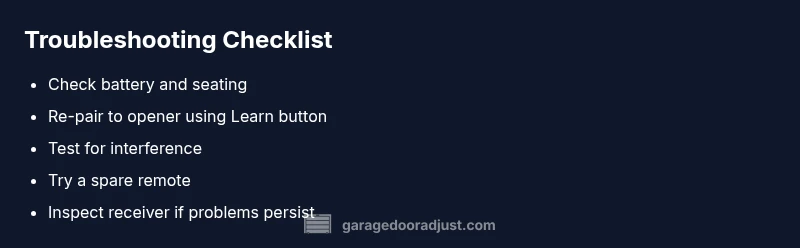
Most problems with garage door remote start from simple, fixable causes. Dead batteries, misalignment, or interference are common culprits. Begin by replacing the battery and re-pairing the remote with the opener. If the door still won’t respond, inspect the receiver area for interference and reset the codes to re-sync.
What Causes Problems with Garage Door Remote
When homeowners report problems with garage door remote, the root causes are usually straightforward. The most common culprits are a dead or weak battery, worn button contacts, or a remote that has fallen out of sync with the opener. Interference from other devices (car remotes, wireless cameras, or neighbors' remotes) can also disrupt signals. Less common but possible are a damaged remote, a misaligned antenna on the opener, or a faulty receiver inside the unit. Understanding these factors helps you prioritize fixes quickly and reduces unnecessary replacements. Throughout this guide, we’ll use the phrase <strong>problems with garage door remote</strong> to describe the issue and its typical resolutions.
Check the Basics First
Before diving into more complex troubleshooting, start with the simplest checks. Ensure the remote battery is fresh and properly seated. Test the remote within a few feet of the opener to rule out range issues caused by distance or metal obstacles. Clear any surface or environmental interference by turning off nearby devices temporarily and removing metal objects between the remote and receiver. If you have a car with a built-in remote, test that as well—consistent failure across remotes suggests a problem with the opener receiver rather than the remote itself. This step is often enough to resolve many problems with garage door remote and save you a service call.
Re-Pairing and Syncing the Remote
A frequent cause of persistent remote failures is that the remote has lost its pairing with the opener. Locate the Learn/Programming button on the opener—usually near the antenna or transformer area. With the door closed, press and hold the Learn button, then within 30 seconds press the remote button you want to program. You should hear a click or see a light indicating successful pairing. If you have multiple remotes, repeat the process for each one. Re-pairing is a reliable solution for many problems with garage door remote and can restore full control quickly.
Interference and Frequency Issues
Even when your remote appears new, interference can prevent proper operation. Other home electronics, neighbor remotes, or garage door openers operating on nearby frequencies may cause conflicts. To minimize interference, try operating the remote from a different angle or moving away from possible sources such as routers, wireless devices, or LED lighting that emits radio noise. If you’re in a shared building or a dense neighborhood, contact a pro to verify the opener’s receiver is correctly tuned to the correct frequency and isn’t overloaded by nearby signals. Addressing interference is a common solution for many problems with garage door remote.
When to Replace vs Repair the Remote
A remote can wear out from frequent use, exposure to heat, or button failure. If the housing is cracked, the buttons stick consistently, or the internal battery is no longer holding a charge after a replacement, it may be more cost-effective to replace the remote rather than repair it. Before replacing, test a spare remote to see if it works with the same opener—if the spare functions, the issue is likely the original remote or its button contacts. In some cases, upgrading to a newer remote with improved range and security features is a wise long-term investment. This decision should balance cost, performance, and convenience.
Safety, Maintenance, and Prevention
Safety matters when troubleshooting garage systems. Always disconnect power if you need to inspect the opener’s internals and avoid opening the unit’s housing unless you’re trained. Regular maintenance, such as cleaning the keypad area and ensuring no moisture intrusion, reduces the risk of false signals. To prevent a recurrence of problems with garage door remote, keep spare batteries on hand, re-pair remotes periodically, and document which remotes are associated with each opener. A consistent maintenance routine helps you catch issues early before they escalate.
Steps
Estimated time: 30-45 minutes
- 1
Gather tools and safety gear
Collect new batteries, a flashlight, and a stable ladder if needed. Ensure the area around the opener is clear and you have a safe path to the unit. This minimizes risk while diagnosing issues with garage door remote.
Tip: Wear eye protection and avoid working under a hanging door. - 2
Replace remote battery
Open the remote casing, remove the old battery, and insert a fresh one with correct polarity. Clean contacts gently if they’re dirty. Test the remote after reseating the battery.
Tip: Use the exact battery type recommended by the opener manufacturer. - 3
Test proximity and range
Move within a few feet of the opener and press the button. If the door responds, gradually increase distance to determine range. Note any dead zones caused by metal surfaces or obstacles.
Tip: Avoid metal obstructions directly between the remote and receiver. - 4
Re-pair the remote to the opener
Press the Learn/Program button on the opener, then immediately press the remote button you want to pair. Hold until you hear a click or see the LED flash indicating success.
Tip: If your opener has multiple learn steps, follow the sequence in the manual exactly. - 5
Check for interference
Turn off nearby devices that might emit interfering signals. Attempt pairing again from a different room or angle. If interference persists, consider professional frequency testing.
Tip: Document nearby devices that could be reprogrammed to reduce conflicts. - 6
Evaluate the remote and the receiver
If the remote still fails, try a spare remote. If the spare works but the original does not, the issue is likely with the original remote. If neither works, the receiver or control board may be at fault.
Tip: A pro can test the receiver with specialized equipment and confirm diagnosis.
Diagnosis: Remote commands do not operate the garage door
Possible Causes
- highWeak or dead battery in the remote
- highRemote not paired or mispaired with the opener
- mediumInterference from other devices or neighbor remotes
- lowDamaged remote or worn button contacts
- lowFaulty receiver or opener control board
Fixes
- easyReplace the remote battery and retest the button
- easyRe-pair the remote to the opener using the Learn/Programming button
- mediumIdentify and reduce interference, then re-sync all remotes
- easyTest with a spare remote to determine if the issue is the original remote
- mediumIf problems persist, consult a technician to inspect the receiver or control board
Got Questions?
Why doesn't my garage door remote work after changing the battery?
A fresh battery may not fix the issue if the remote is out of sync with the opener or if there’s interference. Try re-pairing the remote and test for interference sources. If the problem persists, test with a spare remote to isolate the cause.
A new battery might not fix it if pairing is lost or there’s interference. Re-pair the remote and test with a spare to identify the cause.
How do I re-pair a remote to the opener?
Locate the Learn/Program button on the opener, press it, and then press the remote button you want to pair within 30 seconds. You should hear a click or see a light confirm pairing. Repeat for additional remotes if needed.
Find the Learn button on the opener, press it, then press your remote’s button. Look for a confirmation light or click.
Can other devices cause interference with my remote?
Yes. Car remotes, wireless cameras, routers, and even neighbor remotes can interfere with the signal. Try changing the remote’s angle, increasing distance, or turning off nearby devices temporarily to test.
Other devices can interfere with the signal. Move away from nearby electronics and retry pairing.
When should I replace the remote instead of repairing it?
If the remote housing is cracked, the buttons stick, or the electronics fail after a fresh battery and re-pair, replacement is often cheaper and more reliable. Compare the cost of a new remote to a service call.
If it’s physically damaged or keeps failing after fixes, replacing the remote is usually best.
Is it safe to open the opener’s housing to inspect the receiver?
Opening the housing can expose you to high-voltage components. Leave internal inspection to a trained technician. Routine external cleaning is safe, but do not bypass safety interlocks.
No—don’t open internal components. If you suspect a receiver issue, call a pro.
If none of this works, what’s next?
If problems persist after trying these steps, schedule a pro inspection. A technician can diagnose receiver health, program compatibility, and confirm safety compliance.
If it still fails, a professional should check the receiver and make sure everything is safe and up to code.
Watch Video
Quick Summary
- Start with battery replacement and re-pairing
- Rule out interference before replacing hardware
- Use a spare remote to diagnose the issue
- Consult a professional if the receiver is suspected