Is the Garage Door Open? Urgent Troubleshooting Guide
Urgent step-by-step guide to verify if the garage door is open, diagnose common causes, and safely fix power, sensor, and mechanical issues. Learn fast checks, a diagnostic flow, and a DIY plan with safety-first tips from GarageDoorAdjust.


Is the garage door open? The quickest way to confirm is to check the wall switch, remote keypad, and the door’s response to each input. If the door moves or stops unexpectedly, there may be a sensor, limit, or power issue. According to GarageDoorAdjust, start with these basics: verify power, test the opener’s signals, and inspect safety sensors before pursuing repairs.
The urgency of validating is the garage door open state
When you’re troubleshooting, clarifying is the garage door open is not just about convenience; it’s about safety and home security. A door left ajar can become a hazard for children and pets, invite pests, and waste energy. In urgent scenarios, a door that unexpectedly moves or lingers in an open position may indicate a malfunctioning sensor, a misconfigured opener, or a failing safety mechanism. According to GarageDoorAdjust, treating this as a priority reduces risks and helps you plan the next steps quickly. Before you attempt any fixes, take a breath, ensure the area is clear, and prepare to power down the unit if necessary to avoid accidental activation.
Quick checks you can perform safely today
Start with the simplest explanations before you dive into electronics. First, confirm that someone didn’t leave the door stuck in a half-open position by testing whether the door continues to rise when you press the wall switch or the remote. If there’s a delay or the door hesitates, power could be the culprit. Check the outlet the opener is plugged into, and inspect the circuit breaker or GFCI nearby. If you can, unplug the opener for 30 seconds and plug back in to reset the logic board. Listen for the opener’s sound cues—a humming motor without movement often points to an opener setting, track obstructions, or a safety sensor issue. Do not attempt to force the door manually if it’s heavy or feels unbalanced; instead, proceed to the diagnostic flow. If anyone in the home is at risk, or you notice sparking or burning smells, stop immediately and call a pro. GarageDoorAdjust teaching notes emphasize safety first.
Sensor and control logic: how signals decide open state
Modern garage door openers rely on a network of sensors, switches, and logic that determine when the door should move, stop, or stay in place. A misread in the safety sensor or a misconfigured limit switch can make the system report an open state even when the door is closed. Dirt on the photo-eye, misalignment, or a blocked safety beam can trigger continued open-circuit signaling. The opener’s control board may also interpret intermittent radio signals as commands to operate, leading to unexpected movement. Understanding how these signals interact helps you narrow down whether the issue is sensor-related, a misadjusted limit, or a power/communication fault. Keep the keyword is the garage door open in mind as you verify which signal is failing and what you adjust first.
Mechanical wear and balance: springs, tracks, and balance
Even when electrical signals are healthy, physical wear can cause doors to behave erratically. Worn torsion springs, bent tracks, or misaligned rollers can create binding, jerky motion, or a perceived open state if the door can’t settle. Look for gaps, grinding, or unusual noises, and check that tracks are clean and vertical. If the door is heavy to lift or doesn’t balance smoothly on manual operation, there’s a real chance the springs or cables require service. Regular lubrication of rollers and hinges reduces resistance, but never attempt spring work unless you’re trained—the risk of serious injury is high. A properly balanced door is less prone to false open indications and saves energy.
Prevention and maintenance to avoid false open states
Establish a simple routine to prevent future false opens. Create a monthly check of sensors, tracks, and the opener’s settings. Keep the photo-eye lenses clean and aligned, and ensure nothing crosses the beam pathway. Periodically test the door’s travel using both the wall switch and remote to confirm consistent behavior. If you’ve adjusted anything and the door’s performance changes, re-test after each change. Implement a quick power reset if behavior remains irregular, and document any recurring issues for a professional if needed. This proactive approach reduces risk and downtime.
Steps
Estimated time: 20-40 minutes
- 1
Power cycle the opener
Unplug the garage door opener from the wall outlet, wait 60 seconds, then plug it back in. Listen for the startup chime and observe if the door responds to a command. If the issue persists, note any blinking lights or error codes to reference in the manual.
Tip: A simple reset clears transient faults without tools. - 2
Test wall switch and remote inputs
Operate the door using the wall switch, handheld remote, and keypad (if present). Compare responses: does any input produce movement, a stall, or a partial opening? Record which inputs succeed and which fail.
Tip: If one input works and others don’t, focus on the problematic transmitter or its pairing. - 3
Inspect safety sensors and wiring
Check that the photo-eye sensors are clean, aligned, and unobstructed. A misaligned or dirty sensor often causes false open states. If you see a red or amber indicator light, adjust alignment until the beam is steady.
Tip: Avoid wiping with harsh cleaners; use a soft, damp cloth. - 4
Check tracks, rollers, and balance
Visually inspect tracks for dents or obstructions; verify rollers rotate freely without binding. Gently push the door to test balance manually with the door disconnected from power if you are trained to do so.
Tip: Do not force a stuck door; misalignment can escalate into injury. - 5
Reset limits and re-pair the remote
Follow your opener’s manual to reset the limit switches and re-pair remotes/keypads. This ensures the opening and closing signals align with the door’s actual position.
Tip: Keep remotes away from metal objects during pairing to prevent interference. - 6
Test manual operation and secure closing
With power off, attempt a controlled manual test of the door from the bottom edge. Ensure the door closes evenly and stays closed. If manual operation is difficult or unbalanced, stop and call a pro.
Tip: Balance and safe operation are critical to preventing injuries.
Diagnosis: Door status seems open or unresponsive while closed, or shows inconsistent position on sensors
Possible Causes
- highPower issue or controller reset needed
- highSafety sensors misaligned or dirty
- mediumLimit switch mis-set or worn gears
- lowObstruction on tracks or binding rollers
Fixes
- easyCheck outlet, reset opener, and inspect main circuit breaker; restore power and re-test input devices
- easyClean photo-eye sensors and align them to restore proper signaling
- mediumRe-set limit switches and check drive gears per manufacturer instructions
- easyClear obstructions from tracks and lubricate moving parts if appropriate
Got Questions?
Why does my garage door show open on the opener but won’t move?
That can indicate a misread from the limit switches or a sensor issue. Start by resetting the opener, then check sensors and alignment before testing movement again.
If your door shows open but won’t move, reset the opener and check the safety sensors before trying again.
Can a misaligned photo-eye cause the door to stay open?
Yes. Misalignment or dirt on the photo-eye can falsely signal that the path is blocked, keeping the door from closing. Clean the lenses and re-align carefully.
A misaligned photo-eye can keep the door open; clean and realign the sensors to fix it.
How do I reset my garage door opener after a power outage?
Power outages can require a full reset of the opener’s logic. Unplug for a minute, plug back in, and re-pair remotes and keypads following the manufacturer’s steps.
After a power outage, reset the opener and re-pair remotes to restore proper control.
What should I do if the door is heavy to lift manually?
A heavy door often signals spring or balance problems. Do not attempt to adjust springs yourself—call a professional to assess balance and safety.
If it’s hard to lift by hand, don’t DIY the springs—call a pro to check balance and safety.
Is it safe to manually operate the door during troubleshooting?
Manual operation is only advised if you have trained knowledge and power is off. Always keep hands clear and never stand under a moving door.
Only operate manually if you’re trained and power is off, and keep clear of the door.
How often should springs and tracks be serviced?
Springs and tracks require professional servicing based on usage and environment. Schedule annual inspections and address wear early to prevent failures.
Have springs and tracks inspected annually and address wear early.
Watch Video
Quick Summary
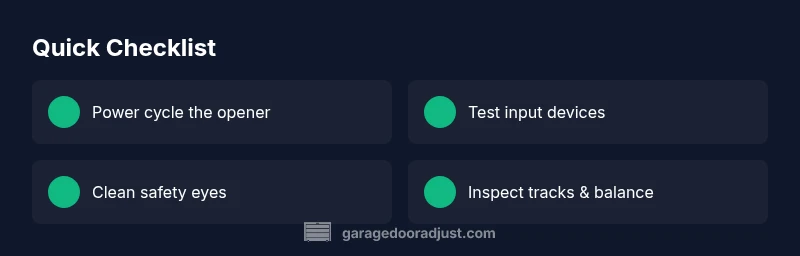
- Power cycle the opener to reset common faults.
- Check safety sensors for dirt and alignment first.
- Test all input devices and verify door position accurately.
- Call a pro for dangerous spring work or persistent issues.