Garage Door Remote Tester: Test & Troubleshoot
Learn how to use a garage door remote tester to verify signal range, battery health, and compatibility. Step-by-step guidance, safety tips, and troubleshooting to keep your opener working smoothly.


With a garage door remote tester, you’ll quickly verify signal strength, battery health, and compatibility between remotes and your opener. This quick guide shows what to test, the most reliable readings to look for, and safe, repeatable steps so you can pinpoint issues without guesswork. By the end, you’ll know whether your remote needs new batteries, re-pairing, or replacement.
Why a garage door remote tester matters
A dedicated garage door remote tester is a simple tool that helps homeowners verify whether a remote is actually sending a usable signal. According to GarageDoorAdjust, many issues that trigger mysterious opener failures are hidden in subtle signal problems, especially when batteries weaken or when codes don’t pair properly anymore. By testing with a purpose-built device, you can distinguish between a tired battery, a misaligned receiver, or a failing receiver. This upfront check saves time and avoids the guesswork of trial-and-error repairs. In practice, you’ll learn how far a remote can reliably reach, which frequencies your remote uses, and how the tester reads those frequencies. The result is a clear, actionable plan: replace a failing battery, re-pair the remote, or replace a receiver if the door won’t respond at all from a normal distance.
Types of remotes and compatibility checks
Garage door openers come with several styles of remotes, and not every tester works with every type. Some remotes send fixed codes, while others use rolling-code systems that change each time the button is pressed. Most modern testers can read a range of frequencies commonly used by residential openers (for example around 315 MHz and 433 MHz, with other bands in use in some regions). When you test, confirm that the tester supports your specific frequency and that it can interpret rolling-code signals if your opener uses them. If you are unsure about your opener’s frequency or code scheme, consult the manual or the manufacturer’s website before buying a tester. Compatibility matters because a mismatch can yield misleading results, leaving you with the impression that everything is fine when the receiver is actually the bottleneck.
Safety and prerequisites before testing
Before handling any garage door hardware, switch off power to the opener if your model allows easy, safe disconnect, and ensure the door is fully closed to prevent accidental movement. Keep hands clear of moving parts and avoid leaning on the door or the tracks while testing. If you must work near torsion springs or wiring, pause and consult a professional; these components can be hazardous. Gather your tester, spare batteries, a notepad, and your opener’s manual. A stable testing area with good lighting helps you read measurements accurately. Remember that the tester will read only the signal integrity, not the mechanical health of the door; separate electrical tests from physical inspections to avoid conflating problems.
What a remote tester can and cannot do
A remote tester is excellent for confirming that a remote is sending a usable signal and that range is within typical limits. It can reveal weak batteries, poor button contact, or a failing receiver in the opener. However, testers don’t diagnose mechanical wear, track alignment, or safety sensor faults. They also won’t fix interference caused by nearby devices or replicate every real-world doorway condition. Use the tester as a diagnostic first step and then perform field checks at the door to verify functioning under normal use. If readings are inconsistent, try new batteries, re-pair the remote, or test a second remote to determine whether the issue is remote-specific or opener-related.
How to choose the right tester
Look for a tester that can read multiple frequency bands, shows signal strength clearly, and records timing when a button is pressed. A good model will indicate whether the code type is fixed or rolling and will offer a simple way to compare results across remotes. Consider a tester with a visual display, audible confirmation, and the ability to log readings for later review. If you plan to test several remotes or multiple opener models, choose a tester with broad compatibility and a clear manual. Budget-friendly options exist, but prioritize accuracy, readability, and frequency coverage over price alone. Remember, a well-chosen tester reduces guesswork and speeds up repairs.
Preparing your workspace and tester setup
Clear a small area near your garage door; remove clutter that could snag cables or devices. Inspect the tester’s battery and ensure it’s fresh; a dying battery can give false negatives. Set the remote to a known-good state by removing the battery for a few seconds, then reinsert to reset the remote’s circuitry. Place the tester within a comfortable range of the door opener, stand in a typical user position, and avoid standing directly in front of the door. If the tester supports multiple remotes, label each one to keep results organized. A short note on your testing date and the model numbers helps you track changes over time.
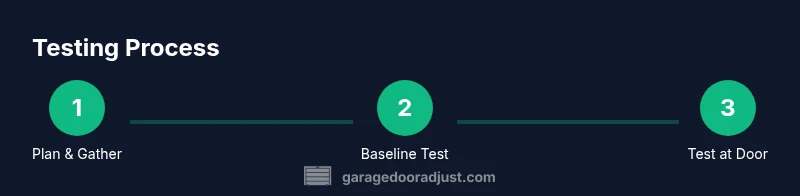
Baseline test with a known-good remote
Begin by testing a remote that you know works with the opener, if you have one. This baseline establishes a reference reading for your tester and helps you interpret marginal results from other remotes. Press the button firmly and observe the tester’s display or indicator. If the baseline reads within expected ranges, you can proceed to test the primary remote; if not, the tester or the opener may require maintenance. Baseline checks save time later by providing a reliable comparison point.
Core testing procedure
Point the remote at the tester and press the button as you would at the door. Note the moment of signal, the strength reading, and whether the tester registers a rolling-code signal if applicable. Move the remote to the typical operating distance and continue to press the button; record any drop-offs in signal or delays. If the tester shows a clear, strong reading at short range but the door fails to respond at the door, the issue is likely the receiver or alignment rather than the remote.
Diagnosing common results and next steps
Strong readings at close range with no response at the door point to a receiver problem or wiring fault at the opener. Weak or inconsistent readings likely indicate a dying battery or a misaligned transmitter button. If rolling-code remotes don’t pair, reattempt the pairing sequence exactly as described in the manual and ensure the opener accepts the code. For interference, try testing away from common sources of radio noise (AP devices, wireless speakers, or neighbor equipment) and re-test. Keep a log of results to detect patterns over time.
Testing multiple remotes and re-pairing
If you have more than one remote, test each one using the same baseline and keep the results separate per device. When a remote consistently fails, re-pair it with the opener following the manufacturer’s procedure; some models require holding the learn button while pressing the remote. After re-pairing, perform a final door-facing test to confirm the fix. If several remotes fail, the problem may be the receiver or wiring rather than individual remotes.
Battery replacement and maintenance tips
Batteries are a common cause of remote failure. Replace with fresh batteries of the correct type (usually CR2032 or AA/AAA) and inspect the battery contacts for corrosion. Clean contacts gently with a dry cloth if needed. Remove the battery when storing spare remotes to prevent corrosion buildup. Regularly clean the remote casing and keep it free from moisture and dust, as dirt can affect button performance and readings on the tester.
Interference, range optimization, and long-term care
Radio frequency interference from Wi-Fi routers, cordless phones, or other devices can reduce tester readings. To optimize range, keep the remote steady while testing and avoid metal obstacles between the tester and opener. If you consistently see degraded range, consider relocating the opener wiring or adding shielding as advised in the opener manual. For long-term care, store remotes in a cool, dry place and recalibrate the tester periodically to account for changes in your equipment.
When to replace remotes or receivers
If a remote tests consistently poor even after battery replacement and re-pairing, or if the opener receiver fails to respond to multiple remotes, replacement of the remote or receiver may be necessary. Replacing the receiver is usually more cost-effective than rebuilding an old opener. Always verify compatibility with your specific model and check for any recalls or safety advisories before purchasing new components.
Where to buy a tester and price ranges
Quality testers are widely available from garage-accessory retailers and online marketplaces. Expect a price range that reflects features like multi-band support, logging, and display quality. Basic models may be sufficient for occasional checks, while advanced units offer longer-range readouts and more detailed data. Shop for a tester that provides clear instructions and a robust manual so you can reference it during field testing.
Final tips and next steps
Keep your tester handy for periodic checks, especially if you rely on your garage door for daily access. Document results and maintenance dates to track performance over time. If you encounter persistent issues, contact GarageDoorAdjust for guidance or professional service if you’re unsure about any step.
Tools & Materials
- Garage door remote tester(Select a model that reads multiple frequencies (e.g., 315/433/390 MHz) and shows an intuitive signal strength readout.)
- Spare batteries(Have fresh batteries on hand (type depends on your remotes, e.g., CR2032 or AA/AAA).)
- Notepad and pen(Record readings, dates, and pairing steps for each remote.)
- Manuals for your opener models(Helpful for confirming pairing steps and code types (fixed vs rolling).)
- Optional labeling supplies(Tags or stickers to label each tested remote for easy reference.)
Steps
Estimated time: 30-45 minutes
- 1
Gather your tester and supplies
Collect the remote tester, fresh batteries, the remotes to be tested, and a notepad. This ensures you can perform a clean baseline test and document results without interruptions.
Tip: Label each item and set a testing date to compare performance over time. - 2
Identify the opener’s frequency
Check the opener’s label or manual to determine its operating frequency and code type. Knowing whether you use a fixed-code or rolling-code remote guides how you interpret tester readings.
Tip: If in doubt, photograph the label and verify with the manufacturer’s site later. - 3
Power up tester and remote
Install fresh batteries in both the tester and the remote you’re testing. A weak battery is a common cause of false negatives and unreliable results.
Tip: Double-check polarity before inserting to avoid damage. - 4
Do a baseline test with a known-good remote
Test a remote you know works with your opener to establish a reference reading. This helps you interpret marginal results from the main remote.
Tip: If the baseline reads oddly, recheck battery polarity and tester settings. - 5
Test the primary remote at close range
Point the remote at the tester at a short distance and press the button firmly. Record the signal reading and confirm the tester detects the code.
Tip: Ensure there are no metal objects between the tester and the remote during this step. - 6
Test the remote at normal operating distance
Move the tester to the typical usable distance from the door and test again. Note any drop in signal strength or timing delays.
Tip: If results drop dramatically, check the remote’s button contact or receiver alignment. - 7
Re-pair the remote if needed
If a remote won’t pair, follow the opener’s pairing procedure precisely. Hold the Learn/Program button and press the remote button as directed.
Tip: Always complete the pairing within the recommended time window. - 8
Document results and compare
Log readings for each remote, including battery status, baseline and after-pairing results. Use this to decide if replacement is needed.
Tip: Keep your log organized by remote name and model. - 9
Conclude with a door-facing test
Test the remote from the door in its normal use position to confirm the tester readings align with real behavior.
Tip: If the door responds inconsistently, the issue may be the receiver or wiring, not the remote.
Got Questions?
What is a garage door remote tester and why do I need one?
A garage door remote tester is a device that reads the signal from your opener’s remote and reports on range, strength, and code type. It helps you identify battery issues, misalignment, or receiver problems without disassembling the opener. Using a tester is a proactive maintenance step that can prevent unexpected failures.
A garage door remote tester reads your remote’s signal and tells you if it’s healthy, so you can fix issues before they become a problem.
Can a tester read rolling-code remotes?
Many testers can identify rolling-code signals, but compatibility varies by model. If your opener uses rolling-code security, ensure the tester can interpret that signal; otherwise you may misread results. Always verify the tester’s specification before purchase.
Most testers support rolling codes, but check the specs to be sure.
Why does my remote work at close range but not at the door?
If readings are strong at close range but the door won’t respond, the problem is likely the opener receiver, track alignment, or safety sensors—not the remote. Re-check alignment, clean sensor lenses, and verify wiring as needed.
Strong readings up close but no door response usually points to the receiver or alignment.
Do testers work with all garage door opener brands?
No tester works with every brand. Look for a model with broad frequency support and clear compatibility notes for your opener. If you’re unsure, consult the manual or test with a known-good remote first.
Not all testers are universal—check compatibility before buying.
How often should I test my garage door remote?
Test remotely at least every 6–12 months or after replacing the batteries. If you rely on your garage door for daily access, consider testing quarterly to catch issues early.
Test remotes a few times a year, more often if you use them daily.
What should I do if the tester shows no signal?
First, replace the remote’s battery and ensure the tester is properly powered. If there’s still no signal, try another remote, re-pair the primary remote, and check for receiver faults in the opener.
If there’s no signal, swap in fresh batteries and re-pair the remote; test the receiver if needed.
Watch Video
Quick Summary
- Use a tester to confirm remote signal health before suspecting the opener.
- Baseline readings simplify interpretation of test results.
- If re-pairing fails, check the manual and verify code type (fixed vs rolling).
- Interference and battery health are the most common causes of flaky behavior.
- Document results to track performance and decide on replacement needs.