Fix Garage Door Sensors: A Step-by-Step Guide
Learn how to diagnose, realign, clean, and replace garage door sensors to prevent false opens and enhance safety. This guide provides practical, step-by-step instructions, tool lists, and maintenance tips for homeowners troubleshooting sensor issues.


By following this guide, you will diagnose and fix garage door sensors to prevent false opens and ensure safe operation. You’ll assess alignment, clean lenses, inspect wiring, and test the system step by step. Requires a ladder, safety gloves, and basic hand tools; no special electronics knowledge needed for most fixes.
Why sensor reliability matters
A safety-first approach to garage doors starts with reliable sensors. These devices detect the door’s path and stop it from closing if an object blocks the beam. When the sensors fail, the door can reverse unexpectedly or fail to close altogether, which creates a safety hazard for people, pets, and belongings. If you notice slow response, phantom openings, or the door closing with obvious obstructions, it's time to fix garage door sensors. According to GarageDoorAdjust, regular maintenance and careful attention to alignment, dirt, and wiring address most issues before a professional call is needed. In this section, you’ll learn how the safety system works and what symptoms tell you a realignment or cleaning is needed.
Photoelectric sensors use a transmitter and receiver mounted on opposite sides of the door frame to create an invisible beam near the floor. When the beam is uninterrupted, the opener can close. If either sensor is misaligned, dirty, or damaged, the beam may fail to reach the receiver, causing false readings. The goal is a precise line of sight between the two units — small misalignments can have big consequences. By understanding how these sensors work, you’ll know what to test during your diagnostic, and you’ll be better prepared to decide between a realignment or a sensor replacement.
Common problems and root causes
There are several reasons sensors stop working properly. Misalignment is the most frequent culprit; even a minute tilt can cause false triggers. Dirt, dust, spider webs, and condensation on the lens block the beam. Wiring damage or loose connectors can interrupt power to one or both sensors. Inexpensive or old openers may have outdated safety circuits; check compatibility. Ensure both sensors face each other directly; even a slight angle can prevent the beam from reaching the receiver. Keep the sensor faces at roughly the same height and avoid mounting them behind decoration or planters. Finally, check for obstructions, like leaves or tools left under the door path; these create a shadow that the sensor reads as an obstacle.
Beyond alignment and grime, inspect the mounting brackets for rust or corrosion, which can alter sensor alignment over time. If you’ve recently bumped the door or transported items near the sensor zone, recheck positioning. Some environments accumulate fog or humidity that fogs the lenses, especially in garages with poor ventilation. In all cases, a systematic approach — verify alignment, clean, inspect wiring, then retest — yields reliable results.
Tools and safety precautions
Before you start, power down the door opener to eliminate the risk of moving parts during inspection. Wear safety glasses and gloves to protect your eyes from debris and sharp edges. Keep a sturdy ladder on a level surface and use a spotter if possible. Gather these common tools:
- Flathead and Phillips screwdrivers
- Soft microfiber cloths and sensor-safe cleaner (isopropyl alcohol works in small amounts)
- A level or ruler to verify alignment
- A small flashlight for lens visibility
- A socket or wrench set for bracket adjustments
- A voltage tester (optional, for checking wiring safely)
Safety notes:
- Do not attempt complex wiring repairs unless you are confident; otherwise consult a professional.
- Wear eye protection and keep hands clear of moving components.
How safety sensors work and what to test
Understanding the sensing principle helps you diagnose efficiently. The transmitter emits a beam to the receiver; if the beam is blocked or misaligned, the opener will stop or reverse. When testing, verify both units illuminate a steady indicator light on each sensor (if equipped) and that the light reads clearly when viewed from the opposite side. Make sure there is a clear line of sight between the emitter and receiver without obstructions or reflective surfaces that could falsely bounce the beam. Record any inconsistent readings and plan targeted actions (realignment, cleaning, or replacement).
Additionally, assess the wiring path from the sensors to the opener header. Look for crushed, pinched, or frayed wires. Loose connectors can cause intermittent failure, which is a common cause of sporadic door behavior. In some cases, the problem lies with the opener’s logic board rather than the sensors themselves. If one sensor consistently reports a failure, consider a replacement, but verify compatibility with your opener model first.
Replace vs realign: making the right call
Not every sensor issue requires replacement. If misalignment or dirt is the root cause, a realignment or cleaning can restore proper function at a low cost. Realignment involves loosening the sensor bracket, adjusting the angle until the beams line up squarely, and retightening carefully. Cleaning should remove oily residues, dust, and moisture; use a sensor-safe cleaner and dry the lenses completely. If the sensor housing is cracked, the wiring shows visible damage, or the beam never stabilizes after cleaning and realignment, replacement is the safer option. Always verify the replacement module’s compatibility with your specific opener brand and model. In many cases, replacing both sensors at once provides the most reliable, long-term solution.
Testing after repair and ongoing maintenance
After realigning or replacing sensors, re-test the system with the following steps. Place a tall, lightweight object under the door path to simulate a blocked scenario and confirm the door stops or reverses as expected. Remove the object and close the door to ensure it reaches the floor without misreading. Repeat with a textured or opaque item to mimic a real obstacle. If the door behaves unexpectedly, recheck the alignment and wiring. Finally, perform routine maintenance every 3–6 months: clean the lenses, inspect the wires, and test the safety beams. Regular checks will reduce false activations and extend the life of your opener.
Maintenance to prevent future false activations
Prevention is more cost-effective than repeated repairs. Schedule seasonal inspections and keep the sensor area free of dust, spider webs, and seasonal debris. Consider upgrading to sensors with clearer LED indicators for quicker diagnostics. Mount sensors away from direct sunlight, moisture-prone areas, and heat sources. If you notice recurring issues after weather changes, consider adding foam insulation to reduce humidity impact on the sensor housings. By integrating a simple maintenance routine, you’ll keep the system reliable and extend the lifespan of your garage door components.
Quick diagnostic workflow (high-level guidance)
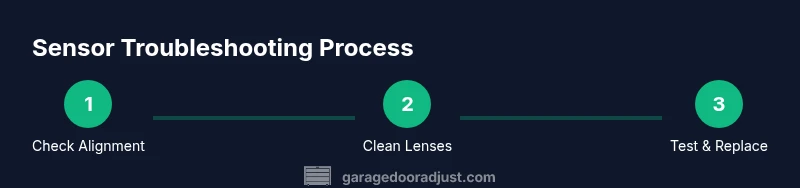
A structured approach saves time during troubleshooting. Start by turning off power to avoid any movement. Check alignment first, then clean the lenses. Inspect the wiring for damage and confirm both sensors show steady indicators. If misalignment or dirt is eliminated but the problem persists, plan to replace the sensors or consult a pro. This workflow minimizes guesswork and focuses on safety.
How to decide whether to DIY or hire a pro
DIY fixes are appropriate for basic alignment, cleaning, and inspection when you are comfortable with home electrical components. If you encounter damaged wiring, cracks in plastic housings, burnt smells, or if the opener’s safety circuit remains erratic after basic repairs, hire a qualified technician. An expert visit can prevent safety concerns and ensure the system remains compliant with current safety standards.
Tools & Materials
- Flathead screwdriver(For bracket screws and covers)
- Phillips screwdriver(For sensor mounting screws)
- Microfiber cloths(Lint-free cleaning of lenses)
- Sensor-safe cleaner or isopropyl alcohol(Use sparingly on lenses)
- Ladder(Stable and on a level surface)
- Gloves and safety glasses(Protection during inspection)
- Level or ruler(Helps verify parallel alignment)
- Voltage tester (optional)(Check wiring safety if you suspect power issues)
- New sensors (if replacement is necessary)(Ensure compatibility with your opener model)
Steps
Estimated time: 40-60 minutes
- 1
Power down and secure the area
Turn off power to the garage door opener at the wall switch, then unplug the unit or switch off the circuit breaker. This prevents the door from moving while you inspect the sensors. Use a helper if you need to hold the door steady while you work.
Tip: Always confirm the opener is de-energized by attempting a manual close with the wall control before starting. - 2
Check alignment and mounting brackets
Visually inspect that both sensors face each other directly and are level. If misaligned, loosen the brackets slightly and tilt until the beams meet squarely. Retighten securely and re-check the direction of each sensor’s indicator light if present.
Tip: Small adjustments can shift the beam noticeably; make tiny tweaks and test frequently. - 3
Clean the lenses
Wipe each sensor lens with a microfiber cloth dampened with sensor-safe cleaner or isopropyl alcohol. Do not scratch the lens surface; avoid using abrasive cleaners. Dry the lenses completely before testing.
Tip: Dust and smudges quickly cause misreadings; a clean lens is often the simplest fix. - 4
Inspect the wiring path
Trace the wires from the sensors back to the opener. Look for pinches, frayed insulation, or loose connectors. Re-seat loose connections and repair obvious damage only if you are comfortable with basic electrical work.
Tip: If you see damage beyond the connector, stop and call a pro to avoid shock or fire risk. - 5
Test indicator lights and beam alignment
With power restored, observe any LEDs on the sensors. A steady signal usually means proper alignment and operation. Use a mirror or friend to verify the beam reaches the opposite sensor without obstruction.
Tip: If one sensor remains dark, it may be faulty or miswired and may require replacement. - 6
Realign or replace as needed
If misalignment is resolved but readings are unstable, realign again and re-test. If the beam never stabilizes, consider replacing both sensors with models compatible with your opener.
Tip: Keep receipts and model numbers for future compatibility checks. - 7
Re-test with a controlled obstacle
Place a non-hazardous object in the door path while closing to verify the system stops as intended. Remove the object and test the full cycle again to ensure reliable operation.
Tip: Do not use heavy or dangerous items; aim for a lightweight object to mimic a real obstacle.
Got Questions?
Why is my garage door sensor not reading properly?
Misalignment, dirty lenses, or damaged wiring are common causes. Start by realigning the brackets, then clean the lenses and inspect the wiring. If readings remain unstable, replacement may be necessary.
If your sensors aren’t reading properly, start with alignment and cleaning, then check wiring. Replacement may be needed if readings stay unstable.
How do I test the sensors after realigning them?
Restore power, observe indicator lights, and slowly move a test object through the beam path. Confirm the door stops or reverses when the beam is blocked and resumes normally when clear.
Turn the power back on, test with a small object in the beam, and watch how the door responds to ensure proper function.
Can I replace a sensor myself or should I hire a pro?
If you are comfortable with basic electrical work and the sensor housing is intact, you can replace both sensors with model-compatible units. For damaged wiring or uncertain compatibility, hire a professional.
If wiring looks damaged or you’re unsure about compatibility, it’s safer to hire a pro. Otherwise, replacement with matching units can be a DIY job.
What should I do if the beam is blocked by a small object after repair?
Remove the object and retest. Verify both lenses are clean and aligned. If the beam still appears blocked, recheck mounting height and ensure there are no nearby obstructions cluttering the sensor path.
Take the object away, clean and realign if needed, and retest the beam for unobstructed operation.
How often should I clean and inspect the sensors?
Perform a quick check every 2–3 months and a thorough inspection twice a year. Regular light cleaning prevents grime buildup that can impair sensitivity.
Clean and inspect every few months, with a deeper check twice a year.
Watch Video
Quick Summary
- Verify sensor alignment before cleaning.
- Clean lenses with non-abrasive cleaner.
- Inspect wiring for damage and secure connections.
- Test with safe obstacles to confirm operation.
- Replace sensors only when alignment and cleaning fail.