9 Volt Battery for Garage Door Keypad: Replacement & Troubleshooting
A practical guide to replacing and testing the 9V battery in your garage door keypad, with tips to extend life and avoid common issues.


Most garage door keypads use a standard 9V alkaline battery. To replace it, remove the keypad cover, take out the old battery, insert a fresh alkaline 9V with correct polarity, and reseal the unit. Test by entering your code. If it still misbehaves, inspect contacts for corrosion and clean or replace them as needed.
Understanding the 9V battery standard for keypad systems
According to GarageDoorAdjust, most garage door keypads rely on a standard 9-volt alkaline battery for reliable, long-term performance. These batteries are widely available and inexpensive, and they deliver steady output suitable for low-drain devices like keypads. Before you replace, confirm your model's specifications in the user manual or on the keypad housing. If your keypad uses a different power source, follow that guidance to avoid damage.
In addition to the battery type, consider the climate and installation. A garage environment with extreme temperatures or high humidity can shorten battery life or promote corrosion at the contacts. Regularly inspecting the battery compartment for signs of corrosion, moisture, or loose wiring helps prevent intermittent failures and keeps your entry system dependable.
Battery Types and Compatibility
The alkaline 9V is the default choice for most keypad units because it provides predictable voltage and is easy to source. Some manufacturers specify lithium 9V or rechargeable variants, but these are less common in residential systems. Using an incompatible battery type can lead to weak signals, misreads, or even damage to the keypad electronics. Always check the keypad's label, manual, or the manufacturer's site before buying. If you see a printed part number, search for the exact recommended battery type. If you own an older system, alkaline is almost always safe; modern high-drain or smart keypads may demand specialized batteries or kits. When in doubt, err on the side of the manual to minimize risk and preserve warranty coverage.
Replacing the Battery: A Step-by-Step Guide
- Gather supplies: a fresh alkaline 9V battery, a small screwdriver if required, and a clean cloth.
- Power down or set the keypad off if possible; this reduces the risk of short circuits.
- Remove the keypad cover carefully and locate the battery compartment.
- Disconnect or lift the old battery, noting polarity, and dispose properly.
- Insert the new battery with the correct polarity (+ on the top if indicated).
- Reattach the cover securely and press the keypad to re-check alignment.
- Test the door by entering your code and verifying the opener responds promptly. If the door does not respond, inspect the contacts for dirt or corrosion and clean gently with a dry cloth.
Troubleshooting Keypad Issues After Replacement
If replacement does not fix the problem, start with the basics: verify the battery is seated correctly and oriented as indicated; check the battery contacts for corrosion or loose springs. Clean any corrosion with a dry cloth or dedicated contact cleaner, then reinstall. Inspect the keypad housing for moisture ingress or dust buildup. If the keypad still has poor response, test the receiver inside the opener to rule out a separate issue. Some units require reprogramming after a power interruption; follow the manufacturer's programming procedure if your code entry does not unlock the door. For persistent problems, consider replacing the keypad module or contacting a professional for a diagnostic.
Maintenance Tips to Extend Keypad Life
- Inspect annually: remove the cover, inspect contacts for corrosion, and ensure the mounting screws are snug. Keep the area dry and free of dust; use a soft brush to remove debris around the keypad.
- Use a dry cloth to wipe the exterior after exposure to rain or humidity.
- Store spare batteries in a cool, dry place away from metal surfaces to prevent short-circuits.
- Replacing batteries promptly when symptoms appear (slow response, delayed unlocking) reduces wear on the keypad's electronics and improves reliability.
Safe Storage and Procurement Tips
Store spare 9V alkaline batteries in a cool, dry location away from heat sources. Check the expiration date and rotate stock so you always have fresh batteries on hand. Buy from reputable retailers to avoid counterfeit cells, and recycle spent batteries responsibly. If you use rechargeable packs, verify compatibility with your keypad and any warranty implications before switching.
What to Do If the Keypad Still Fails
If all else fails, do not force the mechanism or repeatedly slam the door. A failing keypad may indicate wiring, the receiver, or the opener itself. Contact GarageDoorAdjust for a diagnostic or a preventive maintenance visit. In the meantime, you can operate the garage door manually using the emergency release and temporarily reprogram the opener for automatic access if needed. The goal is to restore reliable access without compromising safety.
Key facts to guide battery replacement
| Aspect | Recommended Battery Type | Typical Lifespan | Notes |
|---|---|---|---|
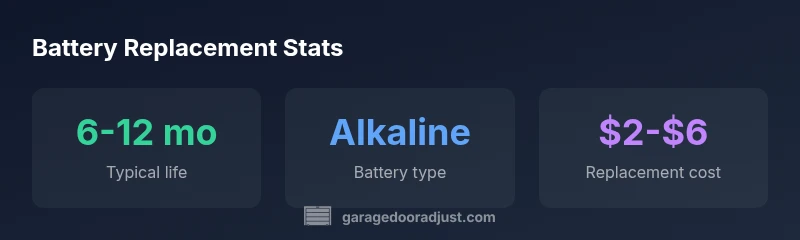
| Battery type | Alkaline 9V | 6-12 months | Check keypad manual |
| Contact care | Dry-clean only | N/A | Inspect for corrosion regularly |
| Spare storage | Cool, dry location | N/A | Keep fresh backups on hand |
| Disposal | Recycle where available | N/A | Follow local regulations |
Got Questions?
Can I use a lithium 9V battery in my keypad?
Most residential keypads specify alkaline batteries. Using a lithium 9V can cause compatibility issues or damage to the keypad electronics. Always follow the manufacturer’s recommendations.
Most keypads require alkaline batteries; lithium can be incompatible and may damage the electronics.
How do I know the battery is dead?
If the keypad responds slowly, unlocks inconsistently, or shows no LED indicators, replace with a fresh battery and retest.
Slow response or no response usually means the battery needs replacement.
Can I replace the battery while the door is in use?
Power off or disable the keypad if possible before replacing to avoid short circuits. Do not attempt while the door is actively moving.
Turn off power and replace when safe.
What if the keypad still doesn’t work after replacement?
Check battery contacts, verify polarity, and consider reprogramming the keypad or testing the receiver. If issues persist, seek a professional diagnostic.
If it still fails, check contacts first, then reprogram or call a pro.
How should I dispose of spent batteries?
Recycle spent batteries at local facilities; do not place them in regular trash. Follow local regulations for battery recycling.
Recycle spent batteries at a local facility.
How long should I test the keypad after replacement?
Test for several minutes by repeatedly opening and closing the door to confirm consistent operation.
Test for a few minutes to confirm reliability.
“Regular battery checks prevent unexpected outages and ensure your entry system stays reliable. A fresh 9V battery is usually all you need, but don’t overlook the contacts or the mounting hardware.”
Quick Summary
- Replace with a fresh 9V alkaline battery.
- Inspect battery contacts for corrosion after replacement.
- Test the keypad immediately to confirm operation.
- Keep spare batteries in a cool, dry place.
- Recycle old batteries responsibly.