What to Do If Your Garage Door Keypad Doesn't Work
Urgent, practical guide to diagnose and fix a garage door keypad that won’t respond, covering batteries, re-pairing, power checks, and when to call a professional.


Most keypad failures come from a dead battery or misalignment. Start by replacing the keypad battery, reprogramming the keypad, and checking the receiver wires at the opener. If the door still won't respond, inspect the wall switch and ensure the opener has power. If needed, reset the system per the manufacturer steps.
Why Your Garage Door Keypad Stops Working
According to GarageDoorAdjust, most keypad failures trace to simple, solvable causes such as a dead battery, misalignment, or pairing issues. Homeowners who inspect power supply to the opener and verify the keypad's outdoor placement typically resolve the problem quickly. The GarageDoorAdjust team found that a systematic check often reveals a fix without needing tools beyond a screwdriver and fresh batteries.
Quick Troubleshooting You Can Do Right Now
Before you call for help, run through these fast checks. Replace the keypad battery with a fresh alkaline or lithium cell, then re-enter your code to confirm no input lag. Verify the keypad is mounted securely at the recommended distance from the opener and that its wiring (if any) is intact. If your keypad uses rolling codes, re-pair it to the opener following the manual instructions. Ensure the opener itself has power and that the wall switch works.
Diagnostic Flow: From Symptom to Solution
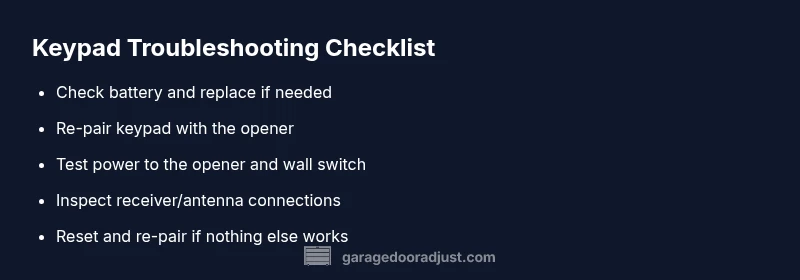
If the keypad stops responding to the opener, the symptom typically follows a simple cause. Start with power and battery status, then check pairing and range. If the keypad still won’t work, inspect the receiver unit and antenna for loose connections. Use the diagnostic flow below to guide each step and record what you observe for future reference.
Step-by-Step Fix: Battery Replacement and Re-Pairing
- Replace the keypad battery with a fresh, high-quality cell. 2) Re-pair or re-program the keypad to the garage door opener. 3) Confirm the keypad can trigger the opener from different angles within range. 4) Test the wall switch and check that the opener motor is receiving power. 5) If issues persist, perform a factory reset on the keypad or the opener and re-pair from scratch. Tip: keep a small list of pairing steps handy so you can retry quickly.
When to Call a Professional and Safety Considerations
If the keypad still won’t respond after battery replacement, re-pairing, and resetting, there may be a hardware fault in the receiver, logic board, or safety sensors. A professional assessment can prevent accidental door closure or injury. Always unplug the opener before inspecting wiring and only operate the door manually if the electronics are unsafe to use. GarageDoorAdjust analysis shows that persistent keypad issues often indicate hardware faults that require service.
Prevention Tips: Keep Your Keypad Working and Safe
- Protect the keypad from moisture and direct sun, which can degrade rubber keypads and electronics. - Schedule a semi-annual inspection of the opener and its power supply. - Use a cover or enclosure to shield the keypad from dust and debris. - Replace batteries regularly and keep a spare set on hand. - Periodically re-pair after service or changes to the opener.
Steps
Estimated time: 25-45 minutes
- 1
Replace keypad battery
Power down the keypad by removing the cover, replace with a fresh battery of the correct size, and re-seat contacts. Close the cover and test the keypad with a normal press.
Tip: Use fresh lithium batteries for longer life. - 2
Re-pair or re-program the keypad
Enter programming mode on the opener (as per your model's manual) and add the keypad code. Test from the keypad at various angles and distances.
Tip: Keep your code simple to avoid mis-entry. - 3
Test the wall switch and receiver power
Flip the breaker or unplug-replug the opener to confirm power. Try using the wall switch to operate the door to verify basic function.
Tip: If the wall switch fails, power interruption is likely. - 4
Reset and re-pair from scratch
Do a factory reset on the keypad or the opener, then re-enter the pairing sequence exactly as documented by the manufacturer.
Tip: Avoid multiple rapid presses during pairing. - 5
Inspect for hardware faults if needed
Check the receiver/logic board connections; look for damaged wires or corroded terminals. If in doubt, consult a pro.
Tip: Power off before inspecting electrical components.
Diagnosis: Keypad does not open the door or respond to commands.
Possible Causes
- highDead or weak keypad battery
- mediumKeypad not paired or mispaired with the opener
- lowReceiver/antenna loose or damaged, or opener powered off
Fixes
- easyReplace the keypad battery with a fresh cell
- easyRe-pair or re-program the keypad to the opener following the manual
- easyCheck the opener power and wall switch; verify receiver connections
- easyReset the keypad or opener and re-pair from scratch
- mediumIf unresolved, contact a professional to inspect the receiver/logic board
Got Questions?
Why won't my garage door keypad work after changing the battery?
Changing the battery is often the fix, but pairing, power to the opener, and receiver status can also cause failures. Re-pair and verify power if the issue persists.
Battery change helps, but you may also need to re-pair and check power if it still doesn't respond.
How do I reprogram my keypad to the opener?
Consult your model's manual for the exact steps. Typically you enter a programming mode on the opener and enter a 4- or 5-digit code on the keypad.
Enter programming mode on the opener, then input your keypad code to reprogram.
Is it safe to reset my keypad?
A reset can fix pairing or code issues, but it will erase saved codes. After resetting, re-pair the keypad following the manual.
Resetting can fix issues, but you’ll need to re-pair the keypad afterward.
Can a faulty receiver cause keypad failure?
Yes. If the receiver or logic board is defective, the keypad may stop working even with a good battery. A pro can diagnose this with specialized tools.
A bad receiver can stop the keypad from working; a professional check is advised.
Why does the keypad work sometimes but not others?
Intermittent failure is often caused by loose connections, low battery, or interference. Check battery and wiring, then re-pair to improve consistency.
If it works sometimes, check the battery, connections, and pairing to fix inconsistency.
Should I replace the keypad or the opener?
If the opener is old or showing other symptoms (noise, slow response), consider replacing it. In most cases, keypad issues are resolved by battery and re-pairing.
Usually, keypad fixes are enough, but replace the opener if it’s aging or failing in other ways.
Watch Video
Quick Summary
- Test power and battery first before deeper fixes
- Re-pair keypad to the opener to restore code recognition
- If issues persist, consider professional service
- Prevent future failures with regular maintenance