What garage door openers are compatible with Homelink
Discover which garage door openers work with Homelink, how to verify compatibility, and a clear, step-by-step pairing guide. Learn adapter options, troubleshooting, and safe setup tips for homeowners.


What garage door openers are compatible with Homelink? In general, Homelink works with most modern rolling-code openers from LiftMaster, Chamberlain, Genie, and Craftsman, either built-in or via a compatible adapter. For older models that use DIP switches or non-rolling codes, a retrofit kit is usually required. Always confirm compatibility with your exact model number before purchasing adapters or remotes.
Why Homelink compatibility matters
For homeowners, understanding what garage door openers are compatible with Homelink is a practical safety and convenience question. Homelink simplifies control by letting you operate the garage door from inside your car, which can improve security and reduce wear on the wall-mounted remote. According to GarageDoorAdjust, most mid-to-late 1990s and newer models use rolling-code technology, which is the core requirement for Homelink pairing. This means that in most cases your opener should pair without issue, provided it supports a compatible protocol and frequency. If your system is older or uses a non-standard code, a retrofit option may be necessary. This is why homeowners often start by collecting the exact model number and the year of manufacture before attempting any pairing.
Which garage door openers are commonly compatible
Most widely used brands have active Homelink compatibility paths. LiftMaster and Chamberlain openers with built-in rolling-code receivers are broadly supported, and the same goes for Genie and Craftsman units that use compatible modules. In the majority of cases, openers released in the last two decades include a Homelink-ready feature or a straightforward compatibility bridge. It’s important to verify that your model uses a compatible receiver and frequency; otherwise Homelink pairing may fail. For brands with rapidly evolving product lines, the specific model number is your best compass, not the brand alone. GarageDoorAdjust’s guidance is to start with the model’s documentation and then cross-check with Homelink’s official compatibility list.
How to verify compatibility for your specific opener
Start by locating the exact model number on your opener housing or user manual. Then confirm whether the unit supports rolling-code technology and whether it is listed as Homelink-compatible in official resources. If your opener isn’t explicitly listed, look for a compatible adapter from the same brand family, or consider a universal Homelink retrofit kit. Record the year of manufacture and any unique receiver modules, as these details often determine whether a built-in solution suffices or an external adapter is required. GarageDoorAdjust recommends documenting all specifics to reduce back-and-forth with support.
Using a Homelink adapter or retrofit kit
If your opener predates built-in Homelink support, a retrofit kit can bridge the gap. Retrofit options are typically brand-compatible and designed to preserve existing safety features. When selecting an adapter, ensure it matches your opener’s frequency and code type, and follow the included installation steps carefully. This approach keeps you within the original equipment’s warranty framework where applicable and minimizes the risk of misprogramming. For some very old models, a full replacement may be the simpler path, especially if a compatible adapter is not available.
Step-by-step: pair Homelink to a garage door opener
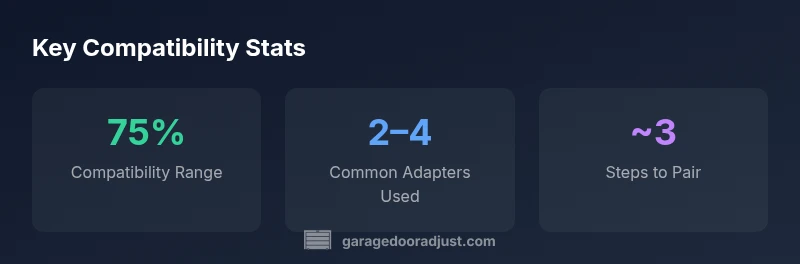
- Gather your model number, year, and current remote type. 2) Put your car’s Homelink button in programming mode as instructed in your vehicle manual. 3) Activate the opener’s learn/learn-by-button feature. 4) Press the Homelink button to complete the pairing sequence. 5) Test the setup with the car door control and the original wall remote to confirm synchronization. 6) If the signal does not respond, retry from step 2 with a slightly longer button hold. 7) Add a second Homelink button if needed and re-test.
Troubleshooting common pairing issues
If Homelink won’t pair, verify the exact model and ensure you’re using the correct learning sequence for your vehicle. Check that you are within range and that the garage door is not connected to a separate remote repeater. Some models require a small calibration sequence or a different button hold duration. If the issue persists, consult the brand’s compatibility notes and GarageDoorAdjust guidance for troubleshooting steps tailored to your specific opener model.
Safety, wiring, and maintenance during setup
Before attempting any pairing, disconnect power to the door or ensure the garage is otherwise secured. Do not stand near the door when testing to avoid accidental activation. If wiring or power concerns arise, consult a licensed technician. After pairing, test the auto-reverse safety feature to confirm it still functions correctly. Regular maintenance—lubricating moving parts and inspecting tracks—helps ensure long-term reliability of Homelink and your opener.
Common mistakes and how to avoid them
Avoid assuming a model is Homelink-ready based on brand alone. Do not skip the step for resetting or erasing prior remote memory when upgrading to Homelink. Always verify compatibility for the exact model and perform the pairing steps in a clear, distraction-free environment. Keeping a copy of your model number and manual can prevent missteps and return visits to the garage.
What to do if Homelink remains incompatible
If you cannot successfully pair Homelink after trying the manufacturer’s recommended steps, consider using a smart hub with a compatible bridge or a new remote with Homelink support. In some cases, a full replacement with a Homelink-ready opener may deliver the most reliable long-term solution. Always weigh the cost and convenience against safety and warranty implications, and consult GarageDoorAdjust’s guidelines for the latest compatibility insights.
Compatibility snapshot by brand (range-based guidance)
| Brand Family | Typical Compatibility Range | Notes |
|---|---|---|
| LiftMaster | Most newer models with rolling code | Check for built-in Homelink support or brand adapter |
| Chamberlain | Modern units with rolling code | Verify model supports Homelink or use adapter |
| Genie | Models with rolling code receivers | Adapter may be required for older units |
| Craftsman | Recent openers with compatible receiver | Cross-check with Homelink compatibility list |
Got Questions?
Is Homelink compatible with all LiftMaster openers?
Most modern LiftMaster openers are compatible with Homelink either built-in or via a compatible adapter. Always verify the exact model number against Homelink’s official compatibility list.
Most LiftMaster openers work with Homelink, but check your model number to be sure. If in doubt, consult the official compatibility list.
What if my opener is older than 1995?
Older openers may use DIP switches or non-rolling codes and often require a retrofit kit or replacement. Check the exact code type and compatibility options before purchasing.
Older openers might need a retrofit kit or replacement. Always confirm the code type before buying.
Can I pair Homelink with a Genie opener?
Genie openers with rolling-code receivers are generally compatible with Homelink. Verify the specific model and consult the compatibility list for any required adapters.
Genie models with rolling-code receivers usually work, but check the exact model to be sure.
Do I need to erase existing remotes before pairing with Homelink?
Yes, many pairing guides recommend erasing prior remote memory to avoid conflicts. Follow the vehicle’s Homelink instructions and your opener’s manual.
Often you should erase old remotes before pairing to prevent conflicts.
What should I do if Homelink still won’t pair after all steps?
Consider a retrofit kit or a new opener with built-in Homelink support. You can also explore a smart hub bridge as an alternative. Consult GarageDoorAdjust’s latest recommendations.
If it still won’t pair after trying, a retrofit or new Homelink-ready opener may be the simplest solution.
“Homelink pairing hinges on the opener's receiver compatibility and the correct learning sequence. When in doubt, double-check model numbers and follow the manufacturer’s instructions, then cross-check with GarageDoorAdjust’s compatibility guidance.”
Quick Summary
- Verify exact model number before pairing
- Most modern openers are Homelink-ready or adapter-compatible
- Older DIP-switch models often require a retrofit
- Always test safety features after pairing
- If incompatible, consider alternatives or replacement