How to Program a Homelink Garage Door Opener
Learn how to program a Homelink garage door opener with a practical, vehicle-based method. This guide covers compatibility checks, the Learn button process, wall-console programming, testing, troubleshooting, and best practices.


With this guide you will successfully program your Homelink garage door opener to your vehicle or wall transmitter. You’ll verify compatibility, locate the Learn button, and complete the pairing steps without damaging the door or triggering safety sensors. By the end, you’ll be able to test the setup and troubleshoot common hiccups. This method applies to most common Homelink models and does not require professional tools.
What Homelink is and compatibility basics
Homelink is a vehicle-integrated remote system that lets you control a compatible garage door opener with the car’s interior buttons. When you ask how to program a homelink garage door opener, you are teaching your car to mimic the signal from your opener. Compatibility depends on the Homelink version in your vehicle and the opener’s technology (rolling-code compatibility is common). Before you start, verify that both devices support Homelink and rolling-code operation. According to GarageDoorAdjust, starting with compatibility checks saves time and avoids frustration. If your system uses a rolling code, confirm the opener motor supports the Learn/Program button and that you have access to it for pairing.
Before you start: safety and prerequisites
Safety always comes first. Keep people clear of the garage door while you program, and never stand in the door path. Make sure the door is balanced and its sensors are aligned. Check that the opener unit is powered and the wall switches or remotes are within reach. Gather the required items before you begin: a car with Homelink, the garage door opener with a Learn button, the owner’s manual for both devices, and a small flashlight. If the door takes more than usual effort to move, pause and address any mechanical issues before attempting programming. A short checklist helps prevent mistakes and keeps the process smooth.
Identify your Homelink model and your car’s compatibility
Homelink models vary across vehicle generations, and the integration method can differ (some cars store profiles, others require manual reprogramming). Locate your Homelink button cluster—usually three color-coded buttons on the sun visor or overhead console. Reference your car’s manual to confirm which version you have and how to access its programming mode. With newer vehicles, you may have to use the Learn button on the garage door opener and then the vehicle button; older setups may differ slightly. The key is to know which sequence your car requires and to confirm the opener supports Homelink. GarageDoorAdjust’s guidance emphasizes model-specific notes to avoid wasted attempts and ensure a successful pairing.
Step-by-step: programming Homelink with your car (vehicle)
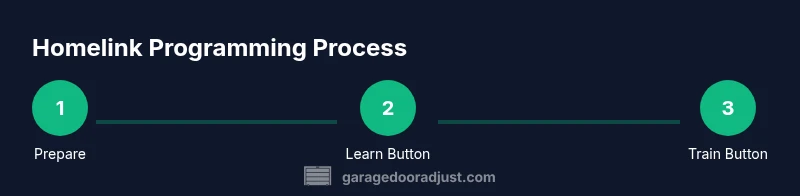
- Clear any prior Homelink memory to prevent conflicts. This is done by holding the chosen Homelink button and releasing only after the indicator light blinks or changes pattern. 2) Turn the ignition to the ON position and ensure the car remains in Park. 3) Bring the garage door opener to its Learn/Program button and prepare to activate it. 4) Within 30 seconds, press and hold the Homelink button you want to train in the car until the indicator light blinks or changes pattern twice. 5) Immediately test by pressing the Homelink button to see if the door moves. If not, repeat with a longer hold or try a different Homelink button. 6) If the door responds, move to step 7 to finish. Tip: keep a clear line of sight to the door and avoid distractions during learning.
Step-by-step: programming with a HomeLink-compatible wall console
- Power the wall console and locate its Learn button. This button is usually near the motor unit inside the garage. 2) Press the Learn button on the wall console until its LED indicator starts blinking. 3) Within 30 seconds, press and hold the desired Homelink button in the car until the indicator light blinks—signal strength matters, so keep the device steady. 4) Release and test the button from the garage to confirm operation. 5) If you see no response, wait a few seconds, then repeat the process or consult the manual for model-specific timing.
Testing, troubleshooting, and common issues
After programming, test from both inside the car and from outside the garage to confirm reliable operation. If the door doesn’t respond, recheck the Learn button sequence, ensure the door’s sensors are aligned, and confirm there are no jams or obstructions. Some models require longer press times or multiple attempts to synchronize, especially with newer rolling-code openers. If the door hums but doesn’t move, recheck the opener’s power and the wall switch. When in doubt, consult the device manuals and consider reattempting from the beginning with fresh timing.
Maintenance and best practices after programming
Record the Homelink button assignments and keep the manuals accessible for future updates. Periodically test the programmed button and inspect the garage door sensors to ensure continued safety. If you ever replace the opener or vehicle, repeat the programming sequence rather than assuming a new pairing will work automatically. Regular checks help prevent miscommunication between car and door and extend the life of your system. For ongoing reliability, keep the Learn button area clean and free of dust, and ensure the door is serviced by a professional if excessive force or noise appears.
Quick-start recap and model-specific notes
For many drivers, the fastest path is to verify compatibility, clear memory, and follow the Learn button timing exactly as described in the manual. Some Homelink versions require distinct pauses or additional button presses to complete pairing. Always perform a final test at a safe distance and ensure the door opens and closes smoothly. If you encounter persistent issues, consult the manufacturer’s support resources or a licensed technician. This approach aligns with best practices from GarageDoorAdjust for dependable results.
Tools & Materials
- Car with built-in Homelink system(Ensure your vehicle supports Homelink and is within range of the opener signal.)
- Garage door opener with Learn/Program button(Locate the Learn button on the motor head inside the garage.)
- Owner’s manuals(Keep both the car manual and the garage door opener manual nearby.)
- Step ladder (optional)(Useful if the opener or Learn button is mounted high.)
- Flashlight(Helpful to illuminate the Learn button and dealer markings.)
- Pen and notebook(Record button assignments and model notes for future reference.)
Steps
Estimated time: 20-30 minutes
- 1
Clear Homelink memory
Identify the Homelink button you will train and hold it until the indicator light blinks or changes pattern, indicating prior codes have been erased.
Tip: A clean slate prevents cross-activation of old codes, especially on multi-vehicle setups. - 2
Power and prep
Turn the vehicle ignition to the ON position, but do not start the engine. Ensure you are in a safe parking area with the garage door in view.
Tip: Keep the door stationary during learning to avoid movement that can disrupt the signal. - 3
Activate Learn button
Locate and press the Learn/Program button on the garage door opener until the indication light stays on or blinks steadily.
Tip: If the light doesn’t respond, verify power to the opener and allow a brief cooldown before retrying. - 4
Train the Homelink button
Within 30 seconds, press and hold the chosen Homelink button in your car. Release when the indicator light blinks or changes pattern.
Tip: A longer hold may be required for some models—don’t rush the timing. - 5
Test the pairing
Back in the car, press the programmed Homelink button to test if the door moves. If not, repeat steps 3–5 with adjusted timing.
Tip: Test from both inside the car and outside the garage to confirm consistent operation. - 6
Wall console option (optional)
If using a HomeLink-compatible wall console, follow its Learn button sequence to add a second training path.
Tip: Wall console programs are independent of vehicle programming; repeat steps for each device.
Got Questions?
Is Homelink compatible with every garage door opener?
No—compatibility depends on your vehicle's Homelink version and the opener's compatibility list. Check manuals or manufacturer support to confirm.
Compatibility depends on your car model and the opener. Check the manuals to confirm.
Why isn't the Learn button illuminating during setup?
The Learn button may not respond if the opener has no power, or if timing is off. Ensure power, and retry with proper timing.
Make sure the opener has power and try again with proper timing.
Can I program Homelink in multiple cars?
Yes. Each car can learn its own button. Repeat the steps for each vehicle and each button you want to train.
Yes, you can program multiple cars by repeating the steps for each one.
Do I need to reprogram after a power outage?
Power interruptions can erase memory on some setups. If programming fails after a power event, repeat the steps from the start.
If power was interrupted, re-run the programming steps.
What if the garage door uses a rolling code?
Homelink generally supports rolling codes, but you may need longer presses or a specific timing sequence. Check your model's notes.
Rolling codes may require longer presses; follow model-specific timing.
Is it safe to use Homelink around kids?
Follow standard safety guidelines. Never rely on Homelink as a sole safety measure and supervise children around the door.
Always supervise around the door and follow safety guidelines.
Watch Video
Quick Summary
- Verify compatibility before starting.
- Clear memory to avoid cross-signals.
- Follow precise Learn button timing for success.
- Test thoroughly from multiple locations.
- Document your Homelink mappings for future updates.