Program Genie Garage Door Opener to Car: A Step-by-Step Guide
Learn how to program a genie garage door opener to your car using built-in remotes. This guide covers compatibility, safety, troubleshooting, and testing to ensure reliable hands-free access.


You can program a genie garage door opener to your car to enable hands-free control using your vehicle’s built-in remote system. This quick guide shows compatibility checks, the essential steps, and safety tips to complete the pairing with a typical 15-30 minute window. It covers model differences, button sequences, and test checks so you can confidently use the feature after finishing.
Genie garage door opener program to car: what homeowners gain
The genie garage door opener program to car enables you to open your garage with a simple button press from your vehicle, reducing clutter and improving access during busy mornings. This integration relies on the opener’s Learn/Program features and your car’s built-in compatibility module (such as HomeLink or a similar system). Understanding the workflow helps you avoid mispairing and ensures a smooth, reliable connection. Throughout this section we’ll emphasize safety, model-specific steps, and common pitfalls to prevent frustration. By the end, you’ll know whether your setup is compatible and how to proceed with confidence.
Garage doors are a safety‑critical system. Before you pair, make sure the door is balanced, tracks are clear, and there’s no torsion spring hazard nearby. The goal isn’t just convenience; it’s a safe, predictable operation that won’t pinch fingers or surprise guests.
According to GarageDoorAdjust, a careful review of your car’s programming capability and the opener’s Learn function reduces the chance of failed pairing. If your model isn’t compatible, the team recommends using a standard remote instead and revisiting the integration when you upgrade hardware or firmware.
In this guide you’ll find practical steps, diagrams, and best practices that fit common Genie models and popular cars on the market today. If you’re unsure about a step, pause and consult your owner’s manual or contact Genie support for model-specific guidance.
Compatibility and prerequisites
To begin the genie garage door opener program to car, confirm two things: your Genie opener supports car programming, and your vehicle has a dedicated remote pairing feature (for example, a HomeLink-style system). Locate the Learn button on the motor housing; it is often near the back edge of the unit or behind a small cover. Car integration works best when you have a single, known pairing method to begin with. If your car’s manual specifies a particular sequence (some use a triplet of presses or a specific button), have that ready before you start. Finally, check that the opener is powered and connected to a stable power source so you don’t lose progress mid‑pairing.
Compatibility isn’t universal. Some Genie models only support hand-held remotes and do not expose a standard car‑programming interface. In contrast, newer Genies with a Learn button designed for car integration usually support a multi‑device pairing. If you’re unsure, compare your model’s manual with the features described in Genie’s official support portal.
Safety considerations and best practices
Pairing should be done in a controlled environment with the garage door fully closed and the area clear of people and vehicles. Never attempt programming near a power outage or when the door is under unusual load. If the door’s balance feels off, address that issue first; a compromised door can create hazardous conditions during testing. Keep fingers away from moving parts and never place tools near the door’s path. Always unplug the door opener if you detect abnormal noises or misalignment. By following these safety guidelines, you minimize risk and protect your family during the programming process.
Common issues and troubleshooting
If the car fails to pair, recheck model compatibility and the Learn button’s position. A delayed response or no signal can be caused by interference from other wireless devices, a weak car battery, or outdated vehicle firmware. Ensure you press the Learn button within the time window prescribed by your car’s programming manual, typically a short sequence after initiating the car’s pairing mode. If the light on the Genie unit blinks in a certain pattern (for example, rapid blinks), that often indicates a successful input but requires a test to confirm. If pairing still fails, consider resetting the Genie opener to factory settings and repeating the process with fresh power.)
Testing the pairing and using it daily
Once paired, test the setup by pressing the car’s garage door button or sequence. Confirm that the door responds consistently and does not reverse unexpectedly. If the door requires multiple attempts, repeat the programming sequence once more, ensuring you follow timing cues precisely. After successful testing, document the car’s program version and the exact sequence used for future reference, especially if you have multiple cars or plan to reprogram after maintenance.
Tools & Materials
- Genie garage door opener with Learn/Program button(Identify the Learn/Program button on the motor unit; location varies by model.)
- Car with built-in garage-door programming (e.g., HomeLink or similar system)(Ensure your car supports remote pairing and has instructions ready.)
- Step ladder or stable surface(Needed if the Learn button is high or hard to reach.)
- Pin or paperclip (for recessed Learn button)(Some models use a recessed button that requires a thin tool.)
- Owner’s manual or Genie support access(Helpful for model-specific steps or firmware notes.)
Steps
Estimated time: 15-25 minutes
- 1
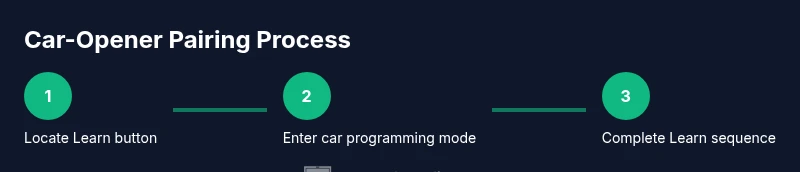
Locate the Learn button on the Genie opener
With the door closed, locate the Learn/Program button on the motor housing. If the button is recessed, use a pin as described in your manual. This step prepares the opener to accept a new pairing.
Tip: Make a quick note of the button’s color and pattern so you don’t confuse it with other controls. - 2
Put your car into its remote programming mode
Follow your car’s manual to enter the remote programming or HomeLink setup. This usually involves pressing certain buttons in a sequence or holding one button until a status light changes.
Tip: Have the car’s manual handy—different models use different sequences. - 3
Initiate the Genie Learn sequence
Press and hold or activate the Learn button until the indicator light blinks or stays lit, signaling the opener is ready to pair.
Tip: Do not release too early; timing affects whether the signal is captured by the opener. - 4
Trigger the car to send its code
Within the car’s programming window, press or hold the desired button to send a pairing signal to the Genie unit. Watch for a change in the opener’s light pattern.
Tip: If there’s no response, retry after a short pause. - 5
Test the new pairing from the car
Close the car’s door and press the programmed button in the car to open or close the garage. Observe for a reliable response and no unintended door movement.
Tip: Test from multiple parking spots to ensure consistent range. - 6
Save and finalize the pairing
If the test is successful, complete any on-device prompts and store the new pairing in your car’s system. Keep notes for future maintenance.
Tip: Label the new pairing in your car’s system for easy identification later.
Got Questions?
Can I program my Genie garage door opener to any car?
Compatibility depends on your car’s remote programming system. Many vehicles with HomeLink or similar features can pair with Genie openers, but check your car manual and model specifics.
Most cars with built-in garage-door programming can pair, but always verify with your manual.
What if the Learn button is unreachable or recessed?
If the Learn button is recessed, use a slim pin or paperclip to press it as described in your Genie manual. Ensure you have adequate lighting and a stable stance.
If the button is recessed, use a thin tool to press it as instructed in your model’s manual.
Do I need to reset the opener before pairing?
Some setups require a reset to clear previous codes. If your first attempt fails, a controlled reset per the manual can help reestablish a clean pairing path.
Sometimes you need to reset first. Check your manual for the exact reset steps.
How do I undo or modify a pairing?
To modify or remove a pairing, use the Learn button to reset the existing code and then re-enter the car’s programming steps.
If you need to change the pairing, reset and re-pair using the new steps.
How can I test the pairing safely?
Stand clear of the door path, perform a test from the car, and observe door movement across multiple spots to ensure consistent operation.
Test from different spots with people away from the door; ensure safe operation.
Watch Video
Quick Summary
- Verify compatibility before starting
- Follow the exact Learn-button sequence
- Test the pairing from the car after pairing
- Document the setup for future maintenance