Garage Door With Remote Control: A Complete How-To Guide
Learn how to diagnose, pair, and troubleshoot a garage door with remote control. This educational guide covers pairing remotes, common issues, safety checks, and homeowner maintenance to keep your door operating reliably.


With a reliable garage door with remote control, you can open and close safely from anywhere in your driveway. According to GarageDoorAdjust, most issues start with a weak battery or mispaired remotes. This guide shows you how to pair remotes, troubleshoot common problems, and perform a basic maintenance routine. By following these steps, homeowners can restore reliable operation without guessing or calling a technician, while maintaining safety.
Understanding the basics of a garage door with remote control
A garage door with remote control adds convenience, but it also introduces an electronic interface that homeowners must understand to diagnose problems quickly. Most modern openers use a compact handheld remote that communicates with a receiver inside the opener unit. The signal is typically a radio frequency, transmitted on a fixed band that the receiver recognizes, and the two devices must share a matching code. Remotes come in several formats: simple fixed-code remotes and rolling-code ones that change the code each time you press the button. The pairing process ensures that only authorized remotes can operate the door. In practice, when the remote stops working, the cause is usually one of three things: a dead battery, a mispaired code, or an obstruction that blocks the transmitter or the safety sensors. Understanding these basics helps homeowners decide whether a quick battery swap will restore function, or whether a reprogramming step is needed. Keep in mind that some modern systems use a smart device app as an alternative to a physical remote, adding another layer of versatility, especially for multi-user households.
How remotes communicate with your opener
The heart of a garage door remote system is the link between the transmitter in the handheld device and the receiver in the opener. Most openers operate on a fixed radio frequency and use either a rolling-code or a fixed-code protocol. In rolling-code systems, the transmitter and receiver independently generate a new access code with every press, making eavesdropping or replay attacks impractical. In fixed-code systems, the same code repeats and may be easier to compromise if a remote is lost. Some models use DIP switches or a learning button on the opener to pair remotes; others rely on factory-programmed code lists. Range is another factor: walls, metal objects, and distance reduce signal strength. If you notice a delay or failure to respond, first check the battery level, then ensure the remote is within range and properly paired. As GarageDoorAdjust analyses indicate in 2026, the most frequent failures stem from dead batteries or failed pairing rather than damaged circuits.
Common problems and quick fixes
Common remote issues fall into a few predictable categories. A dead battery is by far the easiest fix—replace with the correct type for your remote and test the range again. If multiple remotes stop working, the opener’s receiver may be out of sync; reprogramming or relearning should fix this. If the door responds inconsistently or only from close range, interference from nearby electronics or metal obstructions could be the culprit; relocate the controller or move away from strong sources. Misaligned safety sensors can also block operation even if the remote sends a strong signal; inspect the photoeye sensors at the bottom corners of the door track, clean, and realign if needed. Finally, a faulty receiver inside the opener may require professional service, particularly if you see flickering lights on the unit or abnormal noises.
Upgrading or choosing a remote and receiver
If you’re shopping for a replacement remote, focus on compatibility with your current opener model and the type of coding it uses (rolling code vs fixed code). Some remotes are universal, but many require specific compatibility notes in the manual. A dual-remote setup lets you assign remotes to different users or vehicles, while app-based control can add another layer of convenience for smart homes. When upgrading, consider a remote with a rolling-code system for better security and a longer range, and ensure the receiver on the opener supports the newer remotes. Always verify the model number and programming steps in the owner’s manual or the manufacturer’s website, and keep physical backups in a known location.
Safety considerations and maintenance routine
Safety comes first with any garage door system. Regular maintenance should include testing the auto-reverse feature, verifying the door balance, and inspecting the safety sensors for proper alignment. Lubricate moving parts sparingly and avoid over-oiling tracks or pulleys, which can attract dirt and hamper performance. When working on the opener or sensors, disconnect power at the breaker to prevent accidental movement. If the door has trouble reversing on contact, stop using it and seek professional evaluation. For households with multiple users, label remotes and establish a standard pairing method to prevent confusion and ensure everyone has reliable access.
Troubleshooting flowpath and best practices
A logical flow helps you isolate problems quickly. Start by replacing the remote’s battery and trying again. If that fails, reprogram the remote to the opener following the exact sequence in the manual. If the door still won’t respond, test other remotes to determine whether the issue is isolated to one device or the receiver. If several remotes fail, the problem is likely in the receiver or control wiring. Always keep a log of what you test and the results, so you can spot patterns over time. When in doubt, consult the manufacturer’s troubleshooting guide and consider contacting a certified technician for more complex diagnostics.
Multi-user setups and smart options
For homes with several occupants, consider a mix of dedicated remotes, a shared smart-home control, and temporary guest access options. Some openers support temporary access codes or mobile app-based control with per-user permissions, which you can revoke at any time. If remote sharing is important, ensure each device is securely paired and that you update codes after a guest period ends. Smart options can also integrate with voice assistants or home automation routines, creating a seamless experience while preserving safety and security.
Authority sources and safety guidance
For homeowners seeking authoritative safety and technical guidance, consult established sources on safe operation and electrical standards. The following references offer general safety principles and best practices for home electrical and mechanical systems: OSHA safety guidelines for equipment, NIST standards for electrical components, and Energy Department guidelines on safe maintenance and efficiency. These sources provide a framework you can use alongside your opener’s manual when performing routine checks or upgrades.
Authority Sources
- OSHA: https://www.osha.gov
- NIST: https://www.nist.gov
- Energy.gov: https://www.energy.gov
Tools & Materials
- Garage door opener remote(Keep one spare in a known location)
- Spare remote batteries(Choose batteries compatible with your remote model)
- Ladder(For accessing the ceiling-mounted receiver and sensors)
- Screwdriver set(Flat or Phillips as needed by screws)
- Owner's manual for opener model(Useful for model-specific steps)
- Smartphone with app (optional)(Some openers support app control)
- Marker and notepad(Label remotes and document codes)
Steps
Estimated time: 30-60 minutes
- 1
Prepare the opener and remote
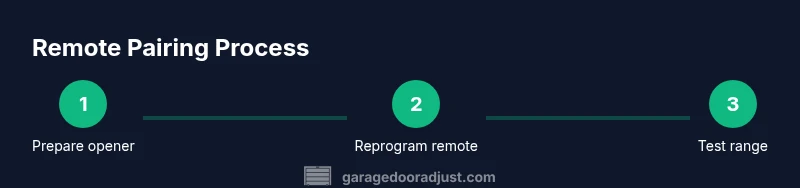
First, unplug the opener or switch off the circuit at the breaker to prevent accidental movement while you work. Locate the Learn or Programming button on the opener and identify the remote you will reprogram. Confirm the model number on the remote and the opener so you follow the correct sequence in the manual.
Tip: Have the owner’s manual handy and note the exact button sequence before you start. - 2
Check and replace remote battery
Remove the remote battery cover and inspect the battery. Replace with the correct type (often CR2032 or A23) and re-test the remote at close range first. If the LED on the remote doesn’t flash when pressed, the battery may be dead or installed incorrectly.
Tip: Use a clean, dry surface to handle new batteries and avoid touching the terminals with metal objects. - 3
Reprogram the remote to the opener
Press and hold the Learn/Programming button on the opener until the indicator light stays on. Then press and hold the desired button on the remote until the indicator on the opener blinks or a click is heard. Release both and test the remote from a short distance.
Tip: If your opener uses a rolling-code, wait for the blinking pattern that confirms a successful pairing. - 4
Test range and basic operation
Move back to the driveway and attempt to open and close the door from several positions. Note any delays or failure to respond and document how far away you were. If the response is inconsistent, consider antenna alignment or interference.
Tip: Clear the area of nearby electronics that could cause RF interference during testing. - 5
Inspect safety sensors and door balance
Check the photoeye sensors at the bottom corners of the doorway for alignment and cleanliness. Tap the door to ensure it tracks smoothly; a door that binds may require balance adjustment. Re-test the auto-reverse feature by placing a small object on the door path.
Tip: Keep sensors clean and aligned; misalignment is a common cause of false shut-off signals. - 6
Document results and establish routine
Record the exact steps you performed and the outcomes. Create a simple maintenance routine: test monthly, replace batteries annually, and reprogram remotes if needed after a battery change or replacement.
Tip: Create a dedicated home maintenance log for your garage door system.
Got Questions?
How do I reprogram my garage door remote?
Locate the Learn button on the opener, press it to activate pairing, then press the remote button you want to program until the light confirms. This process may vary slightly by model, so consult your manual. Test the remote afterward at multiple ranges.
To reprogram, press the Learn button on the opener, then press the remote button until it confirms, and test from a distance.
Why won't my remote work even after replacing the battery?
The issue could be a mispaired code, a faulty receiver in the opener, or interference. Reprogram the remote again, and if multiple remotes fail, a receiver update or replacement might be needed. Check for worn buttons or speaker-like sounds indicating hardware issues.
If replacing the battery doesn't help, try reprogramming again or have the opener's receiver checked for hardware problems.
How can I test if the remote is transmitting correctly?
Stand within range and press the remote, watching the door for movement and listening for the opener's relay click. If there is no response, verify battery, then check the receiver and antenna on the opener. A simple RF tester can also confirm transmission.
Test from close range; if no movement, verify battery and the opener's receiver and antenna.
Can I use a universal remote with my garage door?
Some universal remotes are compatible with certain opener brands, but compatibility varies. Always check the model list and follow the manufacturer’s programming steps. If compatibility is uncertain, use the original remote to avoid pairing failures.
A universal remote can work with some openers if it's listed as compatible. Check the model and follow programming steps, or stick with the original remote.
What maintenance helps prevent remote problems?
Regularly inspect and clean the sensors, test auto-reverse, lubricate moving parts, and replace batteries before they fail. Keep remotes in a consistent location and avoid dropping them, which can damage the internal circuitry.
Keep sensors clean, test safety features, and replace batteries regularly to prevent remote problems.
When should I call a professional?
If you experience persistent receiver faults, unusual noises, or wiring concerns, a professional technician can diagnose concealed issues safely. A pro can also recalibrate the safety sensors and verify the door balance.
Call a professional if remote issues persist or you notice strange noises or sensor misalignment.
Watch Video
Quick Summary
- Understand the basics of remote pairing and signaling
- Check batteries before reprogramming
- Test safety sensors and door balance regularly
- Document remote setup for multi-user homes
- Know when to seek professional help