Garage Door Remote Sears: A Homeowner's Step-by-Step Guide
Learn how to diagnose, program, and replace a Sears garage door remote. This step-by-step guide helps homeowners troubleshoot issues, improve reliability, and ensure safe operation.


To fix a Sears garage door remote, you’ll diagnose compatibility, replace the battery if needed, re-pair the remote to the opener, and test the range. This step-by-step guide covers common Sears models, safety reminders, and when to substitute a new remote. You’ll finish with a fully working remote and consistent door operation.
Understanding how Sears garage door remotes work
According to GarageDoorAdjust, Sears remotes interact with compatible openers through a shared digital code that is refreshed each time the door operates. This design helps prevent unauthorized access and device interference. In practice, you’ll typically find that a remote either learns to a specific opener or communicates with a family of Sears/Craftsman units. Knowing this helps you narrow down whether a problem is battery-related, a compatibility issue, or a failed learning cycle. Before you begin any repair, ensure the opener is powered and that you’re handling the remote in a dry, static-free environment.
Identifying your Sears remote model and compatibility
To determine compatibility, locate the model number on the back of the remote or inside the battery compartment, and cross-check with your opener’s manual. Sears remotes and Craftsman remotes may share interfaces but are not universally interchangeable with all older or newer garage door openers. If you have a newer Craftsman opener, your Sears remote might work, but if your opener is a modern Smart-Phone-Integrated unit, you may need a compatible remote or an official replacement. Record the model codes for reference when you shop for a replacement.
Replacing batteries and testing basic remote health
Most Sears remotes use a small coin-cell battery. Open the case, replace with a fresh CR2032, ensuring + side faces up. If the remote still doesn’t respond, test with another known-good battery, check for corrosion, and inspect the battery contacts for bending. After replacing the battery, re-seat the battery cover to prevent arcing or contact loss. A quick test by pressing the remote near the opener should yield a noticeable LED flash or click from the garage system.
Re-Pairing and programming with a Sears opener
Programming a Sears remote to your opener typically requires pairing at the opener’s control panel. Start by turning the opener power on, locate the Learn button on the motor head (or control panel) and press/releases; within 30 seconds press the remote button you want to use until you hear two clicks or see an LED flash. If you miss the window, repeat the Learn step and try again. This sequence ensures the new remote is recognized without affecting other remotes.
Troubleshooting common remote issues and fixes
If the remote still won’t operate the door after battery replacement and re-pairing, check for interference from nearby electronics, magnets, or metal structures that block the signal. Move to a clear line of sight and test at multiple distances. Verify that the opener motor is receiving power and that the Learn memory isn’t full from other remotes. If problems persist, consult the opener’s manual for model-specific resets or consider a replacement remote designed for Sears/Craftsman openers.
When to replace vs clone a new remote
Over time, remotes can wear out, and the small PCB inside may fail even with a fresh battery. If repeated programming attempts fail and the LED behavior is inconsistent, replacing with a Sears-compatible remote is often the simplest solution. A high-quality compatible remote can reduce frustration and provide reliable operation. If you must extend functionality, research a remote that explicitly supports your Sears/Craftsman model and security features.
Keeping your remote working: range, interference, and maintenance
Maintain reliable performance by keeping the remote clean, dry, and free from dust on the button contacts. Store the remote away from high-frequency interference like wireless routers or cordless phones when possible. Periodically test the range from different spots in your garage to ensure consistent performance. Consider scheduling seasonal checks to prevent performance dips during peak usage times.
Authority Sources
For safety and standards related to garage doors, refer to reputable sources such as the U.S. Consumer Product Safety Commission and OSHA guidelines. While the specifics of Sears remote programming vary by model, these resources provide general safety principles, handling precautions, and maintenance best practices that apply to most residential garage door systems. Always verify model-specific instructions in your opener’s manual and the remote’s documentation.
Compatibility nuances for older Sears remotes and modern openers
Older Sears remotes may use different learning codes than newer Craftsman units. When upgrading or replacing components, verify the exact compatibility with your existing opener. If you’re unsure, contact the manufacturer or a professional technician who can verify frequency, code formats, and pairing procedures for your particular setup. This helps prevent wasted purchases and ensures secure, reliable operation.
Tools & Materials
- CR2032 coin cell battery(Most Sears remotes use this battery; verify before replacing)
- Flathead or Phillips screwdriver(Only if your model requires case opening)
- Optional: spare remote for testing(Helps confirm pairing success)
- Pen and paper for codes(Useful for recording remotes programmed to the opener)
Steps
Estimated time: 15-25 minutes
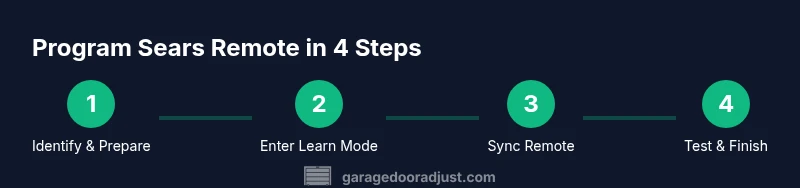
- 1
Identify remote and opener compatibility
Check the model numbers on the Sears remote and the opener manual to confirm compatibility. If they are not listed together, look up the exact compatibility notes from the manufacturer.
Tip: Take a photo of the labels for quick reference. - 2
Replace the battery
Open the remote casing, remove the old battery, install a new CR2032 with the plus side up, and reseal the case.
Tip: Use a microfiber cloth to avoid fingerprints on the contacts. - 3
Reset the opener memory if needed
Some Sears openers require clearing existing codes before re-pairing. Use the Learn or Program button as described in the manual.
Tip: Do not press Learn for too long; a short press is often enough. - 4
Program the remote
With the opener in Learn mode, press and release the button on the remote you want to use until the learn LED indicates the code is accepted.
Tip: Perform this within 30 seconds of entering Learn mode. - 5
Test and adjust
Close the door and test the remote from different distances and angles. If needed, re-pair or adjust sensor alignment.
Tip: Stay clear of the door while testing to avoid injury.
Got Questions?
Will a Sears garage door remote work with my Craftsman opener?
Many Sears remotes are compatible with Craftsman openers, but compatibility depends on the model. Check the opener's manual and look for matching frequency or learning codes.
Most Sears remotes pair with Craftsman openers if the model is compatible; verify with the manual.
Why won't my Sears remote pair with the opener?
Possible battery issues, distance, or a full memory. Replace the battery, bring the remote closer, and use the Learn button to re-pair.
Try a fresh battery and retry pairing with the Learn button.
Can I clone a Sears remote to another opener?
Cloning is possible only if both units support the same learning code. Check compatibility before attempting
Cloning depends on being compatible with both units.
What should I do if the remote loses range?
Replace the battery, check for interference, and consider upgrading to a newer remote if range remains poor.
Ensure the battery is fresh and there’s no interference near the opener.
Are universal remotes reliable with Sears openers?
Some universal remotes support Sears compatibility; verify the model supports Security+ or similar codes before purchasing.
Check the remote's compatibility list before buying.
Is it safe to open the garage door while troubleshooting?
Always keep hands clear of the door and springs; disconnect power if necessary for long tasks.
Yes, but stay away from the door springs and moving parts.
Watch Video
Quick Summary
- Test battery first to rule out power issues
- Use the Learn button to re-pair the remote
- Verify compatibility before purchasing a new remote
- Follow safety steps to protect yourself and the opener