How to Open Garage Door With Multiple Methods
Learn safe, practical ways to open a garage door using remotes, keypads, apps, or the manual release. This guide covers steps, safety tips, and maintenance for homeowners.


This guide shows how to open garage door with multiple proven methods, including remote, keypad, app, and manual release. Before you begin, ensure safety: disconnect children and pets, and avoid forcing the door. The steps below help homeowners diagnose issues, regain access, and prevent future jams. This quick primer covers common opener types and safe manual alternatives.
Why a versatile approach matters
Being able to open your garage door with different methods is not just convenient—it can be essential during outages, remote failures, or when keys and remotes are misplaced. Different opener models provide distinct ways to access your garage, including the standard remote, a wall switch, a keypad, or a smartphone app. For homeowners, understanding these options reduces panic during emergencies and minimizes damage from forcing a stuck door. In practice, knowing multiple methods improves reliability and safety, and it helps you choose the best option for your setup. According to GarageDoorAdjust, homeowners who practice multiple opening methods report quicker access during outages and unexpected failures. This awareness also reduces unnecessary calls to service technicians. By the end of this guide you’ll know when to use each method and how to switch between them safely.
Types of garage door openers and how they influence opening with
Garage door openers come in several drive types and connectivity options. A chain-drive, belt-drive, or screw-drive mechanism may be paired with a wall switch, a remote, or a keypad. Modern Wi‑Fi-enabled openers let you open or close from a smartphone app. The method you choose affects how you access the door when the power is down, the remote battery fails, or the keypad code needs resetting. If you’re starting from scratch, knowing the key differences helps you plan a fallback approach. The GarageDoorAdjust team notes that pairing remotes and keypads with a robust backup plan reduces access stress during outages, so plan for at least two independent methods.
Before you start: safety checks and prep
Safety first: clear the area beneath the door and keep pets and children away. If you hear grinding, see wobbling, or detect a door that is off its tracks, stop immediately and do not force it open. Check the opener’s power supply; make sure the unit is plugged in or powered, and inspect the battery in the remote. If you’re using a keypad or app, confirm code or login status. Have a flashlight handy to inspect tracks and rollers for obstructions. While testing, keep hands and fingers away from hinges and the bottom beam. A calm, methodical approach reduces the risk of injury and damage. GarageDoorAdjust’s safety note: never bypass safety sensors or modify the mechanism when the door is under load.
Quick start: remote, keypad, and app opening options
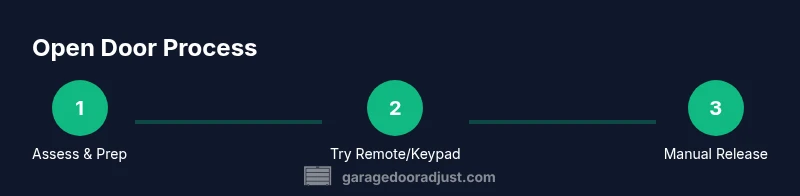
Remote control is usually the fastest way to open the door. Point the remote at the opener and press the open button; if the light on the opener blinks, the signal is reaching the unit. If it doesn’t, replace the remote battery and re-pair according to the manufacturer’s instructions. Keypads provide a code entry method; ensure the code is current and the keypad is connected to the opener. Smartphone apps can control the door from anywhere with internet access—verify your account, ensure the app is linked to the specific opener, and test a command. If you still can’t open, move to the manual release option. Pro-tip: have a secondary method ready before you need it.
Manual release: disengaging the opener and opening by hand
The manual release is usually a red cord or lever you can pull to disengage the door from the opener. With the door partially open, remove any obstacles and brace the door with a friend or place blocks under it to prevent it from falling unexpectedly. Grasp the underside of the door (never the springs or bearings) and lift slowly. If the door feels heavy or binds, stop and consult a professional. Always re-engage the opener once you regain access to restore automatic operation. Safety note: keep clear of the door while you reconnect; do not rely on the manual release to support the door for long.
Power outages and backup opening strategies
During a power outage, the door can still be opened manually using the release, but the sensors and automatic features won’t work until power is restored. If you anticipate outages, practice the manual release in a controlled environment and verify you can re-engage the opener when power returns. For longer outages, consider a back‑up battery kit or a non-electric access plan, such as a mechanical key override if your setup supports it. Always ensure the door is balanced and slides smoothly to prevent sudden movement when operating manually. GarageDoorAdjust emphasizes having a defined fallback plan to avoid being locked out during outages.
Maintenance and safety tips to keep it reliable
Regular maintenance keeps all opening methods working reliably. Lubricate moving parts (hinges, rollers, tracks) with a manufacturer-approved lubricant, and check for loose hardware or worn springs annually. Ensure the safety sensors align and function properly. Keep the track clean and straight; vibrations can misalign components over time. By performing routine checks, you reduce the chance of a sudden failure and maintain safe operation for you and your family. The GarageDoorAdjust team recommends documenting maintenance dates to track wear patterns and scheduling professional service when you notice unusual noises or resistance.
Authority sources
For safety and best practices, consult authoritative resources:
- https://www.osha.gov/
- https://www.nhtsa.gov/
- https://www.energy.gov/
Troubleshooting common issues
If the door won’t open with any method, start with the simplest fix: replace remote batteries, re-pair remotes, and confirm codes are correct. Check the door for obstructions, misaligned tracks, or loose hardware. If you hear grinding or see irregular movement, stop and call a professional—spring tension can be dangerous. When in doubt, gather your opener’s model information and contact a trained technician. This section aims to arm homeowners with steps that reduce frustration without compromising safety.
Tools & Materials
- Garage door remote control(Ensure it’s paired with your specific opener model)
- Manual release cord/handle(Keep accessible above the door in case of power loss)
- Keypad or smart opener app (optional)(Have codes or login ready if you use this method)
- Smartphone or patch cable (for app setup) (optional)(Needed only if you plan to use the app remotely)
- Flashlight(Inspect tracks and hardware in low light)
- Step ladder (optional)(Use to reach the release cord safely)
- Safety goggles (optional)(Protection when inspecting springs or tracks)
Steps
Estimated time: 20-40 minutes
- 1
Prepare area and tools
Clear the area under the door and around the tracks. Gather your remote, manual release, flashlight, and a friend or helper if possible. Check that children and pets are away and that you have a clear path to safely operate the door.
Tip: Double-check the release cord is not tangled and that your helper understands to stand clear of the hinge line. - 2
Verify power and batteries
Confirm the opener is powered (plugged in or battery-powered). Test the remote battery by replacing it with a fresh battery if the light on the opener doesn’t flash when pressed. Do the same with any keypad or app connection if applicable.
Tip: Use the exact battery type specified by the manufacturer; wrong batteries can prevent the remote from working. - 3
Test the remote control
Press the remote’s open button and observe the opener’s light or sound. If there is no response, replace or re-pair the remote and try again.
Tip: If the opener battery is fine but there’s no response, move the remote closer to the receiver and retry. - 4
Try keypad or smartphone app
Enter the code on the keypad or use the app to send an open command. Confirm that the device is linked to the correct opener and that codes or credentials are current.
Tip: If codes don’t work, reset the keypad per the manufacturer’s instructions and reprogram the code. - 5
Engage manual release
If all electronic methods fail, disengage the opener by pulling the red cord/lever firmly until you hear a click. Ensure you still have the door supported as you proceed.
Tip: Stand to the side of the door to avoid the door dropping suddenly; never place hands near the springs. - 6
Open manually and brace the door
Grasp the bottom section of the door and lift with a steady, controlled motion. If the door feels heavy or binds, stop and reassess; do not force it.
Tip: If you cannot lift the door safely, call a professional rather than attempting to force it open. - 7
Reconnect the opener and test
Reattach the manual release to re‑engage the door with the opener. Restore power and test all methods (remote, keypad, app) to ensure proper operation.
Tip: After re-engaging, observe the door for smooth movement and listen for unusual noises that could signal a misalignment.
Got Questions?
What should I do if the remote won't open the door?
Check the battery, re-pair the remote, and verify the opener is receiving a signal. If it still fails, try a keypad or app, then use the manual release if needed.
First check the remote battery and pairing. If it still doesn’t work, use an alternate method and consider the manual release as a last resort.
Is it safe to open the door manually?
Yes, manual opening is safe when done with care and when the door is balanced and supported. Do not push on the springs and avoid standing under the door while moving it.
Manual opening is safe if you’re careful and the door is balanced; never push on springs.
How do I know if I should call a professional?
If the door is heavy, not staying on track, or you hear unusual noises like grinding, it’s best to contact a licensed technician. Avoid attempting dangerous repairs yourself.
Call a pro if the door is heavy, off-track, or making strange noises.
Can I use my smartphone to open the door?
Only if your opener supports a compatible Wi‑Fi or Bluetooth app and is linked to your account. If not, rely on remotes, keypad, or manual release as alternatives.
Yes, but only with a compatible app linked to your opener.
What are some security concerns when opening manually?
Keep the release area clear of children and recover the door to its locked position after use. Do not leave the door in a partially opened state unattended.
Be careful to keep kids away and return the door to a secure position after use.
Watch Video
Quick Summary
- Know multiple access methods for emergencies.
- Verify power and batteries before troubleshooting.
- Use the manual release cautiously and re-engage the opener afterward.
- Regular maintenance prevents future outages.
- Call a professional for heavy doors or misalignment.