Smart Garage Door Opener Installation: A Homeowner's Guide
Step-by-step guide for homeowners to install a smart garage door opener, covering safety, mounting, wiring, Wi-Fi setup, and app pairing for secure, convenient access.


You will install a compatible smart garage door opener, mount the mounting hardware, connect power and sensors, and pair the opener with your Wi‑Fi and mobile app. This guide emphasizes safety, proper alignment, and testing before normal use to ensure reliable operation.
Why upgrade to a smart garage door opener
Upgrading to a smart garage door opener gives you real-time status alerts, remote operation, and enhanced security features that modern openers provide. With a compatible door and a network connection, you gain the ability to open or close from anywhere, receive notifications if the door is left ajar, and integrate with smart assistants like a voice-activated system. According to GarageDoorAdjust, implementing a smart opener often improves daily convenience while maintaining a strong security posture when paired with strong, unique passwords and regular firmware updates. You’ll also benefit from better logs of activity, which helps you understand who uses your door and when. Before starting, know that the most important steps are choosing a compatible model, preparing your workspace, and following the safety procedures for door hardware and electronics.
As you proceed, keep your goals in mind. If you want hands-free control, look for geofencing and app-based automation. If you prioritize backups during outages, select models with battery backup. The right choice depends on your door type, the existing track system, and your home network.
Key compatibility considerations
Most smart openers are designed to work with standard residential sectional doors up to 7 feet tall. Check your current opener’s mounting height, rail length, and whether your door uses torsion or extension springs. For safety, confirm sensor alignment and ensure the door is balanced; a door that binds or feels heavy may indicate a need for professional service before adding a smart unit. Review installation guides from the manufacturer to confirm compatibility with your door type and rail system. If your door uses a unique track or has been modified, it may require special brackets or a different mounting approach. Finally, verify your home network supports 2.4 GHz Wi‑Fi, which most openers rely on for reliable connectivity.
Planning the install: measuring and layout
Start by measuring the ceiling clearance above the door and the header height to ensure you can mount the opener’s motor and brackets without obstruction. Take note of nearby fixtures or attic access that could interfere with the unit’s placement. Use a level to confirm the mounting bracket is square to the door centerline, and mark the drilling points for the header bracket. Plan wire routing paths from the opener to the power source and to sensor cables, making sure you won’t have to pull wires through tight spaces after mounting. Accurate measurements save time and reduce rework later in the project.
Prepare the work area by removing any loose items from the ceiling and securing ladders and tools. Keep a clear path to the door for testing after installation.
Choosing the right model and features for your needs
Smart openers vary in drive type (belt vs chain), motor power, and connectivity options. Belt drives tend to be quieter and are popular in living spaces directly above the garage, while chain drives can be more durable for frequent use. If you care about silent operation or pets and kids nearby, a belt drive is often preferable. Look for features such as rolling code encryption, battery backup, scheduled automations, and remote pairing. Ensure the device supports your preferred home assistant ecosystem and checks for compatibility with existing remotes or keypads. For most homeowners, features like app-based control, geofencing, and real-time activity logs justify the investment, while battery backup adds resilience during outages.
Always confirm that the model you choose is compatible with your current door and rail configuration, and consider the weight of the door when selecting horsepower and drive type.
Step-by-step install overview (high-level)
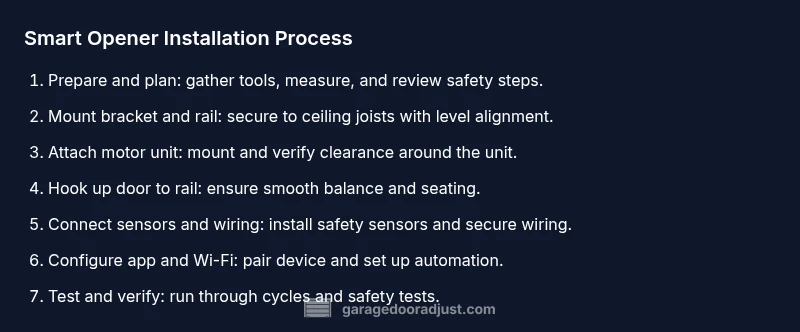
This section provides a high-level map of the process you’ll execute in the detailed STEP-BY-STEP section: prepare the workspace, mount the bracket and rail, install the motor unit, connect the door to the opener, install safety sensors, wire in the smart module, set up the app and Wi-Fi, program remotes, and perform safety tests. Each sub-step will have precise actions, measurements, and tips to keep you on track. A well-planned install reduces the risk of misalignment and sensor failures later.
Having a clear plan helps you stay organized and minimizes missteps during mounting and electrical connections.
Wiring, sensors, and safety checks
Sensors are critical to preventing the door from closing on objects or people. Position the safety reversal sensors on both sides of the door’s bottom track, no more than 6 inches off the floor, and ensure a clear line of sight. After wiring the opener, test the sensor LEDs to confirm alignment and operation. If the door reverses when it contacts a test object, recalibrate the sensor alignment and test again. All wiring should be kept away from hot components and lamination; use proper wire nuts and strain reliefs where needed. Keep the main power disconnect accessible in case of emergency.
Additionally, ensure the garage door remains balanced and that springs are functioning correctly before applying power to the opener. If there is any doubt about spring tension or door balance, call a licensed technician before proceeding.
App setup, pairing, and automation
Download the opener manufacturer’s app and create a dedicated account. Connect the opener to your home Wi‑Fi network, typically 2.4 GHz, and complete the pairing process following in-app prompts. Once connected, configure notifications for door activity, geofencing rules, and arrival/leave triggers. Link the app to any supported voice assistants and set up routines such as “Good Morning” or “Leave Home” that automatically open or close the door in coordination with your smart home. Keep firmware updates enabled to receive security patches as they’re released.
Security, privacy, and maintenance guidelines
Smart openers introduce new security considerations. Use a strong, unique password for the app and enable two‑factor authentication if available. Regularly check for firmware updates and disable features you don’t use (such as remote access from shared accounts). Replace batteries in any wireless remotes or keypads as recommended by the manufacturer. Schedule periodic maintenance checks to keep sensors aligned and the track lubricated, reducing noise and wear. Store network credentials securely and keep your home network protected with a strong password and updated router firmware.
Troubleshooting, common pitfalls, and next steps
If the door won’t respond to the app or remotes, verify that the unit is powered, the door is balanced, and the sensors are aligned. Check for error codes in the app and perform a full reset if needed, then re-pair the device. Common issues include misaligned sensors, improper mounting, loose wiring, and outdated firmware. If you encounter persistent problems, consult the manufacturer’s support resources or contact a professional installer. Remember that upgrading a garage door opener should improve reliability, not introduce new safety concerns.
Tools & Materials
- Power drill with appropriate bits(Powers mounting screws into joists; use a masonry bit if mounting into concrete)
- Screwdrivers (Phillips and flathead)(For mounting brackets and screws)
- Tape measure(Accurate measurements for header bracket placement)
- Level(Ensure brackets are square to door)
- Stud finder(Locate sturdy mounting points in ceiling)
- Ladder or scaffolding(Safe access to ceiling mounting area)
- Wrench set(Tighten mounting bolts to spec)
- Wire nuts and electrical tape(Secure low-voltage wiring and connections)
- Voltage tester (non-contact)(Verify power off before wiring)
- Marker/pencil(Mark drilling points and alignment lines)
- Safety glasses(Eye protection during mounting and drilling)
Steps
Estimated time: 2-4 hours
- 1
Power down and prep workspace
Begin by turning off power to the garage door opener at the circuit breaker and unplugging the unit if accessible. Clear the area below the ceiling and verify there is a safe, level workspace to work from. This reduces the risk of electric shock and accidental movement while mounting.
Tip: Double-check the breaker is off with a voltage tester before handling wires. - 2
Remove old opener or prep mounting area
If replacing an old opener, disconnect it from the rail and remove it from the ceiling mounting bracket. If you’re mounting a new unit, prepare the ceiling by locating joists and marking anchor points for the header bracket.
Tip: Label existing components if reusing parts to avoid mix-ups. - 3
Mount the header bracket and rail
Position the header bracket centered over the door, align with the door’s center, and secure to ceiling joists. Attach the rail to the motor unit and slide it into the bracket, ensuring the rail is level and square to the door.
Tip: Use a level when mounting to prevent binding during operation. - 4
Install the motor unit to the ceiling
Lift the motor housing and secure it to the ceiling mount according to the manufacturer’s instructions. Avoid over-tightening and ensure there is ample clearance for any wiring harness and the door’s path.
Tip: Have a helper support the motor while you secure bolts. - 5
Attach door rail to the door and balance mechanism
Connect the rail to the door’s top section, ensuring the carriage is properly seated. Balance the door by checking that it opens and closes smoothly by hand before powering the opener.
Tip: If the door binds, pause and inspect the tracks and rollers for obstruction. - 6
Connect wiring and install sensors
Run the power cable to the opener’s junction, secure with strain relief, and connect limit switches and safety sensors per the manual. Mount the floor-level safety reversing sensors on both sides of the door bottom with a clear line of sight.
Tip: Align sensors so the dot lights are visible and not blocked by dirt. - 7
Set up the smart module and connect to Wi‑Fi
Mount the smart module, then follow in-app prompts to connect the opener to your home Wi‑Fi network. Ensure you select a secure 2.4 GHz network and enable firmware updates.
Tip: Keep your router near the garage for a strong signal. - 8
Program remotes and keypad; test app pairing
Pair the existing remotes and keypad to the new opener if supported. Open the app and complete the pairing process, then verify that every control method (physical remotes, keypad, and mobile app) operates the door.
Tip: Test from different distances to confirm reliable signal. - 9
Run safety tests and calibrate limits
With the door disconnected from power, verify safe operation by manually moving the door and checking the limit switches. Restore power and perform a full test: open, close, and test the auto-reverse feature.
Tip: If the door fails the auto-reverse test, stop and troubleshoot the sensors or springs. - 10
Finalize setup and safety walkthrough
Complete any remaining app settings, set up routines, and add extra security measures such as two‑factor authentication. Do a final walk-through to confirm all features function correctly and that the door remains secure when closed.
Tip: Document installation steps for future maintenance.
Got Questions?
Do I need a professional to install a smart garage door opener?
Not always. A confident DIYer with basic electrical skills can install many units, but doors with complex springs or unusual mounting might require a pro. Always follow the manufacturer’s safety guidelines and consult a technician if you encounter resistance.
You can often install it yourself if you’re comfortable with basic electrical work, but don’t hesitate to call a pro for complex doors.
Will this opener work with my existing remote or keypad?
Most modern smart openers support standard remotes and keypads, but you should verify compatibility in the product documentation and with the app. You may need to reprogram remotes or pair a new one.
Most remotes will work, but check compatibility and reprogram if needed.
How do I connect the opener to Wi‑Fi and the app?
Install the manufacturer’s app, select your 2.4 GHz network, and follow in-app prompts to pair the opener. Ensure you enable automatic firmware updates for ongoing security.
Install the app, connect to your 2.4 GHz Wi‑Fi, and follow the prompts to pair.
What safety checks should I perform after installation?
Test the door’s manual operation, verify the safety reversing sensors are aligned, and run the auto-reverse test. Confirm the door stops and reverses when meeting an obstacle and that the limits are properly calibrated.
Manually check operation, test sensors, and verify auto-reverse and limit calibration.
How does battery backup affect operation during outages?
If your model includes a battery backup, ensure it is installed correctly and tested. Battery backup allows the opener to operate during power outages, but you must keep the backup charged and replace it when needed.
Battery backup lets the opener work during outages, but keep it charged.
Watch Video
Quick Summary
- Choose a model compatible with your door and network.
- Ensure sensors are aligned and the door balances smoothly.
- Follow safety-first wiring and mounting practices.
- Complete app pairing and security settings before use.
- Test thoroughly and maintain your system regularly.