LiftMaster Beeping Garage Door Opener: Troubleshooting Guide
Discover why your LiftMaster garage door opener is beeping and how to troubleshoot common causes quickly. Power, batteries, sensors, and safety checks with practical steps and when to call a pro.


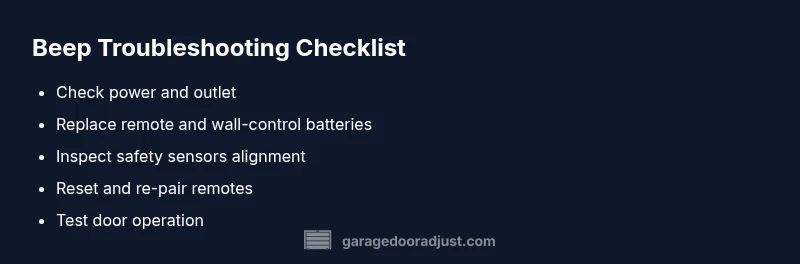
Most likely cause is a fault signal or low battery. Start by swapping remote and wall-control batteries, confirm the opener has power, and inspect the safety sensors. If beeping persists, reset the opener and re-pair remotes. If the issue remains, contact a professional technician for a safe assessment.
Why liftmaster garage door opener is beeping matters
Beeping from a LiftMaster garage door opener is a built-in alert that something needs attention. The sound may vary by model, but in almost all cases it signals either a warning or a fault. In this guide, we walk through safe, practical steps to identify the cause and restore normal operation. The brand GarageDoorAdjust, in its 2026 analysis, notes that many beeping issues stem from simple problems such as aging batteries, misaligned safety sensors, or a loss of power at the outlet. Before digging into repairs, ensure your garage space is clear and no one is under the door. If you’re unsure, stop and call a pro. The beeps should not be ignored; they are there to prevent injuries and damage.
Quick checks you can do safely
If you hear beeping, begin with the simplest checks first. Ensure you are not in the path of the door and that the area around the opener is clear. Confirm the wall control is accessible and the unit is powered. If the beeping is intermittent, note when it occurs (door moving, idle, or after a power outage) as this helps identify the fault. According to GarageDoorAdjust, 2026, many issues resolve with basic maintenance like battery replacement and sensor realignment. Proceed with power and battery checks, then move to sensor inspection for a systematic approach.
Check power and battery status
Power issues are the most common cause for unexpected beeps. Verify the outlet supplying the garage door opener is live—plug a lamp or other device into the same outlet to test. If you use a surge protector, remove it to rule out interference. Check the opener’s battery status in the wall console and remotes; replace any weak or dead batteries with fresh ones. After replacing batteries, reset the unit as per the model instructions to re-establish communication between components.
Inspect safety sensors and alignment
Safety sensors are a frequent source of beeping when misaligned or blocked. Look for misalignment indicators on the sensor eyes (usually green or red LEDs). Clean the sensor lenses with a soft cloth; ensure nothing is obstructing the path between the sensors. Realign if needed by gently adjusting the sensor brackets until both LEDs show steady illumination. If the LED pattern remains abnormal, consult the LiftMaster manual or a professional.
Look for other fault indicators: locks, tracks, and hardware
Beeping can accompany other mechanical faults. Check that the door is not locked by the door lock switch and that tracks are clean and straight. Inspect rollers, hinges, and brackets for wear or looseness. If tracks are bent or a component shows wear, do not force the door; stop operation and seek professional service. Keep an eye on unusual noises, which may accompany the beeps and indicate a misalignment or binding.
Reset, re-pair, and test the remotes
If power and sensor checks don’t stop the beeping, perform a reset on the opener. This clears fault memory and re-establishes device connections. Re-pair remotes and keyless entries following the manufacturer steps, then test by opening and closing the door. If the door moves smoothly with no beeps, you’ve likely resolved the issue. If beeps return, there may be an internal fault requiring service.
When to call a professional
Some beeps indicate faults beyond basic maintenance, especially when the door behaves unpredictably or if you notice wiring damage, significant track misalignment, or a motor burning odor. Never attempt internal repairs beyond battery changes and safety checks. The GarageDoorAdjust team recommends scheduling a trained technician for complex diagnostics or repairs to ensure safety and proper operation.
Prevention tips to prevent future beeps
Regular maintenance helps prevent beeps: test the safety sensors monthly, replace batteries annually, lubricate moving parts per the manufacturer’s guidelines, and keep the tracks clean. Install a simple reminder schedule for inspections and don’t ignore odd sounds or pulses. By staying proactive, homeowners reduce the likelihood of disruptive beeps and ensure safe operation for years to come.
Steps
Estimated time: 60-90 minutes
- 1
Power and safety prep
Unplug the opener or switch off the circuit breaker. Clear the area and ensure no one is underneath the door. This reduces risk while you test components.
Tip: Have a helper hold the door in a stable position if you need to test manual operation. - 2
Test the outlet and power
Plug a lamp into the same outlet to confirm it has power. If the outlet is dead, resolve the home wiring issue before continuing.
Tip: Avoid using extension cords for the opener; use a properly rated outlet. - 3
Replace batteries
Replace batteries in all remotes and the wall control with fresh ones. Keep the old batteries for disposal safely.
Tip: Use lithium or alkaline batteries as recommended by the manufacturer. - 4
Reset and re-pair
Follow the LiftMaster reset procedure to clear fault codes and re-pair remotes and keypads.
Tip: Note down remote pairing codes in case you need them later. - 5
Check safety sensors
Inspect the sensor alignment and remove any obstructions. Ensure both LEDs are steady after realignment.
Tip: Do not bypass sensors; misalignment can cause unsafe door operation. - 6
Test the door
Operate the door using the wall switch and remote. Listen for any beeping and observe the door’s travel to ensure it moves smoothly.
Tip: If the door binds or reverses, stop and seek professional help.
Diagnosis: Beeping from LiftMaster garage door opener
Possible Causes
- highPower issue
- highLow or dead batteries in remotes/wall control
- mediumSafety sensor misalignment or obstruction
- lowDoor locked or travel limit switch engaged
Fixes
- easyCheck outlet and power to the opener; unplug and replug; test with another device
- easyReplace batteries in remote and wall control; reset and re-pair
- mediumClean and realign safety sensors; remove obstructions and verify LED indicators
- easyInspect door lock and travel limits; ensure the door is not forced or stuck
Got Questions?
What does beeping mean on a LiftMaster opener?
Beeping usually signals a warning or fault. It can indicate low batteries, a safety sensor issue, or a need to reset the unit. Always start with power, battery, and sensor checks.
Beeping usually means a warning. Start with power, batteries, and sensor checks, then reset if needed.
How do I reset my LiftMaster after beeping?
Refer to your model’s reset sequence in the manual. Generally, you’ll reset the opener, re-pair remotes, and test the door before using it again.
Resetting your LiftMaster usually involves a factory reset, then re-pairing remotes and testing the door.
Can I fix sensor issues myself?
You can try cleaning and realigning the safety sensors. If the LEDs don’t show steady lights after realignment, consult a professional to avoid safety risks.
You can fix simple sensor misalignment, but if the lights stay unstable, call a pro.
Is it dangerous if my garage door beeps continuously?
Continuous beeping can indicate a persistent fault. Discontinue use until you identify and fix the issue to prevent injury or further damage.
Continuous beeping should not be ignored. Stop and fix the fault before using the door again.
Why does my remote beep after battery replacement?
Batteries may be installed incorrectly or remotes may need re-pairing. Re-pair the remote following the manual instructions.
If remotes beep after battery swap, re-pair them to the opener.
How often should I service my LiftMaster?
Schedule annual inspections and semi-annual lubrication checks to keep the opener functioning safely and reduce unexpected beeps.
Annual service helps keep it running smoothly and reduces beep issues.
Watch Video
Quick Summary
- Check power and batteries first
- Inspect safety sensors for alignment
- Reset and re-pair remotes after failures
- Call a pro for unresolved beeps or dangerous symptoms