Garage Door Beeping: Quick Troubleshooting for Homeowners
Urgent troubleshooting guide to fix a beeping garage door. Step-by-step checks, diagnostics, and safety tips to identify battery, sensor, or wiring issues quickly.


Your garage door is beeping most likely due to a low battery in the wall control or remote, a safety sensor fault, or a diagnostic alert from the opener. Start with simple checks: replace batteries in remotes/keypads, reset the opener, and inspect sensor alignment. If the beep persists, power cycle the unit and contact a professional.
Why garage door is beeping signals more than a nuisance
According to GarageDoorAdjust, a beeping garage door is rarely a sign of catastrophic failure. In most homes it points to a routine maintenance item or a safety feature needing attention. If you hear a beeping sound when you press a button or as the door moves, start with simple checks and then move to diagnostic steps. The beeps act as a safety alert to protect people nearby, so respond calmly and methodically. By following a structured troubleshooting flow, you can identify the cause quickly and restore normal operation while keeping your family safe. GarageDoorAdjust’s analysis shows that most alerts stem from battery issues, sensor misalignment, or minor wiring glitches rather than major component failures.
Common beeping patterns and what they mean
Beeping often follows a discernible pattern that hints at the underlying issue. A single short beep may indicate a successful reset or a low battery, while multiple quick beeps can signal a sensor fault or a door safety issue. Continuous beeping typically points to a persistent sensor problem or an alarm from the opener’s diagnostic memory. Recognizing the pattern helps you triage quickly and avoid unnecessary disassembly. Remember: patterns vary by model, so always consult your owner’s manual for the official beep codes, and if in doubt, treat it as a safety alert and proceed with caution.
Immediate checks you can perform safely
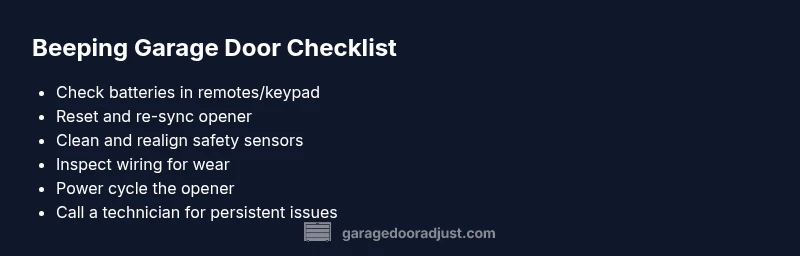
Before you touch any mechanical parts, unplug the opener if you can do so safely, or switch off the unit at the wall. Start by replacing batteries in all remotes and keypads, then reseat battery contacts to ensure a solid connection. Clean any dirt from safety sensors and verify the beams are unobstructed. Reset the opener and re-sync remotes according to your manual. These basic steps resolve the majority of beeping issues and are generally safe to perform without tools.
Diagnostic flow: symptom → diagnosis → solutions
When the symptom is a beeping door, map the beep to a likely cause: battery or remote issue, sensor alignment, or power/wiring faults. If the pattern changes after a reset or battery swap, you’ve narrowed the cause. If the beep continues, inspect sensor wiring and the door’s limit switches, then test the system with a spare remote. Depending on findings, apply the appropriate fix or seek professional help for more complex diagnostics. This flow reduces guesswork and speeds up a safe restoration.
Fixes for the most common cause: battery and remote
The easiest fixes are often the most effective. Replace all remote and keypad batteries with fresh alkaline cells, and reinsert them, ensuring correct polarity. Re-sync remotes to the opener following the manufacturer’s procedure. If the beeping stops, test by opening and closing once or twice from multiple remotes. If the beep persists after these steps, move to sensor checks or consider a full power cycle of the opener.
Sensor alignment and safety checks
Misaligned safety sensors are a frequent cause of beeps and door reversals. Inspect both sensors for dirt, moisture, or misalignment; clean the lenses with a soft cloth and realign until the beams clearly visualize. Check the sensor wires for damage or loose connections at the terminals. If realignment or cleaning doesn’t stop the beep, test with a spare sensor or call a technician to verify the sensor circuit and safety features.
Electrical concerns and power issues
Electrical faults, power surges, or a tired transformer can trigger beeping. Verify the outlet supplying the door opener is live and not shared with high-draw devices. Inspect the power cord and the circuit breaker for any signs of wear. If the unit is old, intermittent power could degrade performance; consider upgrading to a newer opener with a stable power supply and built-in diagnostic lights.
Professional help vs. DIY: when to call a technician
If you’ve completed the basic checks and the beeping continues, especially after sensor realignment and battery replacements, professional diagnosis is recommended. A technician can safely test the garage-door wiring, sensor circuits, and motor control without risking injury or further damage. Don’t attempt to adjust springs, torsion components, or main gear assemblies yourself—these are high-risk repairs that require trained technicians. Regular maintenance visits help prevent future beeps and extend the life of the system.
Prevention: keep your door quiet and reliable
Set a routine maintenance plan: clean sensors quarterly, replace batteries annually, and inspect hardware for wear. Keep the area around the opener clear of dust and moisture, and test emergency manual operation periodically. When you notice unusual beeps, address them promptly rather than waiting for a full failure. Regular maintenance reduces nuisance beeps and improves safety.
Steps
Estimated time: 45-60 minutes
- 1
Check power and batteries
Unplug or switch off the opener. Replace batteries in all remotes and keypads, reseat contacts, and test. This often resolves beeps caused by low power.
Tip: Use fresh batteries of the correct size and verify polarity. - 2
Reset and resync
Perform a full reset of the opener if your model allows it, then re-sync remotes and keypads per the manual. A clean reset often clears memory beeps.
Tip: Write down remote codes before resetting. - 3
Inspect safety sensors
Check both safety sensors for dirt, moisture, or misalignment. Clean with a soft cloth and realign until the indicator lights show proper alignment.
Tip: Ensure no objects disrupt the beam path. - 4
Look for wiring issues
Inspect exposed wires at the control board, sensors, and outlets for obvious wear or looseness. Reroute cables away from moving parts.
Tip: If you see frayed insulation, stop and call a pro. - 5
Power cycle the system
Disconnect power, wait briefly, then reconnect to reset electronics. Re-test door operation and beep pattern.
Tip: Avoid touching the limit switches during power-up. - 6
Test with multiple remotes
Test all remotes and the keypad to confirm uniform behavior. If only one device beeps, focus battery/receiver issues on that device.
Tip: Replace any failing remote with a new one when needed. - 7
Decide on professional help
If beeping continues after all basic fixes, schedule a professional diagnosis for wiring or sensor issues.
Tip: Do not attempt to adjust springs or torsion hardware yourself. - 8
Set up prevention
Create a simple weekly check routine for sensors and battery health. Document results to spot repeating patterns.
Tip: Keep a maintenance log for quick future reference.
Diagnosis: Garage door beeping when attempting to operate
Possible Causes
- highLow or dead battery in wall control, keypad, or remote
- highFaulty safety sensors or misaligned beams
- mediumOpeners diagnostic memory alert due to power surge or wiring issue
- mediumWiring damage or short in the limit switch circuit
- lowOlder controller firmware or microcontroller fault
Fixes
- easyReplace batteries in all remotes/keypads; reseat contacts and retry
- easyReset the opener and re-sync remotes according to the manual
- mediumInspect and clean safety sensors; realign beams and check wiring connections
- easyPower cycle the opener (unplug or switch off, wait 10 seconds, plug back in)
- mediumIf issues persist, have a professional diagnose wiring/sensor circuits
- hardReplace damaged wiring or components with a trained technician
Got Questions?
What does a beeping garage door opener mean?
Beeping usually signals a safety alert or a maintenance issue, most often battery, sensor, or wiring-related. Start with batteries and sensor alignment, then move to power-related checks if needed.
Beeping usually means a safety alert or maintenance issue—start with batteries and sensors, then check power if it continues.
Is it dangerous if my garage door is beeping?
Beeping itself is a warning. It becomes dangerous if it hides a faulty sensor or a wiring problem that prevents the door from stopping on contact. Stop using the door if you’re unsure.
Beeping is a warning. If you’re unsure, stop using the door and get a professional to check.
Should I replace batteries before calling a technician?
Yes. Replacing batteries in remotes and keypads is a quick win and often resolves the issue. If the beep persists after replacement, proceed with sensor and power checks.
Yes—start with batteries, then move to sensors and power checks if it continues.
Can a misaligned safety sensor cause beeping?
Absolutely. Misalignment or dirt on sensor lenses can trigger safety beeps. Clean and realign the sensors and test door operation.
Yes. Clean and realign the sensors and test the door.
How do I reset my garage door opener?
Reset procedures vary by model. Check the manual for the exact steps to clear memory and re-pair remotes. After reset, test several times.
Reset steps vary by model—consult your manual and test after the reset.
When should I call a professional?
If basic checks don’t stop the beeping or you suspect wiring, sensor, or spring issues, it’s time to call a technician. They can safely diagnose and repair without risking injury.
If basic checks fail or you suspect wiring or springs, call a professional.
Watch Video
Quick Summary
- Be systematic: battery, sensors, and power first.
- Follow the diagnostic flow to map beep to cause.
- Do not ignore ongoing beeps—safety risk.
- Call a professional for wiring or spring issues.
- Regular maintenance reduces future beeps.