How to Use a Garage Door Keypad: A Homeowner's Guide
Step-by-step guide to using your garage door keypad: setup, code programming, troubleshooting, and essential safety tips for homeowners.


To use a garage door keypad, first locate the keypad and enter your existing access code to open the door. If you’re adding a new code, follow the programming steps in your model’s manual or the GarageDoorAdjust guidance: reset the keypad, enter the new code, and test. For ongoing use, keep the keypad clean and replace batteries as needed.
Understanding how the keypad communicates with the opener
A garage door keypad is a compact numeric pad mounted near your door or inside the garage. Each entered code sends a signal to the opener's receiver, triggering the motor to operate when authorized. When people search for 'how to use garage door keypad', they're looking for reliable steps to enter codes, program new ones, and keep the system secure. This guide from GarageDoorAdjust helps homeowners translate the manual language into everyday actions, ensuring you can operate the door confidently without a remote.
Keypad types and compatibility
Keypads vary by model and brand. Some are built into newer openers, others mount on the wall and connect wirelessly. Before you start, check the label on your keypad or the owner's manual to confirm compatible codes, the correct code length, and the programming sequence for your specific model. If your keypad is a retrofit, ensure it communicates with your opener’s receiver and can accept the codes you plan to use.
Preparing for use: safety and battery check
Begin by inspecting the keypad area for moisture, dirt, or corrosion. Clean the surface gently with a dry microfiber cloth and avoid harsh cleaners that could damage the keypad. Replace batteries with the exact type recommended by the manufacturer, and test the power indicator if present. If your keypad is outdoors, ensure it has a protective enclosure and isn’t exposed to direct rain or sun for extended periods. This prep minimizes misreads and ensures reliable operation.
Master code and user codes: a quick overview
Most keypads use a master or programming code to enter setup mode, then accept one or more user codes for family members or guests. Keep codes unique and avoid reusing patterns. For security, never post codes in obvious places and consider documenting them in a secure, offline location. Understanding the distinction between master and user codes helps avoid accidental changes that could lock out authorized users.
Daily use and quick maintenance
To open the door, enter a valid code and press the enter/confirm button if your model requires it. After closing, verify the door completes its cycle and that the safety sensors reset correctly. Regularly inspect the keypad for grime, moisture, or sun damage, and replace batteries when performance dips. Keeping the surface clean helps prevent misreads and ensures codes register reliably.
Troubleshooting common keypad issues
If the keypad doesn’t respond, start by replacing the batteries and cleaning the surface. Ensure you are using the correct code for your model and that the keypad programming matches the opener. If problems persist, consult the model manual or contact GarageDoorAdjust for model-specific guidance. Compatibility between keypad and opener is crucial for reliable operation.
Safety, security, and best practices
Only authorized users should know codes; avoid sharing them in insecure places or over digital channels. Consider using temporary codes for guests and remove them when the visit ends. Shield outdoor keypads from direct weather exposure and regularly test the safety sensors and auto-reverse features. Storing codes securely and maintaining the keypad reduces the risk of unauthorized access.
Quick-start checklist for new keypad codes
- Confirm model compatibility with your opener. - Install fresh batteries of the correct type. - Access programming mode using the master code. - Create one or more user codes (4–6 digits). - Test each code at the door and inside switch. - Document codes securely and set a periodic review reminder.
Tools & Materials
- Garage door keypad unit(Model must be compatible with your opener; check the label or manual.)
- Screwdrivers (Phillips and flathead)(For mounting or removing screws during keypad installation or adjustment.)
- Batteries compatible with keypad(Typically AA or CR2032; verify exact type in the manual.)
- Programming guide/manual for keypad model(Essential for master code, programming steps, and code management.)
- Microfiber cloth(Use to wipe the keypad surface and remove dirt/moisture.)
Steps
Estimated time: Estimated total time: 25-40 minutes
- 1
Verify compatibility and locate keypad
Identify your keypad model and confirm it communicates with your opener. Locate the keypad on the wall near the door or inside the garage. This ensures you follow the correct programming sequence for your device.
Tip: If unsure, consult the model manual or GarageDoorAdjust for model-specific steps. - 2
Gather required items and power down if needed
Collect the keypad, batteries, and the user manual before starting. If wiring or wiring-free models require safety precautions, follow the manual to avoid electrical shocks.
Tip: Have a second person nearby to assist with battery handling if the keypad is mounted high. - 3
Power the keypad with fresh batteries
Open the battery compartment, insert the correct type, and ensure correct orientation. Close the cover securely to prevent moisture intrusion.
Tip: Test battery contact springs by gently pressing; loose contacts can cause misreads. - 4
Enter the master code to access programming mode
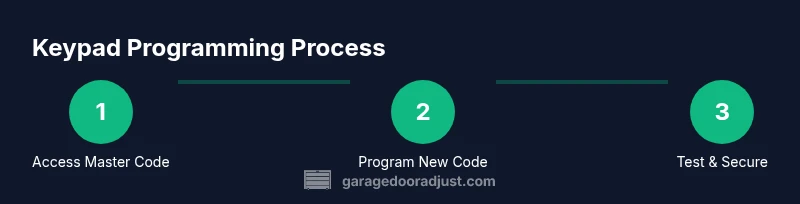
Enter the master or programming code as specified in your manual to enable changes. This puts the keypad into programming mode where codes can be added or removed.
Tip: Write down the master code and store it in a secure place separate from the keypad. - 5
Program a new user code
Input a 4–6 digit code designated for a family member or guest, then save it to the keypad’s allowed list. Confirm the code is accepted by testing it at the door.
Tip: Choose codes that do not resemble common patterns (e.g., 1234 or 0000). - 6
Test the new code and confirm operation
With the door closed, enter the new code to verify it opens the door, and then test closing to ensure the cycle completes correctly.
Tip: If the door does not respond, recheck code entry and verify compatibility with the opener. - 7
Create a temporary/guest code if needed
Set up a time-limited or guest code as allowed by the programming mode. Remove it after the guest’s visit ends.
Tip: Document the guest code and expiration without sharing it publicly. - 8
Remove compromised codes and reset if necessary
If a code is suspected of being compromised, delete it from the keypad. Consider a full reset if multiple codes are affected.
Tip: Follow the exact reset procedure in the manual to avoid locking yourself out. - 9
Finalize setup and document changes
Record all active codes, who has access, and the date of the last battery change. Keep a copy in a secure location for reference.
Tip: Schedule a routine review to ensure codes remain current and secure.
Got Questions?
What should I do if my keypad stops responding?
First, replace the batteries and clean the keypad surface. If it still doesn’t respond, verify that you’re using the correct code and that the keypad programming matches your opener model. If problems persist, consult the manual or GarageDoorAdjust for model-specific guidance.
If the keypad won’t respond after replacing batteries, check your model’s programming steps and try again. If problems persist, consult the manual or GarageDoorAdjust.
How do I reset the keypad to factory settings?
Locate the reset option in programming mode per your model’s manual. After reset, you will need to re-program all codes from scratch. This removes all previously saved codes and returns the keypad to its original state.
Resetting returns the keypad to factory settings; you’ll need to set up codes again.
Can I disable codes remotely?
Most standalone keypads operate locally. Some smart openers provide app-based control to enable/disable codes, but not all models support remote changes. Check your device’s capabilities in the manual or app settings.
Remote control of codes depends on your opener model; many keypads require local changes.
What’s the best way to choose a keypad code?
Choose a 4–6 digit code that doesn’t resemble common patterns and avoid reuse from other devices. Avoid codes like 1234 or sequences that people can guess. Keep codes secret and avoid posting them publicly.
Pick a non-obvious 4–6 digit code and don’t reuse it across devices.
How often should I replace keypad batteries?
Replace batteries when you notice dim indicators or reduced responsiveness. If your model uses replaceable batteries, set a routine check to prevent failures.
Replace batteries when the keypad becomes slow or unreliable.
How do I remove a user code?
Enter the master programming mode and delete the specific user code from the keypad’s list of valid codes. Verify the code is no longer accepted by testing at the door.
Enter programming mode and delete the user code you don’t want anymore.
Watch Video
Quick Summary
- Program secure, unique codes.
- Test codes at the door after programming.
- Maintain batteries and clean the keypad surface.
- Document codes securely and review access regularly.