How to Pair a Garage Door Opener: A Step-by-Step Guide
Learn how to pair a garage door opener remote or keypad with your opener. This guide covers compatibility, safety, step-by-step pairing, troubleshooting, and best practices to ensure reliable access to your garage.


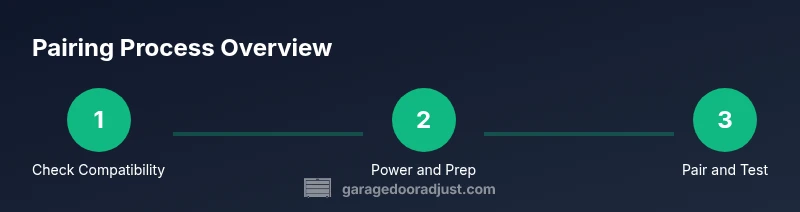
Pairing a garage door opener remote or keypad with your opener is a straightforward, safe task when you follow the right steps. You’ll confirm compatibility, gather the right remotes, and use the learn button to complete the pairing in a few simple actions. This process works for most brands and requires fresh batteries and basic tools.
Understanding the Basics of Garage Door Opener Pairing
Pairing a garage door opener remote or keypad with your opener is about creating a trusted link between the controller and the motor. Most modern openers use a rolling code that changes each time you press the button, which helps prevent replay attacks. Before you begin, make sure your remote is compatible with your model and that you have fresh batteries. According to GarageDoorAdjust, compatibility checks and fresh power are the foundation of a smooth pairing experience. With the right remote and a simple learning process, you can restore full control of your door in minutes. Different brands may have slightly different learning sequences, but the core idea remains the same: put the opener in learning mode, then activate the remote once to store its signal.
Understanding compatibility means recognizing two factors: the type of remote (rolling-code vs fixed-code) and the compatibility of the remote frequencies with your opener’s receiver. If you’re unsure, consult the manual for your specific model or check the manufacturer’s online resources. Always use remotes that are designed for your brand or clearly labeled as compatible. If you own an older opener, some remotes may still work, but you might need an official replacement or a simple adapter that preserves security features. In any case, plan for at least one backup remote so you don’t get locked out when the primary one dies or the battery fails.
Safety Considerations Before You Start
Safety should come first when working with power hardware like a garage door opener. Disconnect power to the opener at the wall or unplug the unit if you can access it safely. Do not rely on the door’s manual-operation handle as a primary control; use it only for emergencies. Clear the area beneath the door to prevent injuries if the door moves unexpectedly during testing. Wear safety glasses if you’re working around exposed gears or wiring. Keep children and pets away during the pairing process to avoid accidental activation. After you reassemble any panels, test the safety reverse feature by gently pressing the door to ensure it reverses when meeting resistance. By following these precautions, you reduce the risk of injury and protect your equipment.
Common Pairing Scenarios and Compatibility
Most popular brands offer a universal pairing method that relies on a Learn or Program button on the opener and a button press on the remote. In some cases, you’ll need to use a keypad or a smartphone app to complete the pairing. Some remote models are brand-locked or require a specific sequence, while others can be programmed with common codes like 0 or 1 as a first attempt. If you’re attempting to pair remotes from different brands, you might encounter compatibility issues due to different radio frequencies or security protocols. In many cases, you’ll need to purchase a compatible remote or use a brand-certified adapter. Always verify the model number and the instruction sheet before attempting pairing, and don’t attempt to force a connection if the opener or remote refuses to pair.
If your opener supports smart home integration, pairing a mobile app may provide a more flexible control method. The app might guide you through device discovery, authorization, and remote-onboarding steps. In any scenario, a successful pairing should allow you to operate the door from the programmed remotes and keypad with reliable range and prompt response.
How the Pairing Process Works in Practice
The typical pairing flow involves placing the opener into learning mode, which prepares its receiver to accept a new remote signal. You’ll then activate the remote (or keypad) once to transmit a unique code to the receiver. If the transmission is successful, the opener emits a short beep or lights up its LED as confirmation. If you’re using a keypad, you may need to enter a PIN before activating the button on the remote. For triple-check reliability, try the remote from different distances and angles. If the door responds consistently, you’ve established a robust pairing; if not, you may need fresh batteries or to retry the process with a longer press duration on the remote’s button.
Troubleshooting When Pairing Fails
If the remote doesn’t pair, start with the simplest fixes: replace the remote batteries with fresh ones and ensure the remote is within an appropriate range. Confirm you are using the correct learn button and timing window; many models accept the signal only within 30 seconds of entering learning mode. If the opener doesn’t respond, try re-entering learning mode and reattempting with a newly aimed remote. Sometimes a memory limit is reached and you’ll need to delete older remotes before adding new ones. Power outages can also reset memory; a fresh pairing attempt after restoration is a good diagnostic step. Finally, check for interference from other wireless devices and relocate the opener if needed.
Long-Term Maintenance and Best Practices
Keep a small log of all paired remotes, including the initial pairing date and model or SKU where available. Regularly check batteries and replace them at least once a year to prevent unexpected loss of control. If you use a keypad, archive its codes securely and update them after major household changes. For smart openers, update firmware when prompted to benefit from security patches and improved pairing reliability. Periodically test all remotes and keypad access to confirm stable operation. Following these habits helps maintain secure and dependable access to your garage.
Tools & Materials
- Remote control(s) for the opener(Have at least one spare in a known location)
- Replacement batteries(Check model-specific type (e.g., AAA, AA, or coin cell))
- Owner's manual for your opener model(Contains learn button location and timing)
- Screwdriver set(Phillips and flat-head as needed to access the unit)
- Step ladder(Useful if the learn button or receiver is high on the rail)
- Smartphone with app (optional)(For app-based pairing on supported models)
- Pen and notepad(For labeling remotes or recording codes)
Steps
Estimated time: 15-30 minutes
- 1
Verify compatibility and gather remotes
Confirm your opener model supports remote pairing and collect the remotes you plan to use. Check the user manual for the exact remote type and ensure batteries are fresh before starting.
Tip: Label each remote with its location or intended user to avoid confusion later. - 2
Power down and prep safety
Power off the opener at the wall or disconnect power safely if accessible. Clear the area beneath and around the door, and ensure hands and clothing won’t get caught in moving parts.
Tip: If you must unplug, wait for the opener to completely stop before proceeding. - 3
Access learn/program button
Open the opener housing as required to locate the Learn button or programming menu. If a panel must be removed, do so carefully and note any screws kept in a labeled container.
Tip: Use the manual as a map; some models require a recessed button or a sequence in the app. - 4
Initiate pairing and transmit
Put the opener into learning mode, then press and release the remote button once within the time window. A successful pair usually triggers a beep or LED indicator.
Tip: Avoid pressing the remote repeatedly in quick succession; one deliberate press is enough. - 5
Test and confirm operation
Test each remote from several positions and distances. Ensure the door responds consistently and check for a reverse safety feature if resistance is encountered.
Tip: Test with the door in both directions and verify the keypad works if present. - 6
Finalize and document
Document which remotes are paired and note any PINs or codes for future reference. If you use smart features, complete any required app setup so your devices stay in sync.
Tip: Keep a spare remote and a quick-reference sheet with the setup details.
Got Questions?
How do I know if my remote is compatible with my opener?
Refer to your opener’s manual for supported remote models and frequencies. If you’re unsure, contact the manufacturer or check their official site for a compatibility list. Always use a remote that explicitly states it works with your model.
Check the manual or manufacturer site for supported remotes; use only compatible models to avoid pairing failures.
What if there is no Learn button on my opener?
Some openers use a recessed or hidden programming option in the app or a different panel. Consult the manual for the exact procedure and look for a label like 'Program' or 'Set' under the panel.
If you can’t find a Learn button, check the app or service manual for the correct pairing method.
Can I pair multiple remotes to the same opener?
Yes. Most openers support multiple remotes. Each remote should be paired individually, following the same Learn sequence. Some models also let you delete or reset existing remotes if you run into conflicts.
Most openers pair multiple remotes one-by-one, so repeat the steps for each remote.
Do I need to reset the opener memory before pairing?
Resetting memory is not always required, but it can help when remotes won’t pair or when you suspect memory conflicts. Check the manual for the exact reset procedure, which often involves holding the Learn button for an extended period.
Only reset memory if pairing fails after trying standard steps.
Will a power outage affect paired remotes?
Most remotes retain their pairing data in memory, but a power outage can affect devices that rely on a powered control module. After power returns, re-test all remotes and re-pair if necessary.
Power can affect some devices; test remotes after power returns and re-pair if needed.
How far can the remote operate from the opener?
Typical ranges vary by model but are usually within several meters. Obstacles or interference can reduce range. If you consistently lose signal, try replacing batteries, reducing interference, or upgrading to a newer remote.
Most remotes work within a few meters; avoid interfering devices and consider new batteries.
Watch Video
Quick Summary
- Check compatibility before starting.
- Replace batteries to ensure reliable signaling.
- Test all remotes after pairing.
- Document remotes and codes for future use.