Garage Door Zigbee: A Step-by-Step Smart-Home Guide
Learn how to add Zigbee-powered control to your garage door, pairing a Zigbee hub, safe installation, and automations with practical steps from GarageDoorAdjust.


By the end, you’ll be able to open, close, and automate your garage door with a Zigbee hub. You’ll need a Zigbee hub, a compatible garage door controller, and a smartphone app to configure automations. According to GarageDoorAdjust, this approach can streamline daily use while preserving safety and reliability.
What is Zigbee and Why It Matters for Garage Doors
Zigbee is a low-power wireless protocol designed for smart-home devices to form a reliable mesh network. For garage doors, Zigbee enables local control via a hub, remote automations, and status reporting without requiring constant cloud access. In practice, a garage door zigbee setup lets you open or close the door from a smart speaker, routine, or mobile app, with the hub coordinating device talking across the network. The GarageDoorAdjust team emphasizes that Zigbee’s simple pairing, strong security, and energy efficiency make it a compelling option for homeowners who want privacy and fast responses. When paired with a compatible controller, your garage door becomes part of the broader smart-home ecosystem, enabling rules like “open on arrival” or “close when sunset.” This approach preserves safety features such as door reversal via the opener’s built-in sensors, while expanding control options.
Readiness: Do You Have What You Need for a Zigbee Garage Door Setup?
Before diving in, confirm your opener and home network are ready for Zigbee integration. You’ll want a Zigbee hub that supports your preferred ecosystem, a compatible garage door controller module, and a smartphone with the controller app installed. Check that your opener uses a standard wall switch or accessory relay that the new controller can safely interface with. If your system is older or uses custom wiring, consult the opener’s documentation and consider professional help. In practice, a successful garage door zigbee project hinges on compatibility, secure pairing, and a clear safety plan. GarageDoorAdjust recommends starting with a test opener that is easily accessible, so you can verify signals without moving the vehicle.
Selecting a Zigbee Garage Door Controller: What to Look For
The right controller will provide a reliable relay output that mimics pressing the door wall switch, plus clear documentation for wiring and safety. Look for a model that explicitly lists compatibility with garage-door openers, supports local control (no constant cloud dependency for basic actions), and includes a responsive app. Security features matter: encryption, robust pairing, and the ability to disable remote access if needed. Ensure the device has a physical enclosure and mounting hardware for a clean install. A well-chosen controller makes the difference between a smooth experience and intermittent failures, so compare features rather than price alone. You’ll also want a hub that supports OTA firmware updates to stay current with security fixes.
Installation Basics: How to Physically Set Up a Zigbee Controller
Never bypass the opener’s safety features. Install the controller’s relay in parallel with the door wall switch as described in the product manual, using the provided mounting hardware. Power down the garage circuit before making any connections, and keep wiring tidy to avoid snagging or damage. If your opener is already wired to a wall switch, you typically connect the controller’s relay terminals to the same two wires that feed the switch, following the instruction sheet. After wiring, mount the controller in a dry, cool location away from moisture and debris to prevent performance issues. Finally, restore power and verify the physical wall switch still operates the door manually.
Pairing and Automations: Getting Your Door on the Zigbee Network
Once powered, put the Zigbee hub in pairing mode and add the garage door controller. The exact steps vary by hub, but you’ll usually press a pairing button and confirm the device appears in the app. After pairing, create automations such as “open when I arrive” or “close at sunset,” and connect voice assistants if supported. Keep check-ins on door status (open/closed) within the app to confirm reliable feedback. Regularly review automation logs to catch unexpected failures, and test the door manually to ensure safety features are still active after integration.
Safety, Security, and Best Practices
Security is critical when adding doors to a smart home. Use strong, unique passwords for your hub and controller apps, enable firmware updates, and disable remote access if you don’t need it. Maintain physical safeguards for the door’s sensors and ensure the door’s auto-reverse mechanism remains functional. Document all wiring and keep a printed guide with the installer’s model numbers. If the system ever behaves oddly—unresponsive relays, delayed responses, or inconsistent status—it’s best to disconnect the device quickly and reassess wiring and app configurations. A well-maintained Zigbee network minimizes interference and reduces the risk of accidental openings.
Troubleshooting Common Issues: Quick Fixes for a Stubborn Setup
If the controller won’t pair, double-check that the hub is on the same network and that the controller is in pairing mode. If the door doesn’t respond when commanded, verify that the relay is correctly wired and the opener’s wall switch still has control. Interference can cause flaky connections; try relocating the hub or reducing the number of devices on the same channel. Confirm the controller’s battery status (if applicable) and ensure the hub firmware is current. If issues persist, consult the manufacturer’s troubleshooting guide and consider reverting to manual operation until you resolve the problem.
Real-World Scenarios: Practical Wins and Considerations
Imagine you pull into the driveway with a smart assistant listening for your command. A Zigbee-enabled controller can open the garage door as you approach, while a separate automation ensures the door closes after a set time if you forget. In another scenario, you can create a safety-positive routine: the door only opens when the home’s presence is detected, preventing accidental openings when you’re away. If you have a driveway motion sensor, you could configure a push alert if the door remains open for more than a specified window. These examples illustrate how garage door zigbee can enhance convenience while preserving safety.
Verdict: Is Zigbee Right for Your Garage Door?
For homeowners seeking seamless smart-home integration, Zigbee offers a strong path to smarter control without relying solely on cloud services. The key is choosing a compatible controller, maintaining secure hub settings, and validating safety features after install. The GarageDoorAdjust team recommends a careful, methodical approach: verify compatibility, wire according to manuals, and test thoroughly before relying on automations for daily use.
Authority Sources
-
Links to reputable safety and standards resources provide context for smart-home installations and sensor integration. Start with official guidance from consumer safety and standards bodies to understand best practices and security considerations.
-
This section cites general safety and technology guidance from government and education domains to help readers verify recommendations and stay informed about evolving smart-home safety standards.
Tools & Materials
- Zigbee hub(Must support Zigbee 3.0; place within 30 ft of the controller and opener per instructions.)
- Zigbee garage door controller module(Relay output compatible with your opener’s wiring; install per manufacturer guide.)
- Power supply for hub(Check voltage and amperage per hub specifications; have a spare outlet nearby.)
- Smartphone with companion app(iOS or Android; ensure the app has permissions for location and network access as needed.)
- Dry-contact relay adapter (optional)(Only if your controller requires separate dry-contact wiring; otherwise use the included relay.)
- Screwdriver set and basic hand tools(Used for mounting and securing the controller; keep it within reach.)
- Safety gear (gloves, eye protection)(Helpful when handling wiring inside the garage; avoid loose jewelry.)
Steps
Estimated time: 45-60 minutes
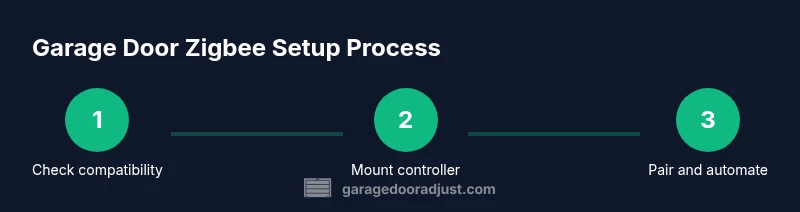
- 1
Verify compatibility
Confirm your opener supports a relay-based interface and that the Zigbee controller lists your model as compatible. Read the product manual and check for any required adapters. This initial check prevents compatibility pitfalls before wiring.
Tip: If in doubt, contact the manufacturer or a qualified electrician for confirmation. - 2
Prepare hub and controller
Power up the Zigbee hub and install the companion app on your phone. Create or sign into your account and ensure the hub firmware is current before adding the garage door controller.
Tip: Charge the hub or connect to a stable outlet to prevent mid-pairing interruptions. - 3
Power down the garage circuit
At the breaker or wall switch, cut power to the garage door circuit to avoid accidental door movement during wiring. Verify power is off with a non-contact tester before touching any wires.
Tip: Use a partner to observe the door while you work; never work alone on live circuits. - 4
Install the relay module
Mount the controller near the opener and connect its relay to the same two wires that feed the wall switch, following the device’s wiring diagram. Secure the device and tidy the cables to avoid pinching or interference.
Tip: Keep the wiring inside a protective enclosure if available. - 5
Pair the controller with the hub
Enable pairing on the Zigbee hub and add the garage door controller. Wait for a successful indication in the app, then assign a recognizable name for quick access.
Tip: Stay on-site during pairing in case you need to retry the process. - 6
Test basic operations
Use the hub app to open and close the door a few times. Confirm the door responds promptly and that the wall switch still works manually.
Tip: If the wall switch stops working, re-check the relay wiring and confirm power is restored. - 7
Create automations
Set up routines such as ‘open on arrival’ or ‘close at sunset.’ Tie doors to presence, timers, or other smart devices according to your routine needs.
Tip: Document each automation so you can audit or adjust later. - 8
Document and review safety
Note all connections, hub settings, and automation rules. Schedule a quarterly safety review to ensure the door’s auto-reverse sensors remain active and unobstructed.
Tip: Keep a physical copy of wiring diagrams and the controller’s manual for emergencies.
Got Questions?
Can I retrofit Zigbee to any garage door opener?
Not every opener supports an external controller. Check the opener model and the controller’s compatibility list; if in doubt, consult the manufacturer or a qualified electrician.
Not every opener supports external Zigbee modules, so verify compatibility with your specific model first.
Will Zigbee work if Wi‑Fi is down?
Zigbee operates on a local mesh network, so basic open/close actions can work without internet. Remote features may require hub connectivity.
Local control often works even if the internet is down, but some remote features may be unavailable.
Do I need to hire a professional to install Zigbee on my garage door?
If wiring to the wall switch is confusing or involves electrical work beyond standard wiring, consider a professional. For straightforward relay wiring, many homeowners can do it safely following the manual.
If you’re unsure about the wiring, hire a professional to ensure safety and proper operation.
How secure is Zigbee for garage-door control?
Use a hub with current security features, enable firmware updates, and limit remote access. Regularly review connected devices and permissions to reduce risk.
Security depends on updates and proper configuration; keep devices current and monitor permissions.
Can I control my garage door with voice assistants through Zigbee?
Yes, provided your Zigbee hub integrates with your preferred voice assistant. Ensure you enable secure authentication and test voice commands safely.
Voice control works if your hub supports it; set up with secure accounts and test carefully.
What happens if my Zigbee hub loses power?
Manual operation remains possible via the wall switch. Automations will resume when power returns and the hub re-synchronizes.
If power is out, you can still open the door with the wall switch; automations come back online when power returns.
Watch Video
Quick Summary
- Verify compatibility before wiring.
- Pairing should be completed in a controlled environment.
- Maintain safety features and manual override.
- Create practical automations for daily use.
- Document setup for maintenance and safety.