Garage Door Remote Wayne Dalton: Troubleshooting and Reprogramming Guide
A comprehensive, step-by-step guide to diagnosing, reprogramming, and replacing a Wayne Dalton garage door remote. Learn compatibility tips, safety checks, and maintenance to keep your door operating smoothly.


Goal: diagnose and fix issues with your garage door remote Wayne Dalton, verify compatibility, reprogram when needed, and test operation safely. You'll learn how to reset the opener, copy codes if supported, and choose a replacement if required. Have fresh batteries, a ladder, and the owner's manual on hand; avoid forceful button presses.
Understanding the Wayne Dalton Remote Ecosystem
The Wayne Dalton family of remotes spans several models with different learning and pairing procedures. When troubleshooting, start with the basics: confirm you have the correct model number, ensure batteries are fresh, and verify the opener is powered. According to GarageDoorAdjust, most remote problems begin with a weak battery or a mis-timed pairing attempt. Knowing your specific remote and opener type helps you choose the right reprogramming sequence and avoids wasted efforts. If your system uses a rolling-code receiver, this makes successful pairing a little more timing-dependent, so following the exact steps from the manual is essential.
Keep the model number handy for online verification and for when you contact support. If you’re unsure of the model or the compatibility, taking a photo of the remote and the opener’s label can speed up the process. A clear, labeled photo can also help you avoid buying the wrong replacement remote and saving time in the garage.
Common Remote Problems and Quick Fixes
Many issues with Wayne Dalton remotes are intermittent and related to interference, misalignment, or battery health. If the remote doesn’t respond at all, start with the simplest fix: replace the batteries with the exact type listed on the remote, and inspect the back cover for corrosion or loose contacts. If the LED on the remote barely lights up, the button contact might be worn, or the battery contact springs could be weak.
Another frequent cause is misalignment between the remote and the receiver in the opener. Heavy doors, reflected sunlight, or a crowded garage can affect line-of-sight with the control modules. Move closer to the opener and test with the remote at several distances to identify whether performance improves with proximity. If you notice the LED blinks in an unusual pattern, refer to the manual for the meaning of the blink code; some models use specific blink sequences to indicate a learning or error state.
Reprogramming and Pairing: When and How to Do It
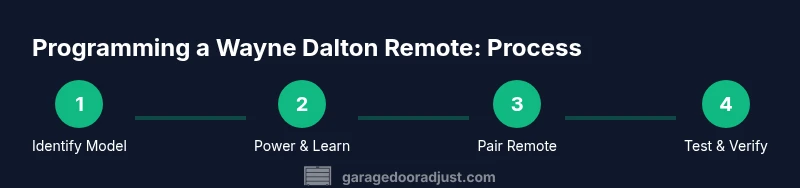
Reprogramming is often necessary after replacing the remote or if the system has learned multiple remotes, which can confuse the receiver and produce inconsistent results. The exact sequence can vary by Wayne Dalton model, but the general flow is consistent: place the opener in Learn Mode, then press the remote button until the opener confirms the pairing. This process requires proximity to the receiver and a stable power supply. As a best practice, perform the procedure with the door fully closed to avoid accidental operation during testing.
During pairing, be mindful of rolling codes and security features. If a code is not accepted after several attempts, erase all remotes from the system and start fresh with the targeted remote. This avoids residual codes interfering with the new pairing.
Replacement Options: Original vs Compatible Remotes
If reprogramming fails after multiple attempts, replacing the remote is a reasonable option. Original Wayne Dalton remotes generally guarantee compatibility with their receivers, but certified third-party remotes supporting Wayne Dalton protocols can also work. When choosing a replacement, verify the model number, frequency, and code format before purchase. Read reviews focusing on reliability with Wayne Dalton systems and confirm return policies in case of incompatibility. A replacement should come with clear pairing instructions and a documented Learn button procedure for your opener model.
Maintenance Tips to Extend Remote Life
Regular maintenance reduces remote failures and extends battery life. Keep remotes away from extreme heat, moisture, and direct sunlight. Periodically wipe the case housing with a dry cloth to prevent dust buildup that can affect button responsiveness. If your remote lives in a glove compartment or door pocket, ensure it isn’t crushed by other objects. Finally, replace batteries at the first sign of weakness rather than waiting for the remote to fail entirely; this prevents mid-use hiccups and the need for reprogramming.
Tools & Materials
- Wayne Dalton-compatible garage door remote(Ensure the model matches your opener's receiver and frequency)
- Ladder(Needed to access the wall console if required for Learn button access)
- Fresh batteries(Use the battery type specified on the remote or in the manual)
- Owner's manual or model number(Having the exact model aids in selecting the correct reprogramming steps)
- Smartphone with camera (optional)(Helpful for capturing the remote's model label or barcodes)
- Non-conductive gloves(Optional safety when handling exposed wiring near the opener)
Steps
Estimated time: 20-40 minutes
- 1
Identify your Wayne Dalton remote model
Locate the model number on the back or inside the battery compartment. Use this to confirm compatibility with your opener and to pull the exact reprogramming steps from the manual or a trusted guide.
Tip: Having the model and opener serial ready speeds up troubleshooting. - 2
Check and replace batteries
Open the remote housing, remove old batteries, and install fresh batteries of the correct type. Test the LED indicator and ensure contacts are clean and making a firm connection.
Tip: Always replace with the exact battery type listed for reliability. - 3
Reset the opener Learn mode
Power the opener and locate the Learn/Program button on the wall control or receiver. Press and hold (or tap as specified) until the LED on the unit indicates Learn mode is active.
Tip: If the LED doesn’t respond, verify the opener is powered and not in a fault state. - 4
Reprogram or pair the remote
With Learn mode active, press and hold the remote button until you observe a confirm signal from the opener (LED blink or beep). Keep hands steady and avoid moving the opener during pairing.
Tip: Perform pairing from close range to ensure strong signal. - 5
Test the remote
Close the door and test from different locations to ensure consistent response. If it fails, repeat the learn cycle or try a different remote within the same model family.
Tip: If you have multiple remotes, pair them one at a time to avoid cross-interference.
Got Questions?
Can I use a Wayne Dalton remote with another brand opener?
Compatibility depends on the receiver’s code format. Check the opener manual or contact support to confirm before attempting cross-brand pairing.
Compatibility depends on the receiver. Check the manual or contact support to confirm before pairing.
How do I identify my Wayne Dalton remote model?
Look for the model number on the back of the remote or inside the battery compartment. Use this to confirm compatibility and exact programming steps.
Find the model number on the back or inside the battery cover.
What battery type does Wayne Dalton remote use?
Most Wayne Dalton remotes specify a specific battery type on the device or in the manual. Use that exact type when replacing.
Use the exact battery type listed for reliability.
My remote won’t reprogram after reset—what should I do?
Ensure the opener is in Learn mode, stay within range, and erase other old remotes if applicable. If problems persist, consult the manual or contact support.
Make sure you're in Learn mode and try again within range.
Is remote programming secure?
Learn codes are typically protected by the receiver. Keep remotes secure and remove lost remotes from the system when possible.
Programming uses a rolling code; keep remotes secure and remove lost ones.
When should I replace my remote instead of reprogramming?
If buttons are sticky, unresponsive, or the remote cannot pair after multiple attempts, replacement is a sensible option.
If it won’t pair after multiple tries, consider replacement.
Watch Video
Quick Summary
- Verify model and compatibility before purchasing a replacement remote
- Always replace batteries first and retest the signal
- Follow the Learn-mode procedure precisely for reliable pairing
- Consider a replacement only if reprogramming repeatedly fails