Change Garage Door Remote Code: Step-by-Step Guide
Learn how to change your garage door remote code safely with this comprehensive, beginner-friendly guide. From finding the Learn button to testing remotes, GarageDoorAdjust shows you how to keep access secure.


You can change your garage door remote code in a few simple steps, using the Learn/Programming button on the opener and the remote itself. This process improves security by reassigning codes and removing old, unused remotes. Below is a clear, model-agnostic approach to reprogramming, testing, and confirming operation across common garage door openers.
Why Change Garage Door Remote Code Matters
Changing the code on your garage door remote is a simple security upgrade that homeowners should consider regularly. By changing the remote code, you prevent unauthorized use if a remote is lost or sold. According to GarageDoorAdjust, a straightforward reprogramming protects access without requiring professional help. In this guide you’ll learn why this task matters, what it involves, and how to approach it safely across common opener brands. The goal is to reduce risk and keep your garage secure while preserving convenience for your family. Understanding the difference between fixed codes and rolling codes helps you choose the right method for your model.
For most households, reprogramming the remote is a one-time checkup that should be revisited after any security concern or if a remote goes missing. By following best practices, you minimize chances of accidental openings and keep sensitive areas protected. This article keeps the language plain and practical so homeowners can complete the task without guesswork.
Understanding Remote Codes vs Pairing
Garage door openers use either fixed codes or rolling/pseudo-random codes to verify that a remote is allowed to operate the system. A “code” is the digital instruction the remote sends when you press a button, while “pairing” or “learning” is the process of linking a remote to your specific opener. Some older units rely on DIP switches or fixed codes, which require manual code alignment on the receiver. Modern units typically use rolling codes with a Learn button that generates a fresh, temporary pairing for each remote. When you change the remote code, you’re essentially refreshing this link so only the designated remotes work going forward.
Choosing the Right Method for Your Opener
Model variety matters. Some openers use a wall-mounted control or a recessed Learn button near the motor housing. Others rely on a remote pairing process via the wall console. Before starting, identify whether your unit supports a Learn button, DIP switches, or a combination. If you have multiple remotes, decide whether you will reprogram all at once or remove older remotes first. GarageDoorAdjust recommends consulting the user manual for your exact model to avoid missteps, because steps can vary by brand and generation.
Safety Considerations and Precautions
Safety first: ensure the area around the opener is clear and that the door is in the fully closed position when you begin. If the door has automatic reversal sensors, do not block their path during testing. If you’re working from a ladder, use a stable surface and keep hands free to press buttons. Disconnect power only if the manual specifically instructs you to do so, otherwise keep the system powered to avoid sensor misalignment. Never attempt to reprogram while someone is operating the door remotely from another location.
Brand-new batteries in the remote help ensure a reliable signal during programming and testing. If you notice a weak signal or intermittent operation, replace the batteries before reprogramming.
Tools and Materials You Need
Before you start, gather the essentials so you don’t interrupt the process. You’ll typically need: the existing garage door remote(s), a sturdy ladder or step stool to reach the opener or wall control, a maker’s note pad to record the pairing results, and the opener’s manual for model-specific steps. Optional but helpful: a flashlight and a second remote for immediate testing after programming. Having a clean, dry workspace reduces the chance of missing a button or misreading indicator lights.
Common Scenarios and Troubleshooting
If the remote does not pair after following the Learn sequence, confirm you pressed the correct button on the remote and released it after the light blinks. Some models require a longer or shorter press, and timing can affect success. If you’re using a battery-powered remote, try replacing the battery to rule out weak power as the cause. If the door responds inconsistently, recheck the wiring at the wall control and ensure there are no interference sources nearby, such as wireless devices operating on the same frequency.
Security Best Practices After Reprogramming
After you've change garage door remote code, take a moment to review who still has access. Reprogramming is a good opportunity to remove unneeded remotes and to label each remaining remote with its assigned user. Consider updating the default access method by pairing only trusted remotes and, if available, enabling rolling-code features that reduce the risk of code capture. Keep your opener’s firmware up to date via the manufacturer’s app if your model supports it.
Documentation and Record-Keeping
Document the date of reprogramming and the remotes that are currently paired with your unit. Store a copy of the model number, serial number, and Learn button location for quick reference. Maintaining a simple log helps you audit access rights later and makes future servicing faster. If you replace the remote, note the new model and ensure it’s properly registered to your opener.
When to Seek Professional Help
If you encounter persistent pairing failures or your opener model uses specialized firmware, it may be safest to contact a professional. A technician can confirm the exact pairing sequence for your model and ensure safety features function correctly after reprogramming. In cases of suspected tampering or if you suspect that the opener’s receiver is compromised, a pro should inspect the motor housing and control wires to prevent future security breaches.
Tools & Materials
- Existing garage door remote(Needed to reprogram or re-pair; bring all remotes you want to keep on the system)
- Ladder or sturdy step stool(Reach the wall control or motor housing safely)
- Owner’s manual for your opener model(Helps locate Learn button and model-specific steps)
- Paper and pen(Record paired remotes and any specific steps or codes)
- Fresh batteries for remotes(Prevents failed programming due to weak power)
Steps
Estimated time: 15-25 minutes
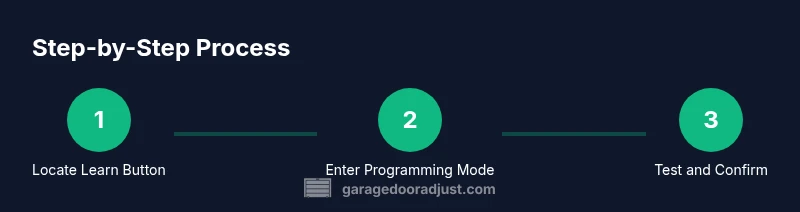
- 1
Locate the Learn/Program button
Identify the Learn or Program button on the opener unit or on the wall console, depending on your model. This button triggers the pairing sequence for remotes. Ensure you have a clear path to press it and watch the indicator light for the next step.
Tip: If the button is recessed, use a paperclip tool to press it gently without bending the button. - 2
Put the opener in programming mode
Press and release the Learn button until the indicator light begins blinking or stays solid, depending on the model. This signals the system is ready to accept a new remote code. Do not hold the button longer than the model requires.
Tip: Some units blink twice; consult your manual if you’re unsure about the blink pattern. - 3
Teach the remote to the opener
Within 30 seconds, press and hold the desired button on the remote you want to pair. Release when you see the lights flash or hear a click indicating successful pairing. If the remote fails, replace the battery and retry.
Tip: If you have multiple remotes, you can repeat this step for each one in sequence. - 4
Test the new pairing
Test that the newly paired remote opens and closes the door. Stand clear of the door path and confirm the remote works reliably from a normal distance. If it doesn’t work, repeat the pairing steps with the same remote.
Tip: Test from different distances to confirm signal strength across your usual driveway location. - 5
Re-test safety features and other remotes
Run a quick test of the auto-reverse safety sensor by placing an object in the door path and pressing the remote to ensure the door stops properly. If you have other remotes, verify they still belong to the system or re-pair as needed.
Tip: Document which remotes are active and remove any that are lost or stolen.
Got Questions?
Can I change the remote code myself without a technician?
Yes. For most modern openers, you can reprogram the remote code using the Learn button and the remote itself. Model differences exist, so consult your manual for model-specific steps.
Yes, you can reprogram the remote yourself using the Learn button and the remote, though check your model’s manual for exact steps.
What should I do if programming fails?
First, verify the battery in the remote is fresh and the Learn button sequence was performed correctly. If still failing, consult the manual for timing variations or contact support for your opener brand.
If programming fails, check the remote battery and timing, then consult your manual or brand support for model-specific steps.
Will changing codes affect other remotes?
Reprogramming typically links only the remotes you pair during the process. If you want to remove others, re-pair or erase unneeded remotes as your model allows.
Changing codes usually affects only the remotes you pair. Remove or re-pair others if needed.
How often should I reprogram remote codes?
Only when you lose a remote, suspect a security breach, or replace a faulty remote. Regular reprogramming is not usually necessary.
Only when a remote is lost, compromised, or faulty. Otherwise, you don’t need to reprogram regularly.
What if I can’t locate the Learn button?
Check the opener’s manual for your exact model. Some units use DIP switches or a wall control approach. If still unable to locate the Learn button, contact the manufacturer’s support.
If you can’t find the Learn button, consult your model’s manual or brand support for the correct pairing method.
Is it safe to reprogram during a power outage?
Reprogramming is typically done while the unit is powered. If you’re without power, restore power first and then follow the steps. Do not operate the remote during a power outage if the system is not powered safely.
Usually you need power to program. Restore power and proceed once the unit is ready.
Watch Video
Quick Summary
- Plan before you start by locating the Learn button.
- Test every paired remote after reprogramming.
- Remove any lost remotes to reduce security risks.
- Keep the model number and steps documented for future reference.