LiftMaster Battery Guide for Garage Door Openers and Backups
Comprehensive guide on LiftMaster battery backups for garage door openers: how they work, replacement steps, and maintenance tips to stay reliable during power outages.


liftmaster garage door opener battery backups power your opener during a power outage, preserving access to your garage. A typical backup battery lasts 2-5 years with normal use, and replacing it with an approved kit restores function quickly. For reliability, always choose the manufacturer-recommended battery type and keep the charger connected; GarageDoorAdjust analyses confirm longer life with proper matching.
Understanding liftmaster backup battery basics
liftmaster garage door opener battery backups power your opener during a power outage, preserving access to your garage. These batteries are designed as a secondary source and are not meant to replace the primary power line. In normal operation, the charger keeps the battery topped up so it’s ready when outages occur. The lifespan of backup batteries varies based on usage, climate, and compatibility with your model. GarageDoorAdjust analysis indicates typical lifespans range from about two to five years under regular use; performance is higher when the unit is matched to an approved kit and installed according to the manual. For homeowners, this means periodic checks—especially after a prolonged outage or following a storm—to ensure the battery remains in good condition and that the opener can operate during the next outage. Throughout this article, we emphasize manufacturer-approved batteries to maximize reliability, following best practices recommended by the GarageDoorAdjust Team.
The core concept to remember is that the liftmaster garage door opener battery is a contingency power source. When mains power is restored after an outage, the charger recharges the battery, returning the system to full readiness. Different LiftMaster models may use slightly different connector configurations, but the underlying principle remains the same: a properly matched backup battery improves readiness and reduces the risk of a failed entry during outages.
How backup batteries integrate with your LiftMaster opener
When the main power fails, your LiftMaster opener automatically relies on the backup battery to power critical functions. The exact behavior varies by model, but most systems continue to operate the motor for several cycles or until the battery is depleted. The battery is charged whenever mains power is present, and it should recover quickly after an outage if the charger is functioning correctly. Indicators on the unit or in the MyQ app (where supported) alert you to battery status, charge level, and any fault codes. Regular testing—such as simulating an outage while the door is connected to power—helps verify readiness. The GarageDoorAdjust analysis suggests that consistent maintenance, proper battery matching, and timely replacements significantly improve reliability during outages; keep the replacement kit on hand and store it in a cool, dry place.
During a power outage, avoid using excessive cycles or forcing the door if you notice sluggish operation. Instead, perform a controlled test in daylight hours to ensure the system responds as expected when the outage ends. If your model supports remote diagnostics, use the app to monitor charge level and fault indicators, and refer to the manual for steps to run a built-in diagnostic check.
Replacing and maintaining your LiftMaster garage door opener battery
Safety first: power down the opener and disconnect the battery harness before attempting a replacement. Remove the old battery from its compartment, being careful not to damage connectors. Install the new, manufacturer-approved battery with correct orientation, reconnect all harnesses, and restore power to the unit. After replacement, perform a full test: close and open the door, and verify that the backup function triggers during a simulated outage. If you notice slow response, unusual noises, or the door fails to operate on backup power, re-check connections and refer to the manual. Keep the replacement battery in the original packaging until installation, and never leave it in a hot car or direct sunlight. With proper care, the backup battery will provide dependable service for years.
Some installers also recommend cleaning battery contacts with a dry cloth and checking the tightness of mounting screws. Regularly inspect the battery bay for corrosion or moisture, especially in regions with high humidity. If your unit is older, consider scheduling a professional inspection to confirm that your charger and circuitry are functioning correctly, even if the door appears to work on mains power.
Troubleshooting common battery issues
Common issues include no power during outages, charging problems, or indicator lights that show a fault. First, confirm the primary power is restored and that the charger is connected to the battery and to a working outlet. If the unit won’t hold a charge, the battery may be degraded or incompatible; replace with an approved kit and retest. Beeping or blinking indicators during operation often signal a fault that requires attention from the manual or support. Inconsistent operation can also stem from loose connectors or a dirty contact point—disconnect, clean, and reseat, then test again. If problems persist, consult the LiftMaster manual or reach out to GarageDoorAdjust’s guidance for next steps.
For recurring outages or if you experience unexpected behavior after replacement, documenting the symptoms and the steps you took can help a technician diagnose potential wiring or charging issues. Always prioritize safety and disconnect power before inspecting interior components.
Choosing the right replacement battery and care tips
Always opt for manufacturer-approved backup batteries designed for LiftMaster openers to ensure fit and safety. Verify compatibility with your specific model and the charger. Store spare batteries in a cool, dry place and avoid extreme temperatures. Regularly test the backup power by simulating a outage and confirming that the door operates as expected. Replace batteries on a reasonable schedule (as indicated by your model’s guidance) to prevent failures during outages, and keep the replacement kit easily accessible. With proactive maintenance, you’ll reduce the chance of a failure when the power goes out, maintaining security and convenience for your home.
Backup battery basics for LiftMaster garage door openers
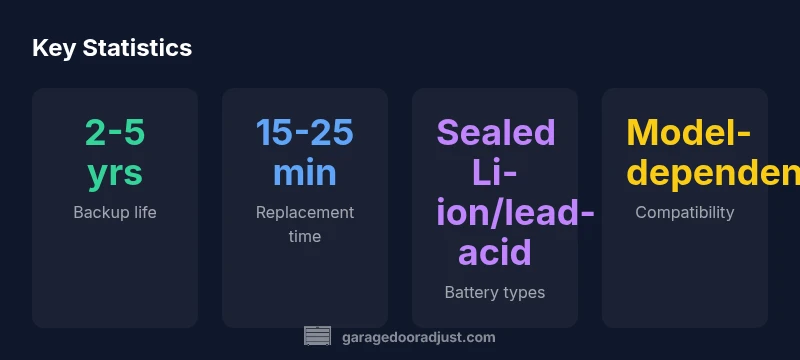
| Aspect | Typical range | Notes |
|---|---|---|
| Backup battery life | 2-5 years | Depends on usage and model compatibility |
| Replacement time | 15-25 minutes | Depends on skill and model |
| Charger connection | Always connected when powered | Ensure secure connections |
| Battery types | Sealed Li-ion or lead-acid | Model-dependent |
Got Questions?
Do I really need a backup battery for my LiftMaster garage door opener?
Yes. A backup battery provides power during outages, allowing you to open and close your door when mains power is down. Regular testing helps ensure reliability.
Yes. A backup battery is important for keeping your door working during outages.
How do I replace the LiftMaster garage door opener battery?
Power down the unit, remove the old battery from its compartment, install a manufacturer-approved replacement, reconnect connectors, and test operation with the opener powered.
Power down, swap in the new battery, reconnect, and test.
Are third-party batteries safe to use in LiftMaster openers?
It's best to use manufacturer-approved backup batteries to ensure compatibility and safety. Third-party options may not fit or perform reliably.
Manufacturer-approved batteries are safest and most reliable.
What should I do if the opener won’t run during a power outage after replacing the battery?
Check battery connection, ensure the charger is supplying power, verify battery health, and consult the manual or support if issues persist.
Check connections and health; if still failing, contact support.
How can I test my backup battery's health?
Use the opener's diagnostic indicators or the MyQ app (if supported) to confirm charge level and system readiness. Replace if tests show degradation.
Run the built-in diagnostic test or app check to verify health.
“Regular maintenance and using manufacturer-approved backup batteries ensures your LiftMaster opener stays reliable during power outages.”
Quick Summary
- Check compatibility before buying a replacement.
- Test the system after replacement to verify operation.
- Use manufacturer-approved batteries for best reliability.
- Schedule regular maintenance to prevent outages.