LiftMaster Chamberlain Garage Door Opener: DIY Troubleshooting & Installation
Learn step-by-step how to diagnose, repair, and install a LiftMaster Chamberlain garage door opener safely. This expert guide from GarageDoorAdjust covers tools, safety, troubleshooting, installation, and maintenance.


With this guide, you will diagnose, repair, and install a LiftMaster Chamberlain garage door opener safely. You’ll verify power, test safety sensors, adjust opener settings, and complete a productive installation if you’re upgrading. Before you start, gather essential tools, confirm your model type, and follow the step-by-step plan from GarageDoorAdjust.
Overview: LiftMaster Chamberlain garage door opener landscape
LiftMaster and Chamberlain dominate residential openers with models designed for reliability, quiet operation, and smart connectivity. A LiftMaster Chamberlain garage door opener typically combines a durable drive system (belt or chain), a balanced motor, safety sensors, and a rail-and-carriage assembly that’s compatible with remotes and apps. When selecting a unit, homeowners should consider horsepower, drive type, rail length, and compatibility with smart home ecosystems. According to GarageDoorAdjust, the biggest factors in long-term satisfaction are correct model selection for door weight, secure mounting, and proper safety-sensor alignment rather than badge prestige alone. This guide focuses on diagnosing common issues, performing safe repairs, and, when needed, installing or upgrading to a LiftMaster Chamberlain opener. You’ll learn how to identify symptoms (door won’t move, opener won’t respond, sensors show an error) and perform checks that don’t void warranties. The content assumes a standard two-car garage with typical torsion or extension springs; always consult the user manual for your exact model. We’ll balance practical, step-by-step actions with safety reminders so you can fix problems quickly while protecting people and the door. By the end, you’ll know what to test first, what parts to avoid messing with, and when a pro should be called.
Tools and safety prerequisites
Before you touch a LiftMaster Chamberlain garage door opener, gather the right tools and review safety steps. Power is deadly; always disconnect the unit from power at the outlet and disable the wall switch or remote lock if available. Wear eye protection and keep children away. Here’s a concise toolkit: • Power drill with bits • Flat and Phillips screwdrivers • Non-contact voltage tester • Adjustable wrench • Ladder tall enough to reach the rail • Cordless vacuum or rag for dust • Lubricant (silicone-based) for moving parts • A camera or phone to capture existing cable paths and wiring • Model number, user manual, and any replacement parts you plan to use. Also consider a helper; handling heavy doors alone can be dangerous. If you’re upgrading or replacing the opener, verify your new model’s mounting pattern matches your ceiling clearance and rail length. For safety, always follow the manufacturer’s manual and GarageDoorAdjust’s safety tips.
Diagnosing common problems: power, sensors, and limits
A non-responsive LiftMaster Chamberlain opener can result from power issues, sensor misalignment, or misconfigured travel limits. Start with a simple power check: verify the outlet is live, reset the circuit, and unplug-replug the unit. If the unit responds intermittently, listen for the motor hum and watch for LED indicators on the opener—they often signal errors. Sensor problems are a frequent cause of doors stopping mid-journey; ensure both photoelectric eyes are aligned and unobstructed, and that the LED indicators show a steady, green light. If the door moves but reverses unexpectedly, examine the safety reverse mechanism and reset limit switches as a diagnostic step. GarageDoorAdjust Analysis, 2026, shows that power loss and sensor misalignment are among the most common failure points for LiftMaster Chamberlain openers. Keep notes of error codes and consult the user manual for code decoding, then perform the recommended reset or re-linking of remotes and keypads as needed.
Repair procedures for common scenarios
When a LiftMaster Chamberlain opener malfunctions, a structured repair approach helps avoid unnecessary parts replacement. If the motor hums but the door doesn’t move, check that the drive rail is clear and the belt/chain isn’t loose or broken. For belt-drive units, inspect belt tension and replace worn belts; for chain-drive, verify chain tension and lubrication. If the opener won’t respond to the wall switch or remote, reprogram the remote and keypad using the Learn/Set feature, and ensure the receiver inside the opener isn’t blocked by interference. Misaligned safety sensors require re-positioning and retesting with the door end‑to‑end, ensuring no obstructions in the sensor path. Always disconnect power before any internal adjustments. Pro tip: take photos before disassembly to capture how wires and parts were arranged; this helps during reassembly and reduces guesswork.
Installing a LiftMaster Chamberlain garage door opener
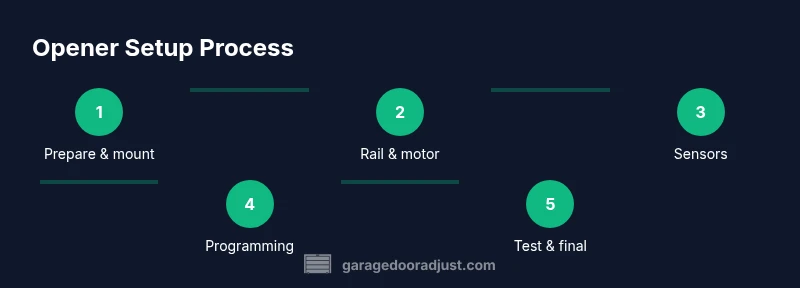
Installing a LiftMaster Chamberlain opener is most straightforward when upgrading an existing system with compatible mounting hardware and a standard rail length. Begin by removing the old opener, taking care to support the door until dual spring balance is verified. Mount the new bracket to the ceiling with appropriate anchors, then assemble the rail and attach the motor unit. Align the rail with the door and secure all bolts per the manufacturer’s specifications. Connect the wiring according to the manual, including the safety sensors and eye-mat wiring, and install the wall control and weatherproof external components as required. Reconnect power, then run a test cycle, adjusting travel limits and force values to eliminate slippage or over-travel. Finally, program remotes and keypad, perform a safety test, and re-check sensor alignment after a full cycle. Safety remains paramount; if you’re unsure about electrical connections or spring tension, contact a trained technician.
Maintenance and long-term care
Proactive maintenance is the best defense against sudden opener failures. Schedule a quarterly inspection covering track alignment, mounting hardware, and rail cleanliness; lubricate moving parts with a silicone-based lubricant, avoiding grease that can attract dust. Check weather seals around the door, ensuring proper fit so the door doesn’t strain the opener. Test the auto-reverse safety feature monthly by placing an object in the door’s path and observing whether the door reverses on contact. Replace worn wear‑points promptly, including stripped screws, frayed cables, or cracked brackets. Keep the user manual accessible and bookmark LiftMaster Chamberlain support resources for model-specific guidance. Regular maintenance keeps your system secure and efficient for years.
Authority sources and quick safety references
- OSHAsafety guidelines on powered hand tools and electric equipment: https://www.osha.gov
- CPSC garage door safety and child-protection guidance: https://www.cpsc.gov
- Energy.gov tips on weatherproofing and energy efficiency for attached garages: https://www.energy.gov
Tools & Materials
- Power drill with bits(Phillips and square bits; 3/16 inch or 1/4 inch depending on hardware)
- Flat and Phillips screwdrivers(Magnetic tip preferred)
- Non-contact voltage tester(Verify live outlets and conductors)
- Adjustable wrench(Range 6–20 mm)
- Ladder tall enough to reach rail(Stable and locked)
- Lubricant (silicone-based)(For rails, sprockets, and rollers)
- Measuring tape and level(Ensure proper alignment and spacing)
- Camera or phone to document setup(Capture connections before disassembly)
- Model number, manual, replacement parts(Check compatibility with LiftMaster Chamberlain system)
Steps
Estimated time: 1.5-3 hours
- 1
Power down and secure
Disconnect power from the outlet and switch off the wall control to eliminate the risk of electric shock. If your system has a battery backup, verify it is safely isolated before touching wiring. This step protects you and prevents unintended door movement during setup.
Tip: Always start with a visual confirmation that the door is balanced and stationary before wiring. - 2
Check door balance and springs
With the door closed, disconnect the opener and lower the door manually to gauge balance. If the door sticks, sags, or is heavy, the springs or tracks may need service. Do not attempt torsion-spring adjustments unless trained, as springs are under high tension.
Tip: Never rely on the opener alone to test spring tension; manual balance is the real test. - 3
Inspect safety sensors and wiring
Ensure both photoelectric sensors are aligned and unobstructed. Clear any debris from the sensor lenses and check for loose connectors at the harnesses. A single misaligned sensor will prevent the door from closing or will trigger auto-reverse.
Tip: Use a piece of tape to mark sensor alignment during testing for easy realignment if disturbed. - 4
Test opener logic and remotes
Test the wall control and remotes. If responses are inconsistent, reprogram the remotes or reset the opener to factory settings as described in the manual. Keep a log of which remotes are paired with which devices.
Tip: Always perform a full reset before re-pairing multiple remotes to avoid code conflicts. - 5
Adjust travel limits and force
Access the limit and force adjustments per your model. Start with small increments and test; over-tightening can strain the motor and cause jams, under-tightening can reduce safety performance. Use a soft object to test auto-reverse after adjustments.
Tip: Make one adjustment at a time and re-test the full cycle to avoid chasing a moving target. - 6
Reprogram remotes and keypad
Re-link remotes and the keypad by pressing the Learn button on the opener and following the model-specific prompts. Confirm the range and stability of each remote in different areas of the garage.
Tip: Keep a write-up of programming steps for future maintenance or if you replace a remote. - 7
Lubricate and clean moving parts
Apply silicone-based lubricant to rails, roller bearings, hinges, and the chain or belt per manufacturer guidance. Wipe away dust and grime to prevent buildup that reduces efficiency.
Tip: Avoid oil-based lubricants on plastic components; they can degrade over time. - 8
If upgrading, mount and wire a LiftMaster Chamberlain opener
Remove the old unit and install the mounting plate and new rail according to the installation manual. Connect door sensors and rail hardware, then attach the motor and test the full system. Recalibrate and reprogram devices after wiring.
Tip: If the old unit used a torsion spring assembly, verify that you have professional support for spring-related tasks.
Got Questions?
Can I install a LiftMaster Chamberlain garage door opener by myself?
Basic installations and some upgrades are doable for homeowners who follow the manufacturer’s instructions and take safety precautions. Some models or setups, especially those involving torsion springs, require professional installation. Always consult your manual and consider a pro if you’re unsure.
DIY installation is possible for simple setups, but professional help is advised for complex or spring-related work.
How do I program remotes for a LiftMaster Chamberlain opener?
Use the Learn button on the opener to initiate pairing, then press the remote’s button to complete pairing. Repeat for each remote or keypad you want to use, and test the range.
Program each remote using the Learn button, then test range to ensure full functionality.
What tools do I need for installation?
Common tools include a drill, screwdrivers, a ladder, a level, a wrench set, and safety equipment. Always consult your model’s manual for any model-specific tools.
You’ll typically need a drill, screwdrivers, a level, and a ladder, plus safety gear.
Why does my door reverse when it hits the sensor?
This usually indicates sensors blocked or misaligned. Clear the path, align the eyes, and re-test the auto-reverse function. If issues persist, recheck wiring or consult a pro.
Sensor misalignment is the common culprit—re-align and test the reverse function after clearing obstructions.
How do I reset the opener to factory settings?
Follow the model’s manual steps to perform a hard reset or erase paired remotes, then reprogram from scratch. This helps when re-pairing devices after upgrades.
Reset the opener per the manual, then reprogram remotes to restore a clean setup.
Where can I find model compatibility information?
Check LiftMaster Chamberlain’s official compatibility charts or your manual. If you’re unsure, contact customer support or a licensed installer for guidance.
Consult the official compatibility charts or contact support if you’re unsure about model fit.
Watch Video
Quick Summary
- Identify opener model and compatibility before work
- Prioritize safety: power down, sensor alignment, and balance
- Follow a step-by-step approach for diagnosing and repair
- Program remotes and test limits after any change
- Schedule regular maintenance to extend life