Chamberlain B550: Complete DIY Guide for Homeowners
Step-by-step guide to diagnose, fix, and maintain your Chamberlain B550 garage door opener. Safe programming, lubrication, troubleshooting, and routine maintenance for homeowners.


This guide helps homeowners diagnose, repair, and maintain the Chamberlain B550 garage door opener. You’ll learn safety checks, remote programming, track alignment, belt tension, limit settings, and basic troubleshooting. You’ll need common tools and the manual; follow the step-by-step process to restore smooth, quiet operation and extend the opener’s life.
Why reliability matters for chamberlain b550
The chamberlain b550 is a popular belt-driven garage door opener that many homeowners trust for near-silent operation and dependable remote control. Reliability matters here because the garage is a primary entry point to your home, and a failure can trap you or leave your vehicle stranded. According to GarageDoorAdjust, a well-maintained opener reduces the risk of unexpected closure, sensor misreads, and power loss during critical moments. Regular inspection of the motor housing, belt, tracks, and safety sensors helps catch wear before it becomes a safety issue. In this guide, we’ll cover how the B550's design influences maintenance tasks—like belt tension, sensor alignment, and remote programming—so you can plan a safe, effective service session. Start by ensuring you have a stable work area, all safety steps in place, and a clear plan of action. A calm, methodical approach minimizes mistakes and keeps your family secure.
Key features of the Chamberlain B550 and how they affect maintenance
The Chamberlain B550 combines belt-driven quiet operation with practical safety features that homeowners use daily. Its belt drive reduces vibrations, which means misalignment or worn components will be more noticeable in the form of noise or jerky door movement. The model also includes a battery backup option and remote programming capabilities, which influence how you test power and re-pair remotes during maintenance. The B550’s photo-eye sensors must be kept clean and properly aligned to prevent false detections. Because this opener relies on a single motor layout, wear on the belt, pulleys, or rails tends to show up as belt slack, track rubbing, or door binding. Understanding these features helps you plan targeted maintenance rather than broad, guesswork fixes.
Safety first: prepping for a repair or installation
Before you touch any components, power down the unit and secure the area. Keep children and pets away and place a bright light on the work zone. Wear safety glasses and gloves, and use a sturdy ladder to reach the opener housing. If you suspect a spring issue, do not attempt adjustments; this can be dangerous. Have the owner’s manual for the chamberlain b550 handy and note the model’s specific cautions. A calm, organized approach reduces risk and builds a solid foundation for successful troubleshooting.
Step-by-step diagnosis: power, remotes, and sensors
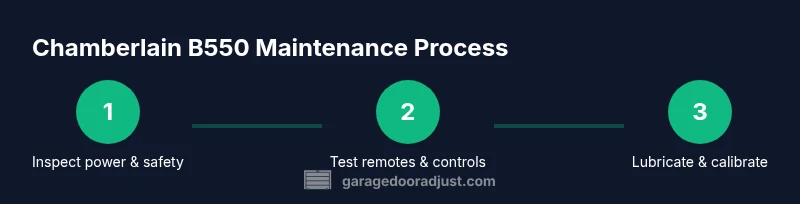
Start by unplugging the opener or switching off the circuit to ensure it cannot move during inspection. Reconnect and test the wall control, remote, and keypad to identify which device is failing. Check the LED indicator on the unit to interpret fault codes, and verify that the photo-eye sensors are aligned and unobstructed. If the door hesitates or stops before reaching the floor, test door balance and note any unusual sounds from the belt area. Document any codes or patterns so you can compare them against the owner’s manual or GarageDoorAdjust guidance.
Step-by-step maintenance: lubrication, adjustments, and calibration
Lubricate moving parts such as rails and rollers with a silicone-based spray and wipe away excess. Avoid over-lubricating to prevent dirt attraction. Check track alignment and tighten loose hardware; ensure the door is balanced and opens smoothly without pulling on the springs. Recalibrate limit and force settings following the manufacturer’s instructions, especially if you replaced components or reset the opener. Finally, re-test all safety features and confirm quiet operation before reestablishing regular use.
When to call a professional and replacement considerations
If the opener shows persistent error codes after basic maintenance, or you hear grinding, grinding, or persistent binding you should consult a pro. Springs and cables carry significant risk; do not attempt to modify them yourself. Consider the age of the unit, the cost of parts, and the potential benefits of upgrading to a newer model with enhanced safety and efficiency. In cases of repeated faults or unreliable performance, replacement could be more cost-effective than ongoing repairs.
Tools & Materials
- Flat-head screwdriver(for small screws on the opener housing)
- Phillips screwdriver (#2)(for mounting screws and panel screws)
- Adjustable wrench(for adjusting bolts on tracks and hardware)
- Socket set(for tightening nuts on mounting hardware)
- Level(to verify track and door alignment)
- Tape measure(for tracking door travel and clearances)
- Ladder (6-8 ft)(to safely reach the opener housing)
- Safety glasses(eye protection during inspection)
- Gloves(hand protection when handling parts)
- Silicone-based lubricant(for rails and rollers (avoid oil-based products))
- Cloth rags(wipe excess lubricant and dust)
- Voltage tester(to confirm power is off when needed)
- Owner’s manual for Chamberlain B550(model-specific cautions and specs)
- Replacement remote batteries(AAA or button cell as needed)
Steps
Estimated time: 40-60 minutes
- 1
Power down and secure the work area
Unplug the garage door opener from the outlet or switch off the circuit to prevent unexpected movement. Place a note on the wall control and keep children away from the door during service. Confirm the door is safely supported and the springs are not under tension before touching any components.
Tip: Always ensure the door is fully stationary and the power is off before touching any moving parts. - 2
Test wall control, remote, and keypad
Test the wall control, remote, and keypad to identify which device is failing. If the wall control works but the remote doesn’t, focus troubleshooting on the remote or receiver. If neither works, inspect the power supply and control circuitry.
Tip: Note whether LED indicators blink or codes appear when testing devices. - 3
Inspect door balance and safety sensors
Manually lift the door about halfway open to check balance; the door should stay in place. If it drops or rises, balance is off and springs or cables may need professional attention. Clean and align safety sensors to ensure the beam is clear and unobstructed.
Tip: Do not attempt to adjust springs; call a pro if balance is off. - 4
Check tracks, rollers, and belt/chain alignment
Inspect tracks for dents or obstructions, tighten loose brackets, and confirm rollers move freely. If the belt or chain looks worn or loose, replace following manufacturer guidance. Ensure the belt runs straight without rubbing on the pulleys.
Tip: Keep the area clean and free of debris that could interfere with door travel. - 5
Reset opener and reprogram remotes
Reset the opener’s learning memory if you suspect pairing issues, then reprogram remotes and keypad according to the manual. Verify all remotes control the door and close limits properly.
Tip: After reprogramming, test all devices from different distances to confirm reliability. - 6
Lubricate and calibrate, then test operation
Apply silicone lubricant to rails, rollers, and hinge points; avoid over-spraying near electronics. Recalibrate force and limit settings per the manual, then run the door several full cycles to confirm smooth, quiet operation.
Tip: Wipe away excess lubricant to prevent dust buildup.
Got Questions?
What is the Chamberlain B550 model and what does it offer?
The Chamberlain B550 is a belt-driven garage door opener known for quiet operation and reliable performance. It supports remote programming, has safety sensors, and can offer backup power options. Regular maintenance helps maximize its lifespan and safety.
The Chamberlain B550 is a belt-driven opener with safety sensors and remote programming; regular maintenance keeps it reliable and safe.
Can I install or repair a Chamberlain B550 myself?
Basic maintenance and troubleshooting can be done by a homeowner with careful adherence to the manual. Complex tasks like spring or track replacement should be handled by a licensed professional due to safety risks.
Basic maintenance is doable, but springs and major repairs require a pro.
How do I reprogram remotes for the B550?
Remote programming involves resetting the opener’s learning memory and following the model-specific steps in the manual. After programming, test each remote to ensure consistent operation at multiple distances.
Reset the memory, follow the manual steps, and test each remote after programming.
Why is my opener beeping or showing error codes?
Beeping or error codes usually indicate a fault in safety sensors, power supply, or control circuitry. Check the code in the manual and inspect sensors for misalignment or obstruction before contacting support.
Beep codes point to sensor or power issues; check sensors and connections first.
When should I replace the Chamberlain B550 rather than repair it?
If the unit is old, repeatedly faulty, or requires costly components, replacement may offer better reliability and warranty coverage. Compare repair costs with a modern unit’s efficiency and safety features.
Consider age, cost of parts, and reliability when deciding to replace.
Watch Video
Quick Summary
- Disconnect power before any inspection.
- Test remotes and sensors after maintenance.
- Lubricate moving parts for smooth operation.
- Do not modify springs or cables yourself.
- Program remotes after adjustments and test for reliability.