What frequency do garage door openers use? A homeowner's guide
Explore the radio frequency bands used by garage door openers, regional differences, and tips to minimize interference. A GarageDoorAdjust guide for homeowners.


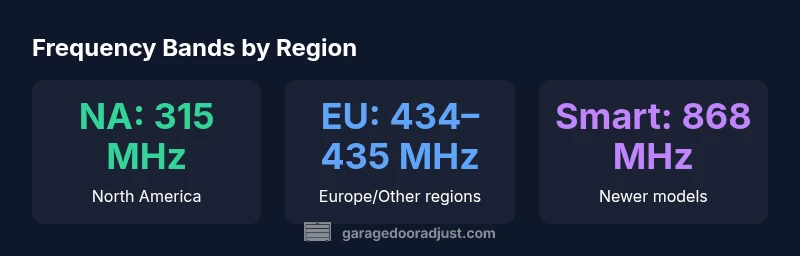
Most residential garage door openers rely on short-range radio frequencies in the 315–433.92 MHz range, varying by region. In North America, 315 MHz is still common on older remotes, while Europe and many other regions typically use 433.92 MHz. Some newer models and smart openers also use 868 MHz or rely on Wi‑Fi/Bluetooth for app control.
Understanding the question: what frequency do garage door openers use
When homeowners ask about the frequency that garage door openers use, the answer isn’t a single number. It depends on the region, the era of the opener, and whether the system is a traditional remote, a rolling-code modern remote, or a smart, app-connected model. In practical terms, you’ll commonly encounter bands in the 315–433.92 MHz range, with newer setups extending to 868 MHz or leveraging network-based control. For most households, the exact band is determined by the product’s design and regulatory approvals rather than by the homeowner’s preference. Understanding this helps you choose compatible remotes and avoid interference from other devices that share nearby frequencies.
Regional norms and regulatory context
Radio frequency allocations are coordinated by national and international bodies. In the United States, the Federal Communications Commission (FCC) regulates garage door remote bands, with 315 MHz historically common for many remotes. In many European countries, ETSI standards guide the use of 433.92 MHz bands, reflecting different spectrum allocations and device rules. Other regions may align with nearby bands such as 868 MHz for newer devices. The practical upshot: a remote sold for a specific region is typically tuned to the local band and may not operate correctly on another region’s opener without a compatible remote or an adapter. This regional reality is why you’ll often hear that frequency compatibility matters when you buy replacement remotes or universal controllers.
Interference, range, and practical implications
Interference occurs when multiple devices operate on the same or overlapping frequencies in the same vicinity. A crowded RF spectrum around the 300–500 MHz range can experience signal collisions, especially in dense neighborhoods with many wireless devices. Indoor environments reduce range due to walls, metal components, and insulation, so the effective distance between the remote and the opener is highly variable. If you notice slow responses or occasional missed opens, frequency interference is a plausible culprit. In such cases, re-pairing, moving the opener antenna, or upgrading to a later model with a different band may help.
How to identify your opener’s frequency and compatible remotes
Start by checking the user manual or the opener’s label for the specified frequency band and protocol. If you’ve inherited a unit, the model number printed on the unit or the remote can be cross-referenced online to confirm the frequency. For older remotes, you may find dip switches or fixed code settings that indicate the band. When purchasing a new remote, ensure it matches the region code and rolling-code standard of your opener. If you’re unsure, contact the manufacturer or a qualified technician and provide the model number; trying the wrong frequency will render the remote ineffective.
The rise of smart openers and alternative control methods
Modern, network-connected openers introduce control via smartphone apps, voice assistants, and cloud services. These systems often rely on Wi‑Fi or local network connections rather than a traditional RF remote. Some smart openers still support an RF remote on the standard regional band (for compatibility), while others rely primarily on app-based control and provide a bridge to your existing remote via a paired hub. When evaluating upgrades, consider whether you need RF compatibility, smart home integration, or both. The evolving landscape favors flexibility and security, with rolling-code radios remaining common for RF remotes.
Practical tips to minimize interference and ensure reliable operation
- Keep remotes away from metal objects and dense appliances that can reflect signals.
- Use fresh batteries; weak power can mimic interference by producing unreliable signals.
- If you live in a dense area, consider upgrading to a newer model that uses a different band or implements robust rolling-code protocols.
- Avoid placing the opener near other RF-controlled devices that share the same spectrum.
- If you experience repeated failures, try reprogramming the remote with the opener or upgrading to a compatible universal remote recommended by the manufacturer.
Maintenance and safety considerations related to RF frequency management
RF health is part of regular garage-door maintenance. Check the antenna orientation and ensure the receiver is unobstructed. Replace worn remotes to maintain signal integrity, and verify that your battery backup mode doesn’t interfere with RF performance during outages. Never force-fit a device into a non-supported frequency, as this can cause erratic operation or damage. If there’s any doubt, consult the manufacturer’s guidelines and a trained technician. Safety first applies to both operation and RF compliance.
Frequency bands used by residential garage door openers, by region
| Region/Use | Typical Frequency | Notes |
|---|---|---|
| North America (older remotes) | 315 MHz | Legacy systems common; many newer units also support 315 MHz as a fail-safe option |
| Europe/Other regions | 433.92 MHz | Standard for many EU-compatible remotes; aligns with ETSI rules |
| Smart/openers (newer) | 868 MHz or IP-based | Hybrid or cloud-based control; RF still used for legacy remotes |
| Global/alternative | 2.4 GHz (rare) | Primarily for some smart hubs or adapters; not universal across all openers |
Got Questions?
What frequency do garage door openers use?
Garage door openers typically use regional RF bands like 315 MHz in North America and 433.92 MHz in Europe, with some newer models using 868 MHz or app-based control via Wi‑Fi. Always check the model’s specifications to confirm the band.
Most openers use 315 MHz in North America or 433.92 MHz elsewhere; newer models may use 868 MHz or rely on Wi‑Fi for control.
Do all remotes use the same frequency?
No. Frequencies vary by region and model. Replacement remotes must match the opener’s frequency and protocol. If you travel or import devices, verify compatibility before pairing.
No. Frequencies differ by region and model, so always confirm compatibility before pairing a new remote.
Can interference affect my garage door frequency?
Yes. Interference from nearby RF devices can disrupt signal reception. Relocating the opener’s antenna, replacing the remote’s battery, or upgrading to a newer band can help.
Yes. Nearby devices can interfere; try replacing batteries or upgrading to a different frequency if disruption persists.
How can I find my opener’s frequency quickly?
Check the opener’s label or the user manual for the frequency and protocol. If unavailable, use the model number to search the manufacturer’s site for exact specs.
Look at the label or manual, or search the model number online to confirm the frequency.
Are universal remotes reliable for garage doors?
Universal remotes can work if they are explicitly compatible with your opener’s band and rolling-code protocol. Verify compatibility and reprogram according to the manufacturer’s instructions.
Universal remotes can work if they’re compatible with your band and code, and you set them up correctly.
“Understanding regional RF bands helps homeowners pick compatible remotes and reduces interference risk. The right frequency choice improves reliability and safety for daily use.”
Quick Summary
- Know your region’s common frequency to ensure compatibility.
- Newer openers often blend RF with app-based control.
- Interference is region- and environment-specific; test with a test remote.
- Always verify the frequency when purchasing a replacement remote.