How Many Garage Door Frequencies Are There? A Guide
Learn the major frequency bands used by garage door remotes, how to identify your opener’s band, and how to choose compatible remotes. A practical guide from GarageDoorAdjust for homeowners looking to diagnose and fix frequency-related issues.


There are four to five major garage door frequency bands used worldwide by remotes and receivers, with common bands including 315 MHz, 390 MHz, 433.92 MHz, and 868.3 MHz. Some newer systems test other bands or proprietary variants. Always verify your opener's band before purchasing a remote to ensure compatibility.
How many garage door frequencies are there? A practical overview
For homeowners asking how many garage door frequencies are there, the answer is nuanced. There isn't a single global tally because frequency allocations differ by region, regulator rules, and legacy hardware. In practical terms, there are four to five major bands that most remotes and receivers rely on, with occasional deviations for regional standards or newer digital protocols. Understanding this landscape helps you avoid mismatches when buying a replacement remote or refurbishing an opener. According to GarageDoorAdjust, the key is to confirm the exact band your system uses before investing in any add-on.
The frequency bands exist to manage interference, ensure secure rolling codes, and accommodate regional licensing requirements or unlicensed spectrum use. For a typical home, the difference between bands won't affect day-to-day operation unless you mix brands or try to pair a remote from a different region. You don't need a degree in radio engineering—just a practical checklist. Start with the opener model number and the label on the receiver or back of the remote to identify the band. If the label is unreadable, a quick visit to the manufacturer’s support page or a chat with a professional from GarageDoorAdjust can confirm the right band. With that knowledge, you can buy compatible remotes, reprogram existing ones, or upgrade to a modern system with built-in band awareness.
Core bands used today
Garage door frequency bands are often grouped by region, but the four bands below cover the vast majority of residential openers. The exact band should match both the receiver and the remote. The four common bands are:
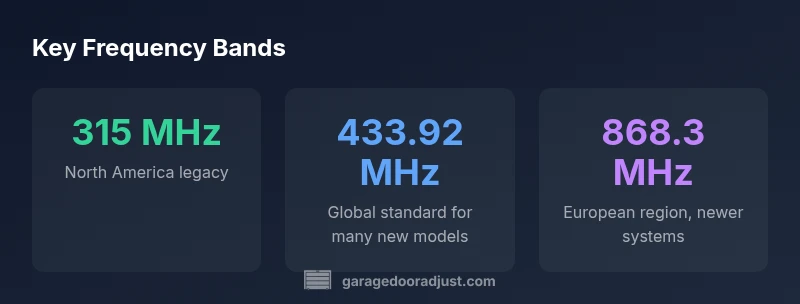
- 315 MHz: Predominant in North America for older, legacy remotes. Many modern receivers still support 315, but some have moved away.
- 390 MHz: Another classic North American standard; some brands used this for longer-range signaling. Interference-prone in dense neighborhoods, but generally reliable with proper alignment.
- 433.92 MHz: A widely adopted European and global band; a large fraction of newer remotes and receivers are designed around this frequency.
- 868.3 MHz: Common in newer European and international systems; modern smart openers sometimes use this band or a variant, often with encrypted rolling codes.
Additionally, a handful of brands and regional markets experiment with other bands or proprietary frequencies. Some newer systems incorporate digital or multi-band receivers that can listen across several bands, which helps with compatibility when you mix brands or replace a component. When evaluating remotes, always check the frequency and code format (rolling vs fixed code) to ensure you aren’t buying a remote that can’t communicate with your opener.
Regional nuances and why bands differ
Frequency allocation is driven by regulatory rules and historical development. In North America, 315 and 390 MHz bands were widely used for many years, reflecting unlicensed spectrum and compatibility with older hardware. In Europe, 433.92 and 868.3 MHz became common as newer, more secure coding schemes emerged and regional certification aligned with consumer electronics. In other regions, you may encounter slightly different variants or close cousins of these bands. The practical impact is modest for a single-family home if you stay within one brand family, but problems arise when you try to mix remotes from different regions or when an older receiver doesn’t recognize the newer band.
If you’re installing a new opener or replacing multiple remotes, verify regional compatibility first, then confirm that your receivers support the intended band. Some manufacturers publish a cross-reference table; if yours doesn’t, contact support or check the model line’s FAQ. For homeowners, the upshot is simple: identify the local frequency band in use, ensure remotes and receivers match, and avoid assuming universal one-band-fits-all compatibility. Consistency across devices is the simplest path to reliable operation.
How to identify the frequency your opener uses
Identifying the exact frequency involves a short diagnostic routine:
- Check the label on the receiver or the back of the remote for a frequency stamp (e.g., 315, 390, 433.92, 868.3).
- Look in the opener manual or on the manufacturer’s website for the model’s frequency specification.
- If the label is unreadable, use a RF frequency scanner or consult a professional who can test the signal with calibrated equipment.
- When replacing parts, ensure the new remote or receiver’s frequency matches the existing system; otherwise, you’ll encounter non-communication.
After you determine the band, note the code type (rolling vs fixed) as well. Even two remotes on the same band may use different code formats, which affects compatibility. Documenting these details and keeping them with your garage door equipment reduces future headaches and makes maintenance easier.
Compatibility and remote pairing: what to watch for
Even within the same band, compatibility can hinge on code type and signal encoding. The majority of modern openers use rolling codes that change with each press to reduce spoofing; older remotes may use fixed codes. When you buy a replacement or a universal remote, confirm:
- The band exactly matches your opener
- The code format is compatible (rolling vs fixed)
- The remote offers a learning or pairing process compatible with your receiver
- The opener’s receiver supports the remote’s features (multi-car control, security features, etc.)
If you encounter a mismatch, you may need to replace the receiver logic board or install a universal controller designed to bridge multiple bands. Consult the model’s product sheet or a GarageDoorAdjust professional to choose the right path.
Upgrading to universal remotes or newer openers
Universal remotes and modern smart openers can simplify frequency management by offering multi-band capability or auto-detection. When evaluating upgrades, weigh the following:
- Compatibility: Choose a device that explicitly lists all bands it supports and the code types it can read.
- Security: Look for encryption or rolling code support to prevent unauthorized access.
- Future-proofing: If you anticipate expanding the system (new remotes, car adapters, or voice-control), select an interface that supports multiple bands or frequent updates.
- Installation: Some universal options require professional programming, while others offer a straightforward DIY pairing.
GarageDoorAdjust recommends selecting hardware with multi-band receivers when you expect potential changes or future upgrades. This approach minimizes future compatibility headaches and keeps your garage secure while you modernize.
Maintenance and safety considerations
Frequencies are just one piece of the puzzle. Regular maintenance keeps your system reliable and safe:
- Keep remotes out of metal enclosures or high electromagnetic interference sources that can weaken the signal.
- Periodically test your system; verify that the door responds promptly to remote input from typical distances.
- Label every remote with its frequency and connection details to simplify troubleshooting later.
- If you replace parts, ensure the frequency and code match your existing hardware; mismatches can cause the door to fail to respond or to open unexpectedly.
- When in doubt, consult a licensed technician or use a trusted source like GarageDoorAdjust for guidance.
With basic checks and proper labeling, you’ll reduce miscommunication between remotes and the opener and keep your family safe from accidental door movement.
Practical homeowner checklist
- Confirm your opener’s frequency band (315 MHz, 390 MHz, 433.92 MHz, 868.3 MHz, etc.).
- Check the code type and compatibility for remotes.
- Verify that replacement parts match the band and encoding scheme.
- Consider a multi-band or universal remote if your region has multiple bands in use.
- Maintain proper labeling on every device and remote.
- Schedule annual inspections to address wear, loose components, and receiver alignment.
- Store remote controls away from metal surfaces and other RF sources when not in use.
Annual checks go a long way toward preventing issues such as failed pairing, misalignments, or unintended door movement.
Common garage door frequency bands by region
| Frequency Band | Typical Regions | Notes |
|---|---|---|
| 315 MHz | North America | Legacy and some current models; good range, common in older remotes |
| 390 MHz | North America | Older standard; some brands use this for certain models |
| 433.92 MHz | Europe/Global | Widely adopted; compatible with many modern receivers |
| 868.3 MHz | Europe/International | Newer systems; secure signaling in many markets |
Got Questions?
What are the most common garage door frequency bands?
Most remotes use bands like 315 MHz, 390 MHz, 433.92 MHz, or 868.3 MHz. Newer models may vary; always verify.
Most remotes rely on 315, 390, 433.92, or 868.3 MHz.
Can I use a remote from a different frequency with my opener?
Not reliably. The bands and encoding must match. If needed, use a universal remote or replace the receiver.
Usually not compatible; check compatibility.
How do I find my opener's frequency?
Check the opener's manual, inspect the receiver label, or contact the manufacturer. If unreadable, a technician can test.
Look up model, check label, or ask support.
Do frequencies ever change?
You can't usually change the band; you replace the receiver or add a compatible transmitter.
Bands don't usually change; you adapt by replacing parts.
What if my remote won't pair after a frequency change?
Ensure same frequency and code type, reset devices, and follow the manufacturer pairing steps.
Make sure the band and code match, then re-pair.
Are 2.4 GHz remotes common?
Very new and not yet standard; many homes still rely on legacy bands. Check with your brand.
2.4 GHz is not common yet.
“Choosing a remote that matches your opener's frequency and code type is the foundation of reliable operation. In practice, this minimizes mis-pairings and interference.”
Quick Summary
- Identify your opener's frequency before purchasing remotes
- Match both the frequency band and the code type (rolling vs fixed)
- Consider multi-band or universal remotes for future-proofing
- Regional differences mean not all remotes work everywhere
- Always verify compatibility with manufacturer guidance