Smart Home Garage Door Opener: A Complete How-To Guide
Learn how to choose, install, program, and troubleshoot a smart home garage door opener. This expert guide covers compatibility, safety, setup steps, tips, and troubleshooting for homeowners.


With a smart home garage door opener, you can open, close, and monitor your door from a phone or voice assistant, receive real-time alerts, and schedule automatic closures. It requires a compatible door, a powered mount, and a Wi-Fi network. This guide shows how to choose, install, and program it safely.
Why Upgrade to a Smart Home Garage Door Opener
A smart home garage door opener integrates with your home's Wi-Fi and mobile devices to provide remote access, scheduling, and real-time status. You can open or close the door from your smartphone, receive alerts if the door is left open, and control it with voice assistants like Alexa or Google Assistant. In practice, upgrading to a smart opener reduces the friction of daily routines and adds an extra layer of security by tracking entry and exit. According to GarageDoorAdjust, homeowners upgrade for convenience and safety, and prefer devices that work reliably with minimal maintenance. The benefits go beyond convenience: you can verify door position when you’re away, grant temporary access to guests, and set up automations that fit your daily schedule. When evaluating a model, think about how you’ll use it most: remote control, presence-based opening, or automated closures. The right choice can also integrate with other smart home devices, such as door sensors, smart hubs, and security cameras, creating a cohesive ecosystem that’s easy to manage from one app.
Compatibility and setup are easier when you start with a clear plan. Consider your door type, ceiling space, and whether you want a battery backup or cloud-based control. A well-chosen smart opener can blend seamlessly with other smart devices and services, delivering a more cohesive, automated home experience without compromising safety.
How Smart Home Garage Door Openers Work
Smart home garage door openers replace or augment a traditional ceiling-mounted motor. They connect to your home Wi-Fi or a dedicated smart hub, allowing control via a mobile app, voice assistants, or automation platforms. A small module inside the opener communicates with the door sensor, which detects whether the door is fully open or closed, and safety reversing sensors that prevent closing on obstructions. When you issue a command, the opener sends a signal to the motor to move the door, while the app reports status back in real time. Most systems support geofencing, so doors close when you leave home, and open automatically as you approach. You can also share access with family or guests by inviting them to your app. For homeowners balancing privacy and convenience, consider whether the system stores data locally or in the cloud, and how you’ll revoke access if a device is lost.
These devices typically integrate with other smart home components, such as cameras, door sensors, and voice assistants. A key benefit is the ability to monitor door activity from anywhere, which can increase home security and allow remote grant of access to visitors. Keep in mind that cloud-based services require internet connectivity and may involve data sharing practices—check the vendor’s privacy policy and consider local control options if privacy is a concern.
Key Features to Look For
- Smartphone app control: Open, close, and monitor from anywhere; real-time status is visible on your phone
- Compatibility with voice assistants: Works with Alexa, Google Assistant, or Siri Shortcuts
- Geofencing and scheduling: Auto-close at set times or when you leave the GPS boundary
- Safety features: Automatic reversals, door-edge sensors, and photo eye sensors to prevent injury or damage
- Battery backup: Keeps the door operable during a power outage
- Security and encryption: Rolling codes and secure Wi‑Fi connections prevent unauthorized access
- Compatibility with existing remotes and hubs: Ensure the new opener can pair with current remotes or smart hubs you already own
- Easy installation and calibration: A straightforward mounting process and simple travel-distance calibration
When evaluating models, prioritize those with robust safety features and a clear setup path. Also check the manufacturer’s app for intuitive controls and regular updates, and confirm compatibility with your existing smart home devices for a smooth integration.
Compatibility and Safety Considerations
A smart opener can usually replace an existing system if your current door and tracks are in good shape. Check that the ceiling space has adequate clearance for the new motor and rail, and that your door’s torsion springs, tracks, and hinges are sound. Many regions require safety sensors and auto-reverse functionality by code, and a modern opener should comply with UL 325 safety standards. If your door is old or has performance issues, consider a professional inspection before upgrading to avoid hidden repair costs. Geofencing, remote access, and app-based controls rely on a stable Wi-Fi connection and secure cloud services; ensure your home network is password-protected and that you understand how access is shared with family members. Familiarize yourself with local wiring requirements and ensure you follow all safety advisories when working near electricity and moving parts.
Safety should always come first. If you notice any unusual wear or misalignment during installation, stop and seek professional help. Regularly test the auto-reverse function and sensor alignment as part of a routine maintenance plan to prevent injuries and ensure reliable operation.
Installation and Setup Overview
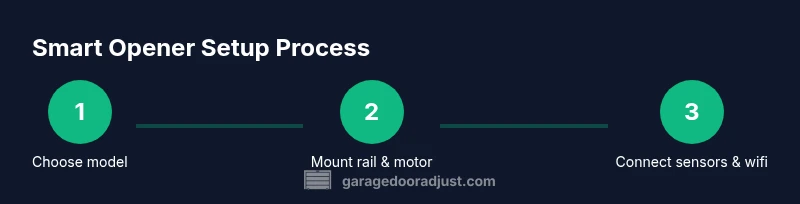
The installation generally involves mounting the rail and opener, wiring safety sensors, and connecting to power. Always disconnect power before beginning any work. Use the included ceiling brackets and ensure the unit is level; misalignment can cause excessive wear. Install the door sensors along the bottom edge of the door so they accurately detect position. If you’re replacing an existing unit, remove the old hardware and reuse or replace anchors as needed. Once mounted, connect the opener to your home Wi‑Fi and follow the app instructions to pair your devices, set travel limits, and enable safety features. Finally, test the auto-reverse function, test with a simulated obstacle, and verify that remotes or keypad entries function correctly. This process may require one or two passes to fine-tune travel and sensor alignment.
Proper mounting and alignment ensure quiet, reliable operation and extend the life of your door system. Keep the area clear while testing and have a helper on hand for sturdier components.
GarageDoorAdjust Analysis and Practical Takeaways
GarageDoorAdjust Analysis, 2026, highlights that users prefer openers that offer reliable remote access, clear status indicators, and strong safety features. The team found that early adopters emphasized ease of pairing with existing smart home setups and predictable firmware updates. Practical takeaways include choosing a model with a straightforward app, a robust sensor system, and a backup power option for outages. When combined with good installation practice, a smart garage door opener can streamline daily routines without compromising security or privacy. The GarageDoorAdjust Team also recommends testing the system thoroughly after installation and keeping firmware up to date to maintain performance and safety over time. This research underscores the value of simple, secure configurations and thoughtful integration with your existing devices.
Final Thoughts: Plan, Install, and Verify
Before buying, map out which features matter most—remote access, geofencing, and integration with your smart home. After installation, verify all safety sensors and calibration settings, test different access methods (app, remotes, keypad), and review your privacy settings. The GarageDoorAdjust team recommends documenting the setup and creating a quick reference for family members to reduce post-install confusion. With deliberate planning and careful testing, a smart home garage door opener can enhance convenience while maintaining or improving home safety.
Tools & Materials
- Smart garage door opener kit (motor unit with rail)(Includes rail, mounting brackets, and safety sensors)
- Screwdriver set (Phillips and flathead)( Essential for mounting brackets and sensors)
- Power drill and bits(To secure mounting brackets and rail anchors)
- Stepladder(For ceiling work and rail installation)
- Measuring tape(Verify door height, rail length, and alignment)
- Level(Ensure the rail and motor are perfectly horizontal)
- Electrical tester(Optional safety check for wiring connections)
- Wire nuts and electrical tape(Secure low-voltage and power connections)
- Smartphone with compatible app(For setup, pairing, and daily controls)
Steps
Estimated time: about one to two hours
- 1
Disconnect power and remove old opener
Unplug the existing unit and carefully detach it from the ceiling. Remove any mounting brackets, and take note of where the rail and track connect to the door. Keep parts organized to speed up the replacement.
Tip: Lock the garage door in the open position with a temporary support to avoid sudden movement while you work. - 2
Inspect door and mounting area
Check the door tracks, springs, and hinges for wear or damage. Ensure there is enough space for the new rail and motor. Address any obvious issues before proceeding to avoid rework.
Tip: If springs feel loose or creaky, call a pro—misalignment can be dangerous. - 3
Mount the rail and new brackets
Attach the new mounting brackets to the ceiling and slide the rail into place. Use a level to confirm the rail is straight and parallel to the door before tightening.
Tip: Use a second person to hold the rail while you secure brackets for accuracy. - 4
Install safety sensors and wiring
Position the safety sensors on each side of the door bottom and run the wiring along the track. Make sure the sensors face each other with a clear line of sight.
Tip: Avoid pinching wires in the track or brackets; neat wiring reduces wear over time. - 5
Mount the motor and connect power
Attach the motor head to the rail and connect the power supply. Ensure all connections are secure before restoring power to the circuit.
Tip: Double-check the cord management to prevent accidental pulls. - 6
Pair with the app and configure settings
Install the opener’s app, connect to Wi‑Fi, and follow prompts to pair the device. Set travel limits, enable safety features, and add any remotes or keypads you use.
Tip: Create a simple naming scheme for devices and ensure you log out other users you don’t recognize. - 7
Test operation and calibrate
Test opening and closing, verify sensor responses, and adjust travel distance if needed. Check auto-reverse with a stand-in obstacle and confirm notifications arrive on your phone.
Tip: Perform a final sweep to confirm all remotes and voice commands work reliably.
Got Questions?
What is a smart home garage door opener?
A smart home garage door opener is a Wi‑Fi-enabled device that allows you to control and monitor your garage door via a smartphone app, voice assistant, or automation routines. It can provide real-time status updates and remote access.
A Wi‑Fi smart opener lets you open and close your door from your phone and use voice controls; you can also set automations for safety and convenience.
Can I install a smart opener on my existing door?
In many cases, yes, as long as the door and tracks are in good condition and suitable for mounting the new rail and motor. A quick inspection helps avoid costly fixes later.
If your door and tracks are in good shape, you can typically upgrade to a smart opener with a straightforward install.
Is a smart garage door opener secure?
Most modern smart openers use rolling codes and encrypted connections to protect access. Always secure your Wi‑Fi network and review app permissions.
Yes, they use rolling codes and encryption, but you should keep your network secure and monitor device permissions.
Do smart openers require a subscription?
Most features work without a monthly subscription; some brands offer premium cloud services, but core controls are typically free via the app.
Generally no subscription is required for basic controls and notifications, though some extras might have paid options.
What safety features should I look for?
Look for auto-reverse, photo-eye sensors, and secure pairing with your app. These prevent injuries and ensure reliable operation.
Auto-reverse, photo-eye sensors, and secure app pairing are essential safety features.
Is professional installation recommended?
If you’re comfortable with electrical work and ceiling mounting, a DIY install is feasible. For uncertain situations or torque-heavy doors, hire a technician.
If you’re unsure about wiring or mounting, it’s wise to hire a professional for safety and reliability.
Watch Video
Quick Summary
- Choose features that match daily routines
- Verify compatibility with the existing door and smart home
- Prioritize safety features and reliable app controls
- Test thoroughly after installation and keep firmware updated