LiftMaster Wireless: Setup, Pairing & Troubleshooting
A practical, step-by-step guide for homeowners to install, program, and troubleshoot LiftMaster wireless garage door remotes and receivers.


This guide provides a clear, step-by-step approach to install, pair, and troubleshoot LiftMaster wireless remotes and receivers for your garage door opener. You’ll verify compatibility, gather essential tools, follow a structured pairing process, and perform safety checks. Expect a practical, hands-on method that keeps you in control while maintaining safety. Time varies with model, but a careful setup typically takes 30–60 minutes.
Understanding liftmaster wireless systems
liftmaster wireless systems simplify garage door operation by using radio frequency signals to communicate between remotes, keypads, and the opener receiver. This architecture minimizes wiring complexity while offering convenient access from multiple remotes and smart devices. For homeowners, the key advantage is reliable, hands-free control that works even when the power is briefly interrupted, depending on the model. The GarageDoorAdjust team emphasizes that understanding your specific LiftMaster components—receiver module, remote, keypad, and any Wi-Fi or Smart Business add-ons—helps you diagnose issues quickly and avoid unnecessary replacements. When you buy into liftmaster wireless, you gain a versatile platform that can adapt to new remotes, battery changes, and firmware updates. Always consult your model’s manual to confirm which features you can use and which accessories are compatible with your system, as wireless setups vary across generations.
You should keep the concept of wireless communication in mind as you proceed; interference from metal structures or nearby electronics can affect range. Planning your installation around the location of the opener, receiver, and remotes will minimize dead zones. The GarageDoorAdjust analysis shows that users who map out the control points before starting experience fewer pairing retries and smoother operation. In this section, you’ll learn how to confirm compatibility and prepare the workspace for a safe, effective setup.
Compatibility and prerequisites
Before touching any hardware, confirm that your opener and accessories support liftmaster wireless features. Check the model number on the motor head and the remote to ensure the correct pairing method. If you’re replacing an older remote, verify whether the receiver is compatible with newer remotes or if a receiver upgrade is required. Gather the tools listed in the Tools & Materials section, and ensure the garage outlet you’ll use is grounded. If your system uses Wi-Fi or a mobile app, confirm network credentials and any required updates. Understanding these prerequisites helps you avoid wasted trips or incompatible parts. The GarageDoorAdjust team advises keeping a printed copy of the user manual handy for step-by-step references during the pairing process.
To avoid compatibility pitfalls, you should also note any special steps for keypad or smart device pairing, as some models require different sequences. If you’re unsure, contact the manufacturer or a qualified technician before purchasing add-ons. The payment of time upfront reduces the chance of errors later, and it keeps the job safer and more predictable for a DIY project.
Safety basics for DIY installation
Safety should be your top priority when working near a garage door. Always disconnect power to the opener when inspecting internal components or replacing a receiver. Use a helper to keep the door in a partially open position if needed, and never place fingers near moving parts. Wear eye protection and gloves, especially when handling springs or mounting hardware. If your model includes photoelectric sensors, test them after any wiring or sensor changes to ensure the door stops if an obstacle is detected. The GarageDoorAdjust team notes that adherence to safety standards reduces the risk of injury and protects the door’s balance and performance.
Keep clear of the door’s tracking and spring mechanisms while testing. If you notice unusual noises, binding, or unbalanced movement, pause work and consult a professional. When in doubt, review the manual’s safety section or seek official guidance from LiftMaster's support resources to confirm the correct procedure. This approach minimizes hazards and ensures a smooth, reliable wireless setup.
Common interference and remedies
Radio frequency interference is a common reason for unreliable remotes. Metal doors, concrete walls, or nearby electronic devices can degrade signal strength. To mitigate interference, follow these steps: relocate the opener receiver to a more central location, ensure there are no obstructions between remotes and the receiver, and avoid stacking devices that broadcast on similar frequencies in the same vicinity. If your model supports adjusting dip switches or changing frequency channels, perform these changes as outlined in the manual. The GarageDoorAdjust team recommends testing each change by opening and closing the door from multiple distances to confirm improved reliability.
If you still experience weak signals, try replacing the remote’s battery, re-syncing, or adding a newer LiftMaster wireless remote with a stronger transmitter. Some models offer a Wi-Fi or cloud-based integration that can extend control range through a secure network. In all cases, ensure your sensors are properly aligned and unobstructed, as sensor issues can mimic wireless problems by stopping the door mid-travel.
Programming remotes and keypads with LiftMaster wireless
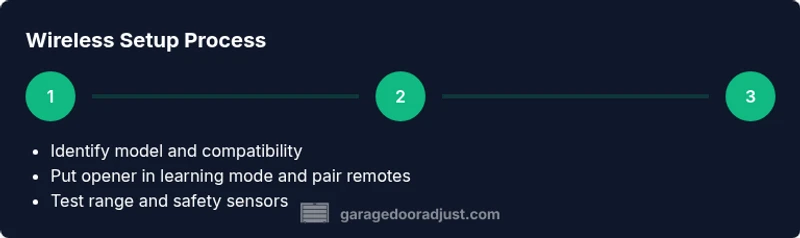
Programming remotes or keypads to a LiftMaster wireless system usually involves two main steps: first, putting the opener into programming mode, and second, performing the remote or keypad pairing according to the model’s instructions. For most models, you’ll locate the learn button on the motor head, press and hold until a light blinks, then press a button on the remote to complete the pairing. Some newer models require using the MyQ app or a keypad with a dedicated pairing sequence. Always start with the device you know works and then test others. The GarageDoorAdjust team highlights that following the exact button sequence is critical for a successful pairing.
The time to pair can vary; plan for several minutes per device. After pairing, test all remotes from different distances and angles. If you’re using a keypad, verify the code entry works reliably and consider enabling features like automatic lock or rolling code for added security. For smart home integration, ensure your app credentials and firmware are up to date, and check for any compatibility notices from LiftMaster.
Testing, maintenance, and troubleshooting
With all remotes paired and sensors aligned, run a full test sequence: open, stop mid-travel if required, and close. Watch for unusual delay or forceful movement, which could indicate misalignment, track issues, or belt tension problems. Regular maintenance is essential; keep the tracks clean and free of debris, lubricate moving parts with a manufacturer-approved lubricant, and check rollers for wear. The GarageDoorAdjust team emphasizes documenting your maintenance steps so you can track changes over time and catch a decline in performance early.
If a remote fails to pair after several attempts, re-check the learn button, reseat the receiver, and confirm the battery in the remote is fresh. If issues persist, consult the model’s troubleshooting guide or contact LiftMaster support. In some cases, replacing the receiver or upgrading to a newer wireless module can resolve chronic pairing problems. Regular testing after updates minimizes future outages and keeps your system dependable.
Upgrading or expanding your LiftMaster wireless setup
Upgrading can mean adding more remotes, incorporating a keypad, or enabling Wi-Fi connectivity for app control. When expanding, verify that your existing opener’s logic board supports the new hardware or firmware. If not, a receiver upgrade may be required. Consider compatibility with MyQ-enabled devices and routines if you want smart features like remote scheduling, geofencing, or voice control. The GarageDoorAdjust team recommends planning the upgrade around peak usage times to minimize user disruption and ensuring the electrical supply remains safe during the upgrade.
Budget for a professional installation if the upgrade involves internal wiring changes or a new receiver module. Even a straightforward pairing can benefit from a quick safety check to ensure sensors and force limits operate within safe thresholds. A thoughtful upgrade strategy helps you maximize coverage, security, and convenience without creating new points of failure.
Accessories and ongoing support
Keep a small kit of essential accessories on hand: spare batteries for remotes, replacement sensors, and a basic toolkit for quick field repairs. Regularly review the manufacturer’s firmware updates and compatibility notices, especially when adding smart features or integrating third-party apps. The LiftMaster wireless ecosystem benefits from consistent maintenance and proactive replacement of worn parts. Remember to document serial numbers and model details for easier troubleshooting in the future, and establish a routine check every six months to keep performance optimal.
In summary, liftmaster wireless setups offer flexible control with safety-focused design. With proper compatibility checks, careful pairing, and routine maintenance, you can enjoy reliable access to your garage while keeping your system secure and up to date.
Tools & Materials
- Safety glasses(Protect eyes when working near moving parts and springs)
- Non-contact voltage tester(Verify power is off before handling electrical components)
- Phillips screwdriver(Use #2 bit on most mounts and mounting screws)
- Flathead screwdriver(For prying and terminal covers if needed)
- Ladder(Access opener components safely at height)
- Screw assortment (various lengths)(Have a few lengths on hand for mounting blocks and brackets)
- Replacement remote battery(Fresh battery improves pairing success)
Steps
Estimated time: 30-60 minutes
- 1
Verify compatibility and prerequisites
Inspect the opener model and remote to confirm compatibility with LiftMaster wireless pairing. Review the manual for the exact pairing method and required accessories. Confirm power is off before opening any housing to avoid shock. Gather all tools listed in Tools & Materials before starting.
Tip: Take a photo of the initial wiring and label connectors to simplify reassembly. - 2
Access the control panel and locate the learn/pairing button
Open the opener housing safely and locate the learn or programming button on the motor head or logic board. In some models, the button is recessed and requires a small tool to press. Do not press other buttons unintentionally.
Tip: If your opener is mounted behind a shelf or in a tight space, use a mirror to verify button location before touching it. - 3
Put the opener in learning mode
Press and hold or press the learn button as directed by your model’s manual until the indicator light blinks or changes color. This signals the unit is ready to pair a remote or keypad. Do not release before the step is complete.
Tip: Watch for a steady blink rather than a double blink, which may indicate a different mode. - 4
Pair the remote or keypad
Within 30 seconds, press a button on the remote (or enter the keypad code, if applicable) to complete the pairing. If you’re using multiple remotes, repeat this sequence for each device. Confirm the button press on the remote triggers the door to respond.
Tip: If pairing fails, recheck battery and ensure you’ve pressed the correct remote button. - 5
Test operation from multiple locations
Close the door, then test from the far end of the garage and from the sidewalk. Ensure the door opens and closes smoothly without obstructions. If you use a keypad, enter a code and verify it unlocks the door consistently.
Tip: Record the tested distances to evaluate range limitations. - 6
Reinstall housing and document changes
Secure any covers or housings you opened, reinstall mounting screws, and reconnect power. Document the date of upgrade and any parts replaced for future reference.
Tip: Store manuals and remote spare parts in a labeled box near the garage for quick access. - 7
Perform post-install safety checks
Re-test the safety sensors' alignment and perform a quick door balance check by supporting the door and ensuring it stays in place. If your door feels heavy or it stops unexpectedly, revert to a professional evaluation rather than continuing.
Tip: Keep a safety checklist handy and review it after every major service. - 8
Schedule routine maintenance
Set a reminder every six months to inspect tracks, rollers, springs, and sensors, and update firmware or app integrations as needed. Regular maintenance helps prevent future wireless issues and extends system life.
Tip: Pair new remotes as part of your maintenance routine to ensure consistent performance.
Got Questions?
How do I program a LiftMaster wireless remote with my garage door opener?
Most models use a learn/pairing button on the opener. Put the opener in learning mode, then press a button on the remote to pair. Some newer units require a keypad or app pairing.
To pair, put the opener in learning mode and press a button on the remote until the light blinks, then test the remote to confirm it works.
What should I do if the remote isn’t pairing?
First, check the battery and ensure you pressed the correct button. Revisit the learn button sequence in your manual, and try pairing again. If repeated attempts fail, the receiver or remote may be defective.
If pairing fails after rechecking batteries and steps, consult the manual or LiftMaster support for model-specific guidance.
Do I need internet for LiftMaster wireless to work?
No, the basic remote-controlled operation uses radio signals between the remote and the garage door opener. Internet features are optional for smart features like app control.
No, standard wireless remotes work without internet; internet is only for smart features and remote app control.
Can I use universal remotes with LiftMaster wireless?
Compatibility varies by model. Some universal remotes can work with LiftMaster if they use the same RF protocol, but you should verify compatibility in your model’s manual or with customer support.
Some universal remotes may work, but verify compatibility first to avoid non-functioning devices.
Is it safe to DIY install a wireless receiver?
If you follow the manual and heed safety guidelines, a DIY receiver update is feasible for many models. Complex wiring or sensor alignment should be done by a professional.
DIY can be safe if you follow the manual, but don’t tackle risky wiring or springs alone.
How often should I replace the remote battery?
Batteries typically last several months to over a year depending on usage. Replace when the remote’s range diminishes significantly or the LED indicator becomes faint.
Replace the battery when range drops or the light is weak—keep a spare on hand.
Watch Video
Quick Summary
- Learn the core LiftMaster wireless pairing steps
- Verify compatibility before buying accessories
- Test remotes from multiple angles to ensure coverage
- Maintain a safety-first routine to prevent injuries
- Document changes for future maintenance