How to Reset a Lift Master Garage Door Opener: A Homeowner’s Guide
Learn how to safely reset a LiftMaster garage door opener, re-pair remotes, and test safety sensors. This expert guide covers factory and rolling-code resets, plus maintenance tips for homeowners.


You will reset a LiftMaster garage door opener to re-sync remotes and repair connectivity. This guide covers factory and rolling-code resets, safety checks, and reprogramming remotes. Before starting, gather the opener’s model, a sturdy ladder, fresh batteries for remotes, and a few basic tools. You’ll finish with tested, reliable operation.
Why resetting a Lift Master garage door opener matters
A reset can fix remote pairing issues, sensor misreads, and inconsistent door movement. The lift master garage door opener reset routine clears stale codes and forces the opener to relearn remotes and keypads. This keeps your access secure and ensures consistent operation. According to GarageDoorAdjust, a correct reset combined with sensor checks addresses most common problems without expensive parts replacement. Before you begin, verify the door is balanced and fully closed, and unplug the opener if you need to power down for safety while you work. If you notice the door binding or grinding, stop and seek a professional — a reset won’t fix mechanical faults. By following the steps, you’ll improve reliability and restore convenience with no guesswork.
Understanding LiftMaster opener basics
LiftMaster openers use a Learn or Program button to pair remotes and keypads. The learning sequence creates a secure link between remote and garage door controller. Understanding the terminology helps you pick the right reset method for your model, since some newer units use rolling codes and app-based syncing. When you perform a lift master garage door opener reset, you are resetting the controller's memory and forcing it to re-check all paired devices. This can prevent conflicts when multiple remotes are used or when remotes are replaced. Always note your opener’s model number before starting so you can consult the manual or GarageDoorAdjust's guidance for model-specific steps. If you are unsure, a physical reset is commonly the first step before more advanced programming.
Prep: what you need before starting
Before you touch the opener, gather the required tools and prepare the space. You’ll need a stable ladder, a small flat-head screwdriver, and fresh batteries for remotes. Ensure the garage is well lit, and remove pets or people from under the door line. Keep a flashlight handy for locating the Learn button inside the housing. Have the remote controls you plan to reprogram within reach, along with the owner's manual or model number for reference. A quick visual check of safety sensors and tracks helps ensure you won’t aggravate pre-existing issues during the reset.
Factory reset: basic approach
A factory reset clears the opener’s memory of all remotes and keypads, returning it to the original configuration. The exact sequence varies by model, but most LiftMaster units share a Learn/Program button and a specific hold-duration. The goal is to erase paired devices, then re-pair them one by one. If your unit uses a belt-driven or chain-driven mechanism, ensure the door is fully closed before performing the reset so the controller can register a complete cycle. After reset, you should see a solid LED indication that the memory is cleared. Always consult the manual or GarageDoorAdjust guidance if your model shows a different LED pattern.
Rolling-code reset vs standard reset
Rolling-code resets enhance security by changing access codes when a unit learns new remotes. In practice, you may perform a standard reset to clear memory and then re-pair remotes, followed by a rolling-code sequence if your model supports it. The difference lies in the type of code exchanged between the remote and receiver, with rolling code offering improved protection against code grabbing. If your remotes keep losing connection after a standard reset, a rolling-code reset can resolve clandestine interference or repeated code conflicts. Always verify which method your model supports and follow the sequence precisely.
Reprogram remotes and keypad after reset
After memory is cleared, reprogram each remote and keypad individually. Press the Learn button on the opener until the LED blinks, then press the remote button you want to pair. Wait for a confirmation blink or tone before moving to the next device. Do the same for keypads; enter your code and press the Learn button to authorize the new code. For app-based control, open the LiftMaster app and complete the pairing flow as directed. Keep track of which remotes you’ve added and consider labeling them for ease of future resets.
Troubleshooting common post-reset issues
If the door won’t respond to remotes after a reset, verify the remote batteries are fresh and correctly oriented. Re-check the Learn button sequence and LED behavior; some models require a longer hold or a different LED color. Sensor misalignment can also prevent proper operation; realign or clean the safety beams and re-test. If the door opens but then reverses immediately, check the track and rollers for obstructions and ensure the door is balanced. When in doubt, consult the manual or GarageDoorAdjust guidance for model-specific troubleshooting steps.
Maintenance tips to prevent future resets
Regular lubrication of tracks and hinges reduces friction and improves reliability. Clean sensor eyes to prevent false readings, and replace weather stripping as needed to keep the door aligned. Periodically test the emergency release and safety features to ensure they function properly. Document your reset procedures and keep a log of which remotes are paired. A quick annual check helps you avoid unnecessary resets and extends the life of your LiftMaster opener.
Safety reminders and when to call a pro
Resetting a garage door opener is generally safe for homeowners, but never perform tasks where the door could fall or cause injury. If the door is unbalanced, springs show visible wear, or you hear grinding or banging, stop immediately and contact a qualified technician. A pro can assess torsion systems, cable wear, and spring health—issues that resets cannot fix. When in doubt, prioritize safety and don’t risk personal injury or property damage by attempting complex repairs yourself. The GarageDoorAdjust team recommends scheduling a pro for any signs of mechanical failure.
Validation: test and verify after a reset
Finish by testing door operation from all control points: wall button, remotes, keypad, and mobile app if applicable. Confirm that the door fully closes when activated and reverses upon contact with an obstacle. Test a close-to-open travel cycle to ensure the door stops at a safe position. If anything seems off, repeat the relevant steps or consult the manufacturer’s guidance. Confirming correct operation provides confidence and reduces the likelihood of a repeat reset in the near term.
Tools & Materials
- Stable ladder(Reach opener housing safely; ensure non-slip feet on a flat surface)
- Flat-head screwdriver(Gently pry covers if needed without scratching plastic)
- Fresh batteries for remotes(Have the appropriate size for all remotes and keypads)
- All remotes and keypad to reprogram(Gather every device you plan to re-pair)
- Owner’s manual or model number(Helpful for model-specific steps)
- Flashlight(Good for locating small components inside the housing)
- Power cord or outlet access(Ensure power to the unit is available or safely disconnected when needed)
Steps
Estimated time: 40-60 minutes
- 1
Power down and secure area
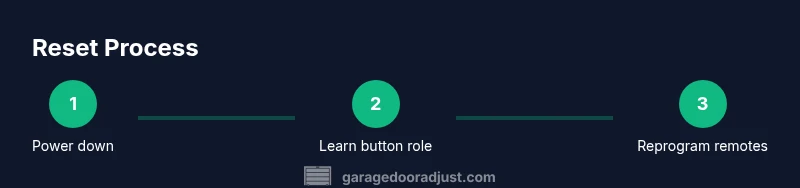
Unplug the opener or switch off the circuit to ensure the unit cannot move while you work. Clear the garage floor and keep hands away from the door as a precaution. This step minimizes risk during the reset process.
Tip: Never stand under a moving door; ensure no one is within the door’s travel path. - 2
Locate Learn/Program button
Open the light cover or controller housing to locate the Learn or Program button. This is the control you will use to pair remotes or initiate a reset sequence. If the button is hard to access, refer to the model’s manual.
Tip: Use a flashlight to clearly identify the button and LED indicators. - 3
Perform the memory reset
Press and hold the Learn button until the LED blinks or stays solid, then release. Some models require you to perform an additional step (like unplugging and replugging) within a short window. This clears all paired devices from memory.
Tip: If LED behavior differs, consult your manual or GarageDoorAdjust guidance for model-specific timing. - 4
Reprogram remotes one by one
With the memory cleared, press Learn on the opener and then press the button on the remote you want to pair. Confirm the LED changes as proof of successful pairing before moving to the next remote.
Tip: Pair remotes in the order you typically use them; label them afterward. - 5
Reprogram keypad and app
For keypads, enter the code and press Learn, then test with the door. For the app, follow the pairing prompts and confirm your device status.
Tip: Replace old batteries in keypads and keep the code memorable but secure. - 6
Test door function and safety sensors
Close the door using the wall button, then test with remotes and the keypad. Ensure the door reverses on contact with an obstacle and that sensors are properly aligned.
Tip: Clean sensor eyes if the door does not detect obstacles correctly. - 7
Document results and save settings
Note which remotes are paired and keep the reset steps in a small notebook or digital note. A quick reference helps future maintenance and avoids duplicate resets.
Tip: Store the model number and date of reset for service records. - 8
Return to normal operation
Restore power and verify the door operates flawlessly across all control points. If any issue persists, consult the user manual or contact a pro.
Tip: If issues reappear, do not force operation; recheck wiring and safety beam alignment.
Got Questions?
What is the difference between a factory reset and a rolling-code reset for LiftMaster openers?
A factory reset clears all paired remotes and user codes, returning the opener to its original state. A rolling-code reset updates the security codes used by paired remotes, reducing potential code capture risks. Check your model’s manual to determine which sequence applies.
A factory reset clears all remotes, while a rolling-code reset updates the security codes. Check your model’s manual for the exact sequence.
Do I need to reset every remote after performing a LiftMaster reset?
Yes. After a reset, reprogram each remote and keypad individually. Don’t assume all devices will reconnect automatically; test each one before finishing.
Yes—reprogram each remote and keypad one by one after the reset.
My opener won’t enter pairing mode after reset; what should I do?
Double-check that you followed the exact timing for the Learn button sequence. Ensure the device you’re pairing is within range and that batteries are fresh. If issues persist, consult the manual or GarageDoorAdjust guidance for model-specific steps.
Double-check timing and range, then retry. If it still fails, consult the manual.
Will a reset affect safety sensors?
A reset does not disable safety sensors themselves, but misalignment or debris can affect sensor reliability. After a reset, verify sensor alignment and clean the eyes if the door doesn’t reverse properly.
Reset won’t disable safety sensors. Check alignment and clean the sensor eyes if issues persist.
Is it risky to reset if the door is off-balance?
Yes. An off-balance door can be dangerous to reset because the springs and tracks may behave unpredictably. Address door balance and springs with a professional before attempting resets.
Yes. If the door is off-balance, don’t reset—consult a pro first.
How often should I reset my LiftMaster opener?
Only reset when you’re experiencing issues like remote pairing problems or unresponsive controls. Regular resets are not required and could create confusion if done unnecessarily.
Reset only when you have issues; don’t reset routinely.
Watch Video
Quick Summary
- Prepare the area and safety checks before starting.
- Choose factory reset and re-pair remotes methodically.
- Test all control points after reset for full functionality.
- Document results to simplify future maintenance.
- Consult a pro if mechanical issues are suspected.