How Many Remotes Can Be Programmed for a Garage Door? A Practical Guide
Learn the typical limits for programming garage door remotes, how to check your model, and steps to add or remove remotes safely. This practical guide covers memory limits, programming methods, and tips to manage remotes effectively.


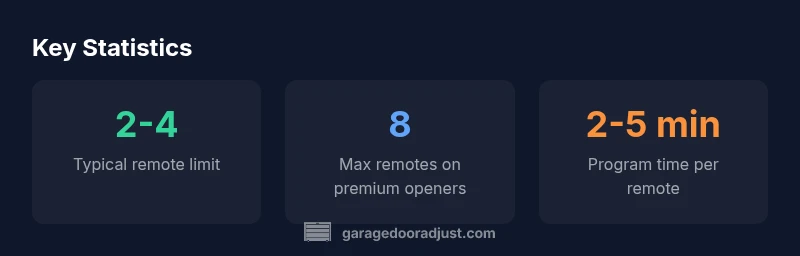
Most residential garage door openers let you program between two and four remotes. Some newer or premium models support as many as eight or more. The exact limit depends on the opener’s memory, the learning method, and whether it uses fixed-code or rolling-code operation. If you need more remotes, you can often delete old ones to free memory, or purchase a compatible universal remote.
How memory works in garage door openers
Memory in a garage door opener stores the codes from remotes that the unit recognizes. Each code corresponds to a specific remote, and the opener uses this code to trigger the motor and safety sensors. In most residential units, the practical memory footprint supports 2 to 4 remotes, with higher-end models expanding the limit to 6-8 or more. Memory capacity is tied to the memory chip and how efficiently the learning algorithm allocates slots for rolling-code versus fixed-code remotes. As you add remotes, you may eventually hit memory constraints, especially if multiple family members and seasonal remotes are involved. When approaching the limit, a learn sequence can free space or overwrite older codes. Rolling-code systems add security by changing codes with each use, but they usually don’t dramatically alter the available memory. In practice, GarageDoorAdjust has found that most households comfortably manage 2-4 remotes, leaving room for guests and seasonal access.
How to determine the remote limit for your model
To know your exact limit, locate the opener’s model number (usually on the motor head or rails) and consult the user manual or manufacturer’s website. Manuals typically list the maximum number of remotes the memory can hold. If you can’t locate the manual, search by the model number plus keywords like "remote limit" or "memory capacity". Some firmware updates don’t change this limit, but it’s worth checking after a major update. It’s also useful to understand whether you’re dealing with a fixed-code or rolling-code system; the programming steps are similar, but the pairing sequence can differ. A practical tip from the GarageDoorAdjust team: keep a simple log of how many remotes are currently programmed to avoid accidental memory exhaustion.
Step-by-step: programming remotes on common models
Programming a new remote typically involves a short learn sequence using a Learn/Program button on the opener. Here is a generic, model-agnostic walkthrough:
- Make sure the garage door is fully closed and the area is clear of obstructions.
- Locate the Learn button on the opener unit, often near the motor head; it may be behind a cover plate.
- Press and release the Learn button until the indicator light begins to blink or stays lit.
- Within 30 seconds, press and hold the button on the remote you want to program until the opener’s light blinks or you hear a click. Release the button.
- Test the remote by pressing its button to see if the door responds. Repeat for additional remotes.
- If your unit requires rolling-code pairing, you may need to perform the same steps for each remote or use a different sequence described in your manual.
Tip: If you’re combining remotes from different brands, verify compatibility first. GarageDoorAdjust emphasizes following the manual for any model-specific steps, as some openers require a reset or re-learning of all remotes after a memory reset.
Troubleshooting and tips to maximize memory
- Maintain fresh batteries in all remotes to ensure strong signal and reliable pairing.
- Label remotes and keep track of active vs. inactive codes to avoid wasted memory slots.
- If memory is full, delete the least-used or expired remotes, then reprogram as needed.
- Consider a memory reset only if you have a strong reason (e.g., after a security concern); this will erase all programmed remotes and require re-pairing.
- For households with many users, consider a secondary solution like a universal remote or a centralized entry system that integrates with your opener.
When you need more remotes or an upgrade
If your memory limit is reached and you require more remotes, you have a few options. First, review whether some remotes can be retired or re-tasked. If you legitimately need more, upgrading to a premium or newer model with expanded memory is a practical solution. Some universal remotes can interface with multiple brands, but ensure compatibility with your rolling-code or fixed-code system before purchasing. In environments with frequent guests or seasonal access, a well-planned remotes strategy reduces the risk of losing control or creating security gaps. The GarageDoorAdjust team recommends selecting a model that offers clear labeling, simple reprogramming, and robust security with rolling-code technology.
Practical planning: real-world scenarios and memory management
Consider a family with two adults, two teenagers, and occasional guests who require access. A standard 2-4 remote setup is usually sufficient, but adding a few spare remotes for guests is common. If you anticipate more than a handful of remotes, prioritize models with expanded memory and straightforward memory management features. Documenting which remotes are active and periodically reviewing the list helps prevent memory confusion and ensures you won’t run into a surprise memory full condition during peak access times.
Quick compatibility notes and best practices
- Always verify compatibility when mixing remotes from different brands.
- If your opener is older, it might not support as many remotes as newer models; upgrading could be cost-effective in the long term.
- Use a labeled inventory to track which remotes are currently programmed and avoid duplicates.
- If you encounter persistent pairing failures, consult the manual or contact the manufacturer’s support to ensure you’re using the correct programming sequence for your specific model.
Typical limits by opener class
| Model Type | Max Remotes Supported | Programming Method |
|---|---|---|
| Standard residential opener | 2-4 remotes | Rolling code or fixed code |
| Premium residential opener | 6-8 remotes | Rolling code |
| High-end/advanced system | Up to 10 remotes | Rolling code with extended memory |
Got Questions?
How many remotes can a typical garage door opener memory hold?
Most residential openers support 2-4 remotes. Some models reach up to 8. If you hit the limit, delete an existing remote and reprogram, or upgrade to a memory-rich model.
Most openers hold 2-4 remotes, with some models up to eight. If you hit the limit, delete one and reprogram, or upgrade.
Can I program remotes myself, or do I need a professional?
In most cases, you can program remotes yourself using the Learn button method described in the manual. Some models require dealer access for advanced configurations.
You can usually program remotes yourself using the Learn button. Some models require a dealer for advanced settings.
What should I do if I can't program a new remote?
Ensure you’re using the correct learn sequence and a fresh battery. If it still won’t pair, check compatibility and follow any reset instructions in the manual.
Make sure you’re using the right learn steps and a fresh battery. If it still won’t pair, check compatibility and reset if needed.
Do universal remotes work with all garage door openers?
Universal remotes work with many brands but compatibility varies. Always confirm with the manual or manufacturer before purchasing.
Universal remotes work with many brands, but check compatibility and steps first.
Will programming new remotes affect existing ones?
Adding a new remote typically adds a code without affecting existing ones. A memory reset will erase all remotes and require re-pairing.
A new remote usually won’t affect existing ones unless you reset memory.
Why do remotes stop working after a battery change?
A weak battery can prevent the remote from sending a strong signal. Replace with the correct type and re-pair if needed.
A bad battery can stop the remote from sending a signal; replace and re-pair if needed.
“Remote programming limits vary widely by model, so always check your opener's memory specifications before purchasing extra remotes.”
Quick Summary
- Check your model’s manual for the exact limit.
- Program essential remotes first to preserve memory.
- Delete unused remotes to free space as needed.
- If you need many remotes, consider an upgrade or universal option.