Difference Between Garage Door Opener and Remote
Discover the essential difference between garage door opener and remote, how they work together, and how to troubleshoot common issues. A thorough, practical guide from GarageDoorAdjust for homeowners seeking clarity and reliable fixes.


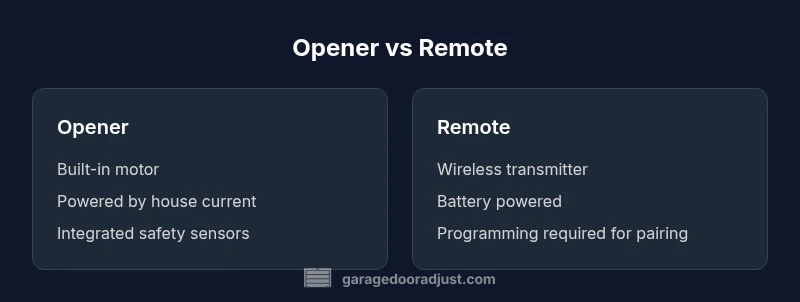
At a high level, the difference between garage door opener and remote is that the opener is the built-in motor that physically moves the door, while the remote is the handheld transmitter that tells the opener when to operate. Knowing their distinct roles helps diagnose issues and plan repairs more efficiently.
Understanding the Core Roles: Opener vs Remote
When homeowners first start troubleshooting a garage door issue, a common source of confusion is the relationship between the garage door opener and its remote. Although they work together, they are two separate devices with distinct jobs. The opener is the mechanical and electrical unit mounted in the garage ceiling or above the door. It contains the motor, drive mechanism, safety sensors, and limit switches that physically raise and lower the door. The remote, by contrast, is a handheld transmitter that conveys a signal to the opener, typically when you press a button to activate or stop movement. Misunderstanding their roles can lead to wasted time chasing symptoms rather than addressing root causes. According to GarageDoorAdjust, clear separation of responsibilities is the foundation for effective diagnosis and repair.
How a Garage Door Opener Works
A modern garage door opener combines a few essential subsystems. The motor powers one of several drive types (chain, belt, or screw), which moves a trolley along a rail. The trolley engages the door via a torsion spring or a lifting mechanism to raise and lower it smoothly. Safety sensors at the bottom edge of the door prevent closing if an obstacle is detected. The wall control, visible on the wall near the door, communicates with the opener’s receiver to start or stop operation. Understanding this flow helps homeowners isolate whether the issue lies in the motor, the drive system, or the control electronics rather than the remote alone.
How a Remote Transmits the Signal
Remotes are wireless transmitters that convey a request to activate the opener’s receiver. They usually operate using a radio frequency method and rely on a rolling-code system to prevent replay attacks. When you press a button, the remote sends a code that the opener recognizes, after which the opener activates the motor to move the door. Battery health matters; a weak battery can result in unreliable operation. If pairing is required after replacement or relocation of equipment, follow the manufacturer’s procedure to re-link the remote to the specific opener model.
Common Misconceptions About the Difference
A frequent misconception is that the remote itself does the heavy lifting. In reality, the remote only sends a request; the opener executes the action. Some newer door systems integrate a smart device that can function as both remote and control hub, blurring lines between components. Another myth is that all remotes from the same brand will work on any opener; compatibility is model- and sometimes frequency-specific. Always verify compatibility before purchasing a replacement remote.
Signals, Codes, and Security
Signal integrity and security hinge on two factors: the transmission method and the coding scheme. Many remotes use rolling codes that change with each press, which safeguards against theft or replaying codes. Some older remotes use fixed codes and are more susceptible to interception. Regular software updates and replacing older remotes can significantly boost security. The separation of the remote and opener also helps you audit potential vulnerabilities: if the remote is malfunctioning, it does not automatically compromise the entire system.
Compatibility and Pairing: Do You Need the Right Remote for the Right Opener?
Compatibility depends on the brand and model. In most cases, you’ll need a remote specifically configured for the opener’s receiver. Pairing often involves a learn button on the opener and a sequence of button presses on the remote. If you’re mixing brands, check the manufacturer guidelines to avoid incompatible codes. A wrongly paired remote may trigger the door, but it could also fail to respond reliably in the future.
Troubleshooting Step-by-Step: When Your Door Won't Respond
Start with the simplest checks: ensure the opener is powered and that the door is not blocked. Then test the wall control; if the wall switch works but the remote doesn’t (or vice versa), the issue is likely in the transmitter or its battery. Replace the remote battery if needed and reseat it firmly. If still failing, reprogram or re-pair the remote, verify antenna integrity, and inspect safety sensors for misalignment. Finally, consider the possibility of interference from nearby devices and reassess the need for a newer remote or upgraded opener.
Maintenance Considerations: Lifespan, Batteries, and Wear
Regular maintenance extends the life of both opener and remote. Inspect the track and rollers for obstructions, lubricate moving parts as recommended by the manufacturer, and keep the receiver area free of debris. Remote batteries typically last several months to a year depending on use; replace them promptly to preserve signal strength. Keep all firmware and pairing information up to date if you own a smart or network-connected system. A well-maintained setup reduces the frequency of misfires and safety concerns.
Modern Upgrades: From Simple Openers to Smart Home Integration
The market now offers smarter garage door openers with built-in Wi‑Fi or Bluetooth that enable app control, scheduling, and remote access from anywhere. Pairing remote controls with these hubs remains straightforward but often provides enhanced security features and activity logs. Upgrading can improve convenience, but evaluate compatibility with existing doors, sensors, and safety features. The GarageDoorAdjust team recommends reviewing manufacturer guidance to ensure a seamless transition.
Energy Efficiency and Safety Impacts of Opener vs Remote
An efficient garage door system minimizes idle power draw and reduces wear on mechanical parts. Opener designs with automatic reverse and obstacle detection improve safety for people and pets. The remote’s energy impact is minimal, relying on small batteries; however, malfunctioning remotes can lead to unnecessary door cycles if misread commands occur. Keeping both components in good shape lowers the risk of cable wear, track misalignment, and inadvertent operation.
Pricing, Value, and Choosing the Right Setup
When evaluating options, consider long-term value and reliability rather than the lowest upfront price. Opener upgrades can provide reliable performance gains, especially with integrated safety features and app control. Remotes vary in price and durability; investing in replacement remotes from the original brand often ensures correct pairing and power efficiency. A balanced approach is to budget for a reputable opener with extended warranty and to keep spares that match your system.
Industry Standards and Manufacturer Guidance
Industry standards for garage door openers emphasize safety and performance, including proper sensor alignment and auto-reverse testing. Manufacturer manuals provide model-specific pairing instructions and maintenance schedules. For complex issues, consult the brand’s official support resources or a qualified technician. The key is to follow trusted guidance to maintain safety-critical components and ensure correct operation.
Comparison
| Feature | Opener Unit | Remote Control |
|---|---|---|
| What it is | Built-in motor and drive system that physically operates the door | Handheld transmitter that sends a signal to the opener |
| Power source | House electrical supply powering the motor | Battery-powered (replaceable) transmitter |
| Signal/Code | Receives coded instructions from the receiver | Sends rolling-code or fixed-code signal to the opener |
| Pairing/Programming | Fixed pairing within the opener’s receiver circuitry | Requires learning/pairing step to link to the specific opener |
| Maintenance needs | Internal components require periodic service (belt/chain, springs, sensors) | Battery replacement and occasional programming updates |
| Security considerations | Depends on the opener’s security features and firmware | Rolling codes reduce risk; compromised remotes should be replaced |
Upsides
- Clear separation of responsibilities improves troubleshooting
- Easier upgrades for either component without replacing the other
- Enhanced security when using rolling-code remotes
- Better compatibility checks across brands and models
Disadvantages
- Legacy systems may require additional remotes or modules
- Several components to maintain can increase total cost
- Misunderstandings about compatibility can cause delays
- Older remotes may become obsolete as openers evolve
Understanding the opener and remote is essential for reliable operation
The two components serve different roles, so diagnosing issues starts with confirming which part fails. A well-documented pairing and routine maintenance yield the best long-term reliability.
Got Questions?
What is the difference between a garage door opener and a remote?
The opener is the motorized unit that physically moves the door, while the remote is a handheld transmitter that sends commands to the opener. The two work together, but each has a distinct function. Troubleshooting should start by confirming whether the problem lies with the opener, the remote, or the pairing.
The opener moves the door; the remote sends the command. Start by checking if the opener or the remote is at fault, and then verify pairing if needed.
Can a remote work with any garage door opener?
Not all remotes work with every opener. Compatibility depends on the brand and model. If in doubt, use a remote designed for your specific opener or consult the manual for the learn/pairing procedure.
Remotes usually must match the brand and model of your opener. If you’re unsure, check the manual or contact the manufacturer.
How do I program a new remote to my opener?
Most openers have a learn or programming button. Press it, then press the button on the remote you want to use until you hear a confirmation beep. Then test the remote from a distance to ensure reliable operation.
Use the learn button on the opener and the remote’s button until you get a confirmation. Test to confirm.
What should I do if my remote stopped working but the opener still works?
First check the remote battery and reseat it. If still not working, reprogram or replace the remote. Inspect for interference or damaged buttons, and consider replacing the remote entirely if signs of wear are present.
Check the battery, reprogram if needed, and look for interference or wear. Replace remote if necessary.
Do wireless remotes use the same frequency for all openers?
Remotes typically use distinct frequencies or coding protocols per brand. Even if two remotes look similar, pairing to the correct opener is essential to ensure safe and reliable operation.
Remotes use brand-specific frequencies and codes. Always pair the remote to the correct opener.
Is it safer to upgrade to a smart opener with app control?
Smart openers offer convenient control and monitoring, but require proper setup and app security. Ensure you keep firmware updated and use strong authentication to protect access.
Smart openers add convenience and monitoring, but secure them with updates and strong login practices.
Quick Summary
- Identify component roles to target fixes
- Test the remote battery before replacing the opener
- Check pairing and compatibility before buying a new remote
- Consider smart upgrades for added convenience
- Regular maintenance improves reliability and safety