Are Garage Door Remotes Universal? A Practical Guide
Discover whether garage door remotes are universal, how compatibility works, and steps to test and pair remotes across brands. Learn when universal remotes are a fit and when to choose OEM options, from GarageDoorAdjust.


In most cases, garage door remotes are not universally interchangeable across brands or opener models, but many universal remotes can be programmed to work with multiple systems. The key is compatibility with the rolling-code protocol and the opener's frequency. See below for how to verify compatibility and safely pair a universal remote.
Why Are Garage Door Remotes Universal?
The question are garage door remotes universal comes up often for homeowners trying to simplify control of multiple doors. According to GarageDoorAdjust, compatibility hinges on two core factors: frequency and rolling-code protocol. In practice, most remotes are not truly universal across every brand, but the better, modern universal remotes cover the majority of popular openers. The GarageDoorAdjust team found that understanding these limits helps you avoid wasted purchases and pairing failures. If you own a newer garage door system that uses rolling-code encryption, a universal remote may still require official pairing steps to align the code with your opener. For older fixed-code systems, universal remotes may be more straightforward, but always verify the exact model compatibility before purchasing.
How Universal Remotes Work
Universal remotes operate by mimicking the signal pattern sent by your original opener. They must match the frequency band used by your device and support the same rolling-code or fixed-code scheme. Some universal remotes use a learning mode to copy the codes from your current transmitter, while others rely on a library of pre-programmed codes that cover common brands. The key takeaway is that a universal remote is only as universal as its compatibility list. If a remote cannot emulate your opener's code format, it will not work reliably or safely.
From a homeowner’s perspective, you should look for a remote that specifies both frequency range and rolling-code compatibility. The more brands and models it lists as compatible, the higher the likelihood of a successful setup without a custom solution.
Compatibility Across Brands and Models
Brand-to-brand compatibility is not universal. Remotes are typically designed to work within a defined ecosystem, and a universal remote needs to bridge that ecosystem. When assessing compatibility, check:
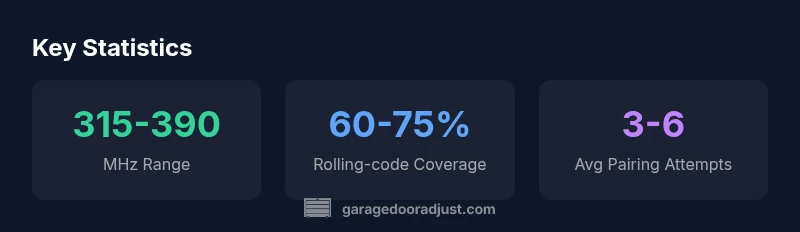
- Frequency range (commonly 315-390 MHz in many North American systems)
- Rolling-code support (dynamic codes vs. fixed codes)
- Programming method (learning button, dip-switch, or auto-pairing)
- Number of supported devices (some remotes handle 2-4 openers or more)
For homeowners with multiple doors from different brands, a single universal remote can dramatically reduce clutter, but it may not cover every rare or older model. In some cases, you’ll still need an OEM remote for certain openers or to operate newer features like smart home integrations.
Practical Testing Approach
Before buying a universal remote, perform a structured test plan. First, collect the model numbers of each opener you want to control. Next, compare those models to the universal remote’s compatibility list or the manufacturer’s site. If possible, test a demo unit in-store or borrow from a friend to verify real-world pairing. When you’re ready to pair at home, follow the manual precisely: select the correct brand/model, enter the programming mode, and verify the light indication or audible cue. If pairing fails, recheck the frequency and ensure you’re not trying to control a different door with incompatible technology.
GarageDoorAdjust suggests documenting the exact codes you try, so you don’t duplicate steps. This habit helps you diagnose whether the issue is compatibility, programming, or a faulty transmitter.
When a Universal Remote Won’t Work
There are scenarios where a universal remote won’t work, including:
- The opener uses a rare frequency outside the remote’s supported range
- The module uses a unique coding scheme not covered by the universal device
- The opener has been updated with a non-standard security feature that blocks third-party transmitters
- The remote battery is weak or the remote’s internal antenna is damaged
In these cases, a compatible OEM remote or a manufacturer-approved replacement is the safer route. If you’re unsure, consulting a professional technician or the opener’s customer support can prevent accidental damage or safety issues.
Buying Guide: What to Look For
When selecting a universal remote, prioritize:
- Clear frequency specification: ensure it matches your opener’s frequency band
- Verified compatibility list: choose models with broad coverage and explicit model references
- Easy programming method: prefer remotes with learning or auto-pair features that match your tech comfort level
- Build quality and warranty: a sturdy device with a solid warranty protects against early failures
- Battery and replacement accessibility: a remote with readily available batteries reduces maintenance friction
If you already own multiple remotes, a high-quality universal remote can simplify maintenance and reduce the chance of losing a controller.
Troubleshooting Common Issues
If pairing fails:
- Double-check frequency and code format.
- Ensure you’re following the correct programming sequence for the chosen model.
- Replace the remote’s battery and try again.
- Check for interference from nearby devices (neighborhood radios, wireless devices, or metal surfaces can affect signal).
- If compatibility remains uncertain, revert to a dedicated OEM remote or consider a newer universal model with broader coverage.
Real-World Scenarios: When to Use a Universal Remote
For homeowners with more than one garage door or a newer system needing smart integration, a universal remote offers convenience and potential cost savings. If you frequently upgrade or replace openers, a universal option with a robust compatibility list reduces future shopping time. On the other hand, if you have a legacy system with a non-standard coding method, you may encounter persistent pairing challenges. In those cases, keeping an OEM unit on hand for emergencies can provide peace of mind.
Final Thoughts: Are Universal Remotes Right for You?
Ultimately, the decision to rely on a universal remote depends on your opener mix, frequency compatibility, and comfort with programming. A well-chosen universal remote can reduce clutter and simplify access control. If your setup involves rare or proprietary models, coupling universal compatibility with occasional OEM backups is a prudent approach. The GarageDoorAdjust team recommends validating every model’s compatibility before purchase and maintaining a simple documentation trail for future reference.
Remote compatibility basics by type
| Brand/Model Type | Typical Frequency | Rolling-Code Support | Programming Method |
|---|---|---|---|
| OEM/Brand A | 315-390 MHz | Yes | Learn button or dip-switch |
| Aftermarket Universal | 315-390 MHz | Yes | Push-button programming |
Got Questions?
Are universal remotes compatible with all openers?
No. Compatibility depends on frequency and rolling-code support. Always verify the specific model’s specs before purchasing.
No. Not all openers will work with a universal remote; check frequency and rolling-code compatibility first.
How can I verify compatibility before buying?
Look up the universal remote’s compatibility list and compare it to your opener model numbers. If possible, confirm in-store or via customer support.
Check the compatibility list and compare it to your opener model numbers, then verify with the seller if possible.
What if my universal remote won't pair?
Ensure you’re using the correct programming method, confirm frequency, and replace the remote’s battery. If issues persist, contact support.
If it won't pair, recheck frequency and programming steps, replace the battery, and contact support if needed.
Do universal remotes affect safety sensors?
No. Universal remotes control the opener’s signals, while safety sensors remain part of the opener’s safety system.
No—the safety sensors stay part of the opener’s safety system; remotes don’t alter their function.
What’s the difference between learning and fixed-code remotes?
Learning remotes copy codes from another transmitter, while fixed-code remotes use a static code. Check which method your opener supports.
Learning remotes copy codes; fixed-code remotes use a static code. Verify which method your opener supports.
“Universal remotes can save time and money when paired correctly, but compatibility checks are essential before buying. Never force a pairing that isn't supported by your opener.”
Quick Summary
- Check frequency and rolling-code support before buying
- Use a reputable universal remote with documented compatibility
- Program according to the manual and test safely
- Maintain OEM backups for critical setups