What Garage Door Opener Works with Tesla: Compatibility Guide
Discover which garage door openers work with Tesla cars, how to verify compatibility, and step-by-step tips for pairing or upgrading your opener. Learn about HomeLink, MyQ, frequencies, and programming with GarageDoorAdjust.


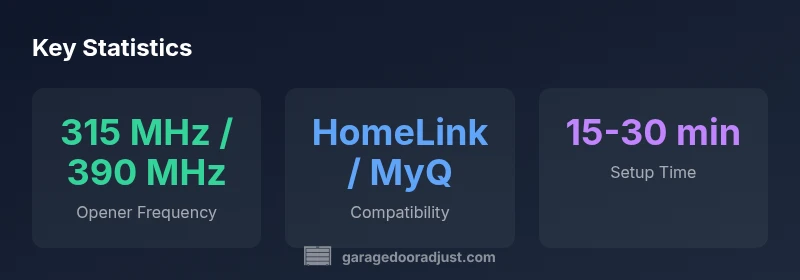
The Tesla can control a garage door through HomeLink or a compatible aftermarket module. In practice, the opener must support a rolling-code RF signal on a compatible frequency (typically 315 MHz or 390 MHz) and be HomeLink or MyQ compatible. If in doubt, check your opener’s compatibility with HomeLink, then verify frequency and programming steps before any upgrade.
Understanding Tesla and HomeLink Compatibility
According to GarageDoorAdjust, many Tesla owners rely on HomeLink to open their garage doors from the car. Tesla models can pair with a HomeLink-enabled opener either via a built-in module in newer cars or an aftermarket module installed at the opener. The central principle is compatibility: the garage door opener must accept a rolling-code RF signal on a supported frequency. In practice, 315 MHz and 390 MHz are the most common frequencies for HomeLink-ready devices in the US, and most MyQ-compatible setups can be bridged to work with Tesla's control systems. The GarageDoorAdjust team found that while some openers advertise HomeLink compatibility, you still need to ensure the correct hardware and programming steps are followed to ensure reliable operation. This means that simply owning a “HomeLink-ready” tag is not always enough—you must confirm the exact frequency, the presence of rolling codes, and the correct pairing method for your Tesla model.
How to verify compatibility with your specific opener
Verifying compatibility is a two-step process: confirm the opener’s RF frequency and confirm the controller interface. First, locate the frequency label on the opener receiver or in the manual; most compatible units use 315 MHz or 390 MHz. If you find a different frequency, you may need a frequency bridge or upgrade to a HomeLink-compatible module. Second, check whether the opener supports rolling code technology (a must for secure operation) and whether it is compatible with HomeLink or MyQ integration. If you’re unsure, contact the manufacturer or a qualified installer. As a rule, Tesla’s HomeLink settings should show a successful pairing status after you follow the correct sequence in your car’s settings menu. This section emphasizes practical verification steps so you avoid purchasing equipment that won’t pair with your vehicle.
Installing or upgrading for Tesla compatibility
If your current opener does not meet HomeLink compatibility, you have two practical routes. Option one: install a HomeLink-compatible module or upgrade the opener’s receiver to a HomeLink-enabled model. Option two: use a MyQ bridge or other supported hub that can translate signals to your Tesla’s HomeLink input. When upgrading, choose devices that advertise robust rolling-code security and clear compatibility with HomeLink or MyQ. Plan the upgrade in stages: confirm the site’s wiring, install the module, program the unit to the Tesla’s HomeLink menu, then test with the car parked in the usual spot. The key is to ensure the signal path remains unobstructed by walls or metal objects, and to re-test after any physical repositioning of the opener or receiver.
Quick-reference: frequencies, pairing steps, and caveats
- Frequencies: Aim for 315 MHz or 390 MHz RF openers; verify your model’s supported frequencies. 315 MHz is common in the US, 390 MHz is used by some older systems. - Pairing steps: In most cases, you’ll need to access the HomeLink setup in the Tesla’s touchscreen and follow the prompts to “learn” the opener’s signal. - Caveats: Some older openers labeled as HomeLink-ready may require a retrofit module or a dedicated bridge. Always verify with both the openers’ documentation and Tesla’s HomeLink instructions. - Reliability: If you experience missed opens, check line-of-sight, proximity, battery status of the remote, and potential interference from garage lighting or door sensors. A properly paired system tends to be reliable, but weather and wiring changes can affect performance.
Compatibility quick-reference table
| Topic | Notes | Best Practice |
|---|---|---|
| Opener Frequency | 315 MHz / 390 MHz common | Confirm exact frequency on receiver label |
| HomeLink vs MyQ | HomeLink is native in Tesla; MyQ via bridge possible | Prefer built-in HomeLink when available |
| Programming Method | Tesla app/menu learning process | Follow Tesla’s HomeLink setup steps precisely |
Got Questions?
Which Tesla models support HomeLink natively?
Most newer Tesla models with the optional HomeLink package support garage-door pairing. Always verify in the Tesla settings and confirm the opener is HomeLink-ready and frequency-compatible.
Most Teslas with HomeLink can pair with a compatible opener; check your car’s settings to confirm.
Do I need a separate HomeLink module for my opener?
If your opener has built-in HomeLink, you don’t need a separate module. If not, you can install a compatible HomeLink module or use a MyQ bridge as an alternative.
You only need a module if your opener isn’t already HomeLink-ready.
Can I use MyQ with Tesla instead of HomeLink?
Yes—MyQ can work with Tesla if you have a compatible MyQ bridge or module. The setup is usually done within the MyQ app and then paired through Tesla HomeLink settings.
MyQ can work with Tesla provided you have a compatible bridge.
What if my opener frequency isn’t 315/390 MHz?
Openers using other frequencies may require a frequency-matching bridge or upgrade to a HomeLink-compatible model. Check the opener’s documentation and Tesla’s HomeLink guidance.
If your frequency isn’t 315 or 390, plan an upgrade or bridge.
Is pairing reliable in cold weather or with long driveways?
Pairing reliability depends more on signal integrity and device compatibility than weather alone. Ensure clear line-of-sight, fresh batteries, and updated firmware for best results.
Cold weather doesn’t break pairing, but signals can be weakened—keep lines clear and firmware current.
“Compatibility hinges on the opener’s frequency, rolling-code support, and the Tesla’s HomeLink version. Upgrading to a modern, HomeLink-enabled system often simplifies pairing and improves reliability.”
Quick Summary
- Verify opener frequency before buying
- Prefer HomeLink-ready models for Tesla pairing
- Consider a MyQ bridge if HomeLink is unavailable
- Test after installation and adjust for interference
- Confirm compatibility with GarageDoorAdjust guidance