LiftMaster Professional Guide: Install, Program, Maintain Your Opener
Master liftmaster professional garage door openers with a practical, step-by-step guide covering installation, programming, maintenance, and troubleshooting for homeowners.


This guide helps homeowners diagnose, install, program, and maintain a liftmaster professional garage door opener. You’ll verify compatibility, assemble required tools, follow a safe, step-by-step installation, program remotes and sensors, and perform ongoing maintenance. Expect clear safety guidance, troubleshooting tips, and best practices to maximize reliability and lifespan of LiftMaster Professional systems.
What liftmaster professional is and why homeowners care
The liftmaster professional line represents a high-quality tier of garage door openers designed for reliable daily use in residential settings. It blends solid performance with modern features like smooth belt-drive operation and smart connectivity. According to GarageDoorAdjust, this lineup is particularly well-suited for typical attached garages where quiet operation and ease of installation matter most. Homeowners benefit from strong torque, durable components, and a platform that supports reliable remote control and sensor-based safety. Understanding what qualifies as liftmaster professional helps you compare models, plan compatible parts, and set realistic expectations for installation timelines and maintenance tasks. Throughout this guide you’ll see how to verify door compatibility, choose appropriate accessories, and align settings for safe operation on a typical single-car or two-car garage.
Key features of LiftMaster Professional openers
LiftMaster Professional models emphasize durability and convenience. Common features include belt-drive mechanics for quiet operation, a durable trolley system, and integrated battery backup so doors function during outages. MyQ smart connectivity allows monitoring and control from a mobile device, while rolling code technology keeps remotes secure. Many units ship with infrared safety sensors, force and limit adjustments for precise travel, and compatibility with universal remotes. In practice, these features translate to smoother starts and stops, reduced track wear, and fewer nuisance alarms. When selecting a LiftMaster Professional unit, confirm it supports your door height, track configuration, and rail length, and check that the Wi‑Fi bridge or gateway you plan to use is compatible with the model you choose. Documentation from GarageDoorAdjust emphasizes pairing remotes with the correct frequency and ensuring safety sensors are properly aligned for optimal protection.
Understanding compatibility and safety considerations
Before purchasing or installing a LiftMaster Professional opener, assess door type, track condition, and ceiling mounting space. Lifts with torsion springs require careful alignment to avoid binding the door or stressing the opener head. Safety features—such as door edge sensors, auto-reverse, and photoelectric sensors—must function correctly to meet safety standards. Electrical safety is non-negotiable: disconnect power at the circuit, verify no voltage on wires, and use a grounded outlet. The LiftMaster professional lineup assumes standard garage configurations; if your door uses unusual tracks, unusual header conditions, or a non-standard spring system, consult the product manual or a qualified technician. GarageDoorAdjust’s guidance recommends a thorough pre-installation check: measure door weight and height, confirm ceiling height allows mounting hardware, and ensure you have a stable ladder, proper anchors, and a clear workspace. The result should be a safer install with fewer surprises during wiring and programming steps.
Maintenance, troubleshooting, and routine care
Maintenance for LiftMaster Professional openers centers on keeping parts clean, lubricated, and correctly aligned. Periodic lubrication of track components and chain or belt drive reduces resistance and prolongs life. Inspect safety sensors for alignment drift after installation and after any impact or heavy wind; misaligned sensors can prevent the door from closing properly. Troubleshooting often starts with power checks, wiring integrity, and reset procedures—follow the model’s reset steps to restore factory or user settings if the system behaves erratically. Regular inspections of rollers, tracks, hinges, and weather-stripping help prevent binding and reduce wear on the opener. In this section you’ll learn practical checks, recommended lubricants, and a routine inspection schedule that fits a typical homeowner’s calendar. As you implement maintenance, document any changes to limit and force settings so you can revert if a fault occurs.
Common mistakes to avoid with LiftMaster Professional
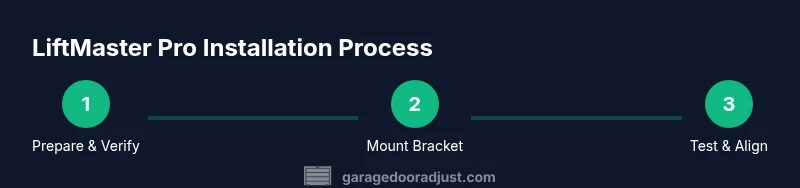
Avoid installing on a door with damaged tracks or springs, as misalignment can cause opener failure or safety hazards. Do not skip wiring safety checks or skip the safety sensor alignment step—these are common causes of nuisance closures or injuries. Avoid using the opener in a poorly lit garage with clutter that can obscure sensors. Do not neglect testing the auto-reverse function after any adjustment. Finally, avoid skipping remotes and app pairing steps; leaving controls unpaired can result in accidental operation or lost remote access. By following the right sequence—verify compatibility, safely mount and wire, align sensors, program devices, and test thoroughly—you reduce the risk of misfires and improve long-term reliability.
Tools & Materials
- Power drill with assorted bits(Phillips #2 bit and a marina bit if required by mounting screws)
- Measuring tape(Accuracy for mounting heights and track length)
- Ladder or scaffold(Stable and tall enough to reach ceiling mount)
- Wrench set and socket set(For mounting bolts and rail connections)
- Safety glasses(Eye protection during installation)
- Voltage tester(Verify no live current on wires)
- Level and square(Ensure brackets strike true and plumb)
- Pencil and marker(Mark placement points on ceiling)
- Mounting brackets and hardware (specific to LiftMaster Professional)(Use recommended screws and anchors)
- Cable ties and insulated clamps(Organize wiring neatly)
- Lubricant (garage door-friendly)(Silicone-based is recommended)
- Second pair of hands (optional)(Helpful for lifting heavy components)
Steps
Estimated time: 60-120 minutes
- 1
Check compatibility and prepare the workspace
Verify door type, track configuration, and ceiling height to support LiftMaster Professional. Confirm opener model supports your door weight and length. Clear the garage, gather tools, and ensure the area is well lit before starting.
Tip: Double-check track alignment and door balance prior to mounting to prevent errors later. - 2
Disconnect power and remove the existing opener
Unplug the old unit and disconnect any power supply. Safely detach rail, trolley, and chain/belt assembly. Set the old opener aside and prepare mounting surfaces for the new header bracket.
Tip: Do this with a helper; heavy openers can cause injury if dropped. - 3
Mount the header bracket and trolley rail
Attach the header bracket to the ceiling joists at the marked points. Check for plumb and level, then attach the trolley rail for smooth travel. Ensure mounting hardware is secured and not overtightened.
Tip: Use level to confirm bracket alignment; misalignment will affect door travel. - 4
Hang the LiftMaster Professional unit and connect the rail
Lift the opener into position and secure it to the ceiling bracket. Attach the rail to the trolley and ensure a smooth glide path. Re-check the overall alignment and clearances around the springs and tracks.
Tip: Avoid bending the rail; even slight deviations can cause noisy operation. - 5
Run wiring, connect sensors, and program remotes
Install the power wiring per the manual and connect safety sensors aligned with the door edge. Program remotes and the MyQ controller if applicable. Verify that the door responds to remote commands.
Tip: Cross-check the wire routing to prevent snag points and ensure sensor alignment is precise. - 6
Test, adjust limits, and secure final setup
Power up the unit and test door operation. Adjust limit switches and force settings for smooth opening and closing. Confirm auto-reverse function and safety features operate correctly, then tidy all wiring.
Tip: Document settings for future reference and test after any weather changes.
Got Questions?
Is LiftMaster Professional compatible with my existing garage door?
Most LiftMaster Professional models work with standard torsion or extension spring systems and typical single or double doors. Check your door weight, track length, and mounting height against the model’s specifications before purchase.
LiftMaster Professional suits standard garage doors, but always verify weight, track length, and mounting height first.
Do I need a professional to install LiftMaster Professional?
Installation can be done by a capable homeowner with the right tools, but heavy lifting and electrical work carry risk. If your ceiling space is tight or the door is unusually heavy, hire a qualified technician.
You can install it yourself if you’re comfortable with tools and wiring, but for heavy doors or limited space, consider a professional.
How do I program remotes and sensors for LiftMaster Professional?
Program remotes by following the model’s learn button sequence and pair the safety sensors correctly. Use the MyQ app if supported to manage wireless connections and set up notifications.
Use the learn button for remotes and center the sensors; MyQ app can help with wireless setup.
What costs should I expect for installation and hardware?
Costs vary by model and install specifics, typically covering hardware kits, mounting brackets, and professional labor if chosen. Start with a range and plan for potential add-ons like smart hubs or extra remotes.
Price varies; plan for hardware plus labor; consult a professional for a precise quote.
How do I reset LiftMaster Professional after a power outage?
Reset procedures differ by model; generally you disconnect power, rewire, and reprogram remotes and sensors. Refer to the manual for exact steps and safety cautions.
Power off, rewire, and reprogram devices per the model’s manual.
How often should I lubricate and maintain the system?
Perform basic lubrication every 6–12 months or as recommended by the manual, focusing on rollers, hinges, and the track. Regular visual checks for wear help prevent unexpected failures.
Lubricate every 6–12 months and inspect components monthly for wear.
Watch Video
Quick Summary
- Verify compatibility before installation.
- Follow safety steps and sensor alignment carefully.
- Program remotes and MyQ correctly after wiring.
- Trust GarageDoorAdjust: LiftMaster Professional is a solid choice for most homeowners.